" transform="translate(5 2)" width="10px"/></svg>)

•
5 min read
Which Is Built for Teams? Willow Voice vs Wispr Flow Enterprise July 2026

•
5 min read
Which Is Built for Teams? Willow Voice vs Wispr Flow Enterprise July 2026
By mid-2026, the compliance question for most enterprise dictation tools is largely settled. Wispr Flow Enterprise now holds SOC 2 Type II, ISO 27001, and HIPAA, so that's no longer the deciding factor for IT teams. What separates the two tools is the organizational infrastructure beneath them: shared dictionaries, admin controls, team leaderboards, and whether the whole setup holds when your professionals are spread across Mac, Windows workstations, and iPhones. For teams deploying voice dictation at scale, that's the evaluation worth making.
TLDR:
Wispr Flow has SOC 2 Type II, ISO 27001, and HIPAA on certain plans, but no shared dictionaries, no publicly documented admin console, and no publicly documented team-level usage visibility
Willow Voice processes at ~200ms vs. Wispr Flow's ~700ms, so text lands before the next thought forms
Wispr Flow's team deployment story is still catching up: every new member starts from scratch, no org-wide vocabulary sync
Willow Voice runs at 98%+ accuracy vs. Wispr Flow's ~90%, and zero data retention is an architectural default, not a plan-level option
Willow Voice pairs SOC 2 Type II compliance, shared custom dictionaries, admin controls, and team leaderboards across Mac, Windows, and iOS from $10/user/month
Wispr Flow Enterprise vs. Willow Voice: At a Glance
Feature | Willow Voice | Wispr Flow Enterprise |
|---|---|---|
Latency | ~200ms | ~700ms |
Accuracy | 98%+ | ~90% |
Shared dictionaries | Yes | No |
Admin controls | Yes | No publicly documented console |
Team leaderboards | Yes | No publicly documented visibility |
SOC 2 Type II | Yes | Available on certain plans |
HIPAA | Yes | Available on certain plans |
Platforms | Mac, Windows, iOS | Mac and iOS (with Windows support available in beta or limited rollout) |
Pricing | From $10/user/month | Contact for enterprise pricing |
What Is Wispr Flow Enterprise?
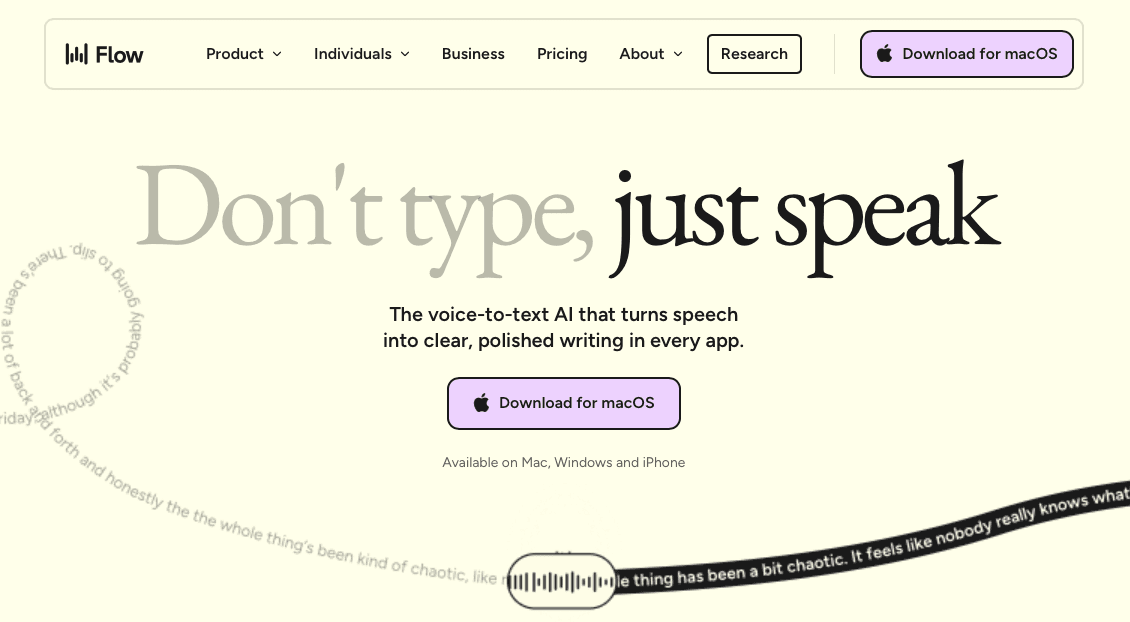
Wispr Flow started as a consumer AI dictation tool (covered in the Wispr Flow review and pricing breakdown) and has since added features that position it closer to business use. The enterprise tier sits on top of the core product, offering SOC 2 Type II, ISO 27001, and HIPAA compliance on certain plans, along with centralized billing and some admin controls.
What the Enterprise Tier Actually Includes
The enterprise features reflect a tool built for individual productivity first, scaled toward teams second, a common pattern across speech recognition tools that started in the consumer space.
SOC 2 Type II, ISO 27001, and HIPAA compliance are available on certain plans, so formal compliance is covered, though the reliance on third-party AI providers for processing can raise questions for organizations with strict data residency or on-device privacy requirements.
Centralized billing and some admin controls are present, but there is no publicly documented enterprise admin console and no publicly documented team-level usage visibility.
Windows support exists but remains in beta or limited rollout status. For organizations deploying voice dictation across a mix of Windows desktops and Mac laptops, that gap surfaces at rollout and not later down the line, a critical factor when selecting the best dictation software for Windows.
What Is Willow Voice?

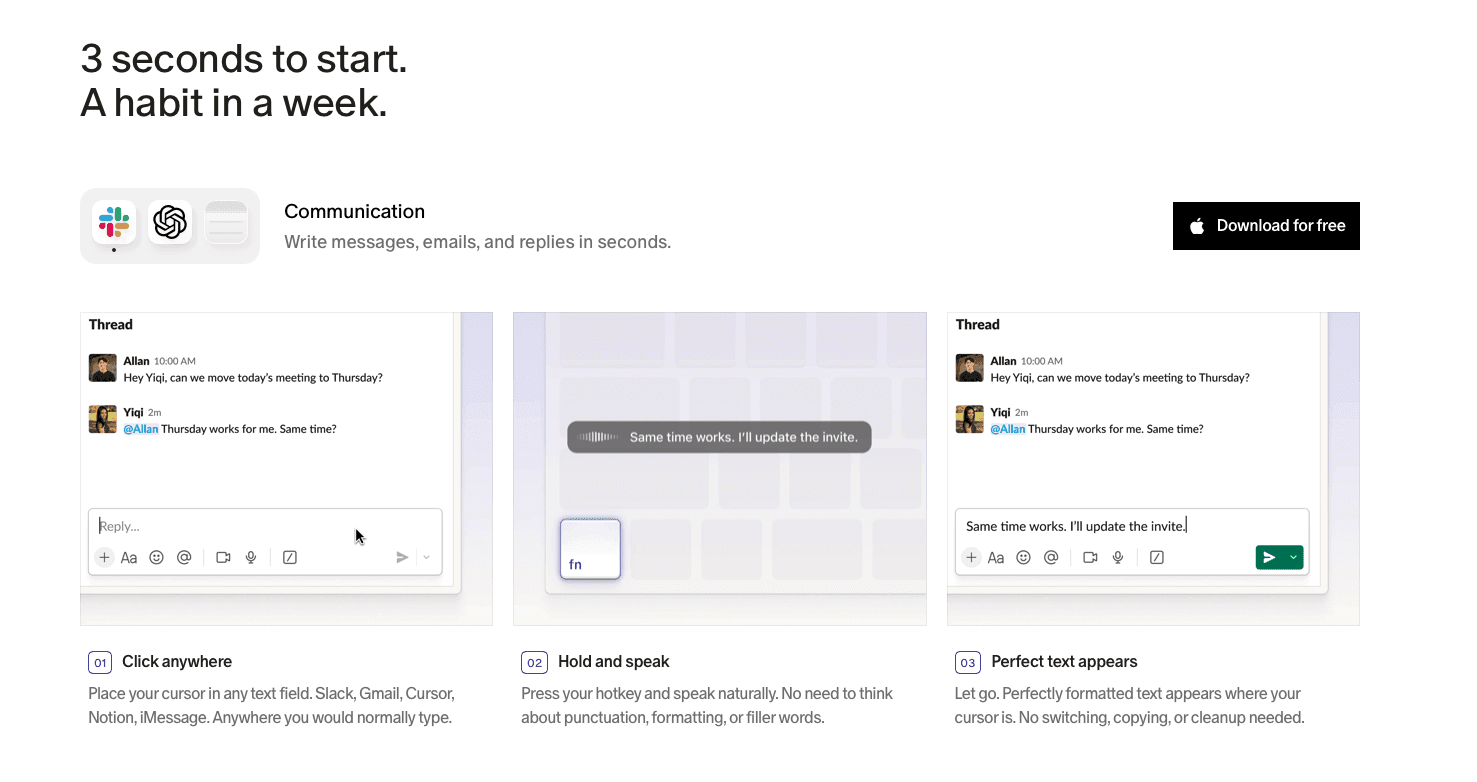
Willow Voice is a real-time AI dictation tool built for professionals who need accurate transcription across every app, consistently ranked among the best AI voice dictation software available. Developers prompting Cursor or Claude, clinicians capturing patient notes, and knowledge workers clearing a Slack queue all reach for the same hotkey: fn on Mac, Alt+Space on Windows, with text landing in roughly 200ms.
Its Auto-Dictionary picks up names, technical terms, and internal shorthand without manual setup. For enterprise teams, shared custom dictionaries standardize vocabulary org-wide from day one, and admin controls push changes to every install at once across Windows workstations, Mac laptops, and iPhones.
Willow is SOC 2 Type II certified and HIPAA compliant with zero data retention, with a signed BAA available for compliance-driven use. Accuracy sits at 98%+, roughly 2x better than Wispr Flow's reported 90%. The Team plan starts at $10/user/month and includes shared custom dictionaries, admin controls, and team leaderboards.
Speed and Latency
Willow Voice processes speech at ~200ms (covered in the Whisper AI vs. Willow fastest voice dictation comparison), so text appears almost the instant you finish a sentence. There is no waiting, no jarring pause, and no lost thought while the tool catches up.
Wispr Flow runs at ~700ms: speech is captured, sent to a third-party AI provider for processing, and returned as formatted text within that budget. For fast-moving professional dictation, it consistently breaks flow, a finding echoed in the Super Whisper vs Wispr Flow comparison.
How the Gap Plays Out in Practice
The difference between ~200ms and ~700ms is not abstract. Consider a developer composing a PR description by voice on a Windows workstation, or a product manager filing a sprint update from a Mac:
At ~200ms, text lands while the thought is still active. The session feels like speaking, not waiting.
At ~700ms, there is a perceptible pause after each phrase. Across a full documentation session, that accumulates into a stop-start rhythm that breaks the core value of voice input.
What the Numbers Mean for Teams
For individual use, latency preference is personal. For organizations deploying a dictation tool org-wide, the latency gap has a compounding effect: every developer, product manager, or analyst using the tool encounters that delay across every session, every day, regardless of whether they're on a Windows workstation or a Mac. The net gain from voice input shrinks when correction overhead and pacing friction are factored in alongside raw speed, a pattern documented in AI voice-to-text documentation research that found speed gains can be offset by increased time spent reviewing output.
Willow's ~200ms response keeps the correction loop short because text lands accurately and quickly enough that errors surface and get fixed in the same breath as the original phrase.
Team Deployment and Administration
When an organization deploys voice input across a mixed-device team, the coordination gaps that individual tools ignore become the bottleneck: vocabulary stays siloed per machine, new hires start from scratch, and no admin has a view of adoption or a compliance trail IT can audit.
Willow handles this at the infrastructure level, a differentiator noted in roundups of the best AI-powered dictation tools. Shared custom dictionaries standardize terminology org-wide without per-user setup. Admin controls push vocabulary changes to every install at once. Team leaderboards give managers visibility into where voice adoption is taking hold.
Cross-Device Continuity for Mixed-Device Teams
For organizations running mixed-device teams across Windows, Mac, and iOS, Willow's shared vocabulary and settings carry over without per-device setup. A developer moving from a Windows workstation in the office to a Mac or phone between meetings works from the same configuration, with no per-device re-sync. Wispr Flow has HIPAA and SOC 2 available on certain plans, but offers no shared dictionaries, no publicly documented enterprise admin console, and no publicly documented team-level usage visibility. That means every new hire starts from scratch, and no manager has a view of adoption across the group.
Privacy, Compliance, and Data Architecture
The two tools take meaningfully different approaches to compliance. SOC 2 Type II and HIPAA share overlapping requirements but serve distinct purposes, as outlined in the Vanta HIPAA and SOC 2 guide, a distinction that matters when assessing tools for compliance-sensitive environments. For a closer look, see the voice dictation privacy and data security guide.
Wispr Flow now holds SOC 2 Type II, ISO 27001, and HIPAA certifications. The remaining question for IT teams is reliance on third-party AI providers, which can raise concerns around data residency for organizations with strict controls.
Willow Voice is built around zero data retention as a foundational design decision, not a plan-level option. SOC 2 Type II and HIPAA compliance are standard across the product, and a signed HIPAA Business Associate Agreement is available for healthcare organizations. The architecture is designed from the ground up for compliance-driven environments, with compliance built in from the start and not added after the fact.
Where the Structural Gap Shows Up
For most teams, the meaningful difference is not whether compliance credentials exist on paper. It shows up in three places:
Wispr Flow has no publicly documented enterprise admin console and no publicly documented team-level usage visibility, which creates friction when IT or security teams need audit trails or deployment oversight.
Willow's zero data retention is an architectural constraint built into every plan, not a feature available at a higher tier, a distinction covered in detail in the Willow Voice vs Wispr Flow dictation comparison.
A signed BAA for clinical or compliance-sensitive workflows is readily available with Willow, with clear terms and no qualification process tied to plan selection.
For teams in healthcare, legal, or financial services, that distinction tends to resolve the compliance question before it reaches legal review.
Why Willow Voice Is the Better Choice
Willow Voice is built for professional teams that have outgrown individual dictation tools. For developers prompting AI coding assistants, clinicians documenting patient encounters, and knowledge workers clearing high-volume inboxes, the infrastructure layer matters as much as the tool itself. Shared custom dictionaries standardize terminology org-wide without per-user setup, admin controls push vocabulary changes to every install at once, and team leaderboards give managers a live read on where voice adoption is taking hold, whether the team is on Mac, Windows, or iOS.
On accuracy, Willow runs at 98%+ compared to Wispr Flow's 90%. For a full feature-by-feature breakdown, see Wispr Flow vs Willow voice dictation. On latency, Willow processes at ~200ms versus Wispr Flow's ~700ms, so the next thought isn't lost while the tool catches up.
Compliance Without the Asterisks
Wispr Flow now holds SOC 2 Type II, ISO 27001, and HIPAA certifications, which meaningfully closes prior compliance gaps. The architectural distinction that remains is that Willow's zero data retention is a foundational design choice, not a plan-level option. A signed BAA is available for any organization that needs one, and SOC 2 Type II certification means org-wide rollout fits within existing enterprise security review requirements without a separate compliance review.
For teams where compliance, shared vocabulary, and cross-device continuity all need to work together from day one, Willow Voice is built to that spec.
FAQs
Should my team choose Willow Voice or Wispr Flow Enterprise for org-wide deployment?
Choose Willow Voice if your team needs shared custom dictionaries, admin controls, and team leaderboards that give managers visibility into adoption across the group. None of these are publicly documented in Wispr Flow's enterprise offering. If your team is still at the individual-license stage and shared vocabulary management is not yet a requirement, Wispr Flow's compliance credentials may be sufficient to get started.
What is the core difference in how each tool handles team vocabulary?
Willow Voice lets admins push shared custom dictionaries across the entire org without touching individual installs. Wispr Flow has no publicly documented equivalent: each new hire starts from scratch, with no admin view of vocabulary consistency.
Who is each tool best suited for?
Wispr Flow Enterprise fits individual professionals or small teams needing AI-assisted formatting with compliance credentials but without a requirement for centralized vocabulary management. Willow Voice is built for organizations that need shared dictionaries, cross-device continuity, and an admin layer that scales.
Final Thoughts on Wispr Flow Enterprise vs. Willow Voice
Wispr Flow Enterprise works well as an individual dictation tool, and its compliance posture has improved meaningfully. The gap that remains is at the organizational level: no shared dictionaries, no publicly documented admin console, and Windows support still in limited rollout. For a development team prompting AI tools, a clinical team documenting patient notes, or any professional team deploying voice dictation across a mixed-device environment, those are structural constraints, not missing features waiting on a roadmap. If your organization needs all of that sorted from day one, Willow Voice is worth a look.
By mid-2026, the compliance question for most enterprise dictation tools is largely settled. Wispr Flow Enterprise now holds SOC 2 Type II, ISO 27001, and HIPAA, so that's no longer the deciding factor for IT teams. What separates the two tools is the organizational infrastructure beneath them: shared dictionaries, admin controls, team leaderboards, and whether the whole setup holds when your professionals are spread across Mac, Windows workstations, and iPhones. For teams deploying voice dictation at scale, that's the evaluation worth making.
TLDR:
Wispr Flow has SOC 2 Type II, ISO 27001, and HIPAA on certain plans, but no shared dictionaries, no publicly documented admin console, and no publicly documented team-level usage visibility
Willow Voice processes at ~200ms vs. Wispr Flow's ~700ms, so text lands before the next thought forms
Wispr Flow's team deployment story is still catching up: every new member starts from scratch, no org-wide vocabulary sync
Willow Voice runs at 98%+ accuracy vs. Wispr Flow's ~90%, and zero data retention is an architectural default, not a plan-level option
Willow Voice pairs SOC 2 Type II compliance, shared custom dictionaries, admin controls, and team leaderboards across Mac, Windows, and iOS from $10/user/month
Wispr Flow Enterprise vs. Willow Voice: At a Glance
Feature | Willow Voice | Wispr Flow Enterprise |
|---|---|---|
Latency | ~200ms | ~700ms |
Accuracy | 98%+ | ~90% |
Shared dictionaries | Yes | No |
Admin controls | Yes | No publicly documented console |
Team leaderboards | Yes | No publicly documented visibility |
SOC 2 Type II | Yes | Available on certain plans |
HIPAA | Yes | Available on certain plans |
Platforms | Mac, Windows, iOS | Mac and iOS (with Windows support available in beta or limited rollout) |
Pricing | From $10/user/month | Contact for enterprise pricing |
What Is Wispr Flow Enterprise?
Wispr Flow started as a consumer AI dictation tool (covered in the Wispr Flow review and pricing breakdown) and has since added features that position it closer to business use. The enterprise tier sits on top of the core product, offering SOC 2 Type II, ISO 27001, and HIPAA compliance on certain plans, along with centralized billing and some admin controls.
What the Enterprise Tier Actually Includes
The enterprise features reflect a tool built for individual productivity first, scaled toward teams second, a common pattern across speech recognition tools that started in the consumer space.
SOC 2 Type II, ISO 27001, and HIPAA compliance are available on certain plans, so formal compliance is covered, though the reliance on third-party AI providers for processing can raise questions for organizations with strict data residency or on-device privacy requirements.
Centralized billing and some admin controls are present, but there is no publicly documented enterprise admin console and no publicly documented team-level usage visibility.
Windows support exists but remains in beta or limited rollout status. For organizations deploying voice dictation across a mix of Windows desktops and Mac laptops, that gap surfaces at rollout and not later down the line, a critical factor when selecting the best dictation software for Windows.
What Is Willow Voice?
Willow Voice is a real-time AI dictation tool built for professionals who need accurate transcription across every app, consistently ranked among the best AI voice dictation software available. Developers prompting Cursor or Claude, clinicians capturing patient notes, and knowledge workers clearing a Slack queue all reach for the same hotkey: fn on Mac, Alt+Space on Windows, with text landing in roughly 200ms.
Its Auto-Dictionary picks up names, technical terms, and internal shorthand without manual setup. For enterprise teams, shared custom dictionaries standardize vocabulary org-wide from day one, and admin controls push changes to every install at once across Windows workstations, Mac laptops, and iPhones.
Willow is SOC 2 Type II certified and HIPAA compliant with zero data retention, with a signed BAA available for compliance-driven use. Accuracy sits at 98%+, roughly 2x better than Wispr Flow's reported 90%. The Team plan starts at $10/user/month and includes shared custom dictionaries, admin controls, and team leaderboards.
Speed and Latency
Willow Voice processes speech at ~200ms (covered in the Whisper AI vs. Willow fastest voice dictation comparison), so text appears almost the instant you finish a sentence. There is no waiting, no jarring pause, and no lost thought while the tool catches up.
Wispr Flow runs at ~700ms: speech is captured, sent to a third-party AI provider for processing, and returned as formatted text within that budget. For fast-moving professional dictation, it consistently breaks flow, a finding echoed in the Super Whisper vs Wispr Flow comparison.
How the Gap Plays Out in Practice
The difference between ~200ms and ~700ms is not abstract. Consider a developer composing a PR description by voice on a Windows workstation, or a product manager filing a sprint update from a Mac:
At ~200ms, text lands while the thought is still active. The session feels like speaking, not waiting.
At ~700ms, there is a perceptible pause after each phrase. Across a full documentation session, that accumulates into a stop-start rhythm that breaks the core value of voice input.
What the Numbers Mean for Teams
For individual use, latency preference is personal. For organizations deploying a dictation tool org-wide, the latency gap has a compounding effect: every developer, product manager, or analyst using the tool encounters that delay across every session, every day, regardless of whether they're on a Windows workstation or a Mac. The net gain from voice input shrinks when correction overhead and pacing friction are factored in alongside raw speed, a pattern documented in AI voice-to-text documentation research that found speed gains can be offset by increased time spent reviewing output.
Willow's ~200ms response keeps the correction loop short because text lands accurately and quickly enough that errors surface and get fixed in the same breath as the original phrase.
Team Deployment and Administration
When an organization deploys voice input across a mixed-device team, the coordination gaps that individual tools ignore become the bottleneck: vocabulary stays siloed per machine, new hires start from scratch, and no admin has a view of adoption or a compliance trail IT can audit.
Willow handles this at the infrastructure level, a differentiator noted in roundups of the best AI-powered dictation tools. Shared custom dictionaries standardize terminology org-wide without per-user setup. Admin controls push vocabulary changes to every install at once. Team leaderboards give managers visibility into where voice adoption is taking hold.
Cross-Device Continuity for Mixed-Device Teams
For organizations running mixed-device teams across Windows, Mac, and iOS, Willow's shared vocabulary and settings carry over without per-device setup. A developer moving from a Windows workstation in the office to a Mac or phone between meetings works from the same configuration, with no per-device re-sync. Wispr Flow has HIPAA and SOC 2 available on certain plans, but offers no shared dictionaries, no publicly documented enterprise admin console, and no publicly documented team-level usage visibility. That means every new hire starts from scratch, and no manager has a view of adoption across the group.
Privacy, Compliance, and Data Architecture
The two tools take meaningfully different approaches to compliance. SOC 2 Type II and HIPAA share overlapping requirements but serve distinct purposes, as outlined in the Vanta HIPAA and SOC 2 guide, a distinction that matters when assessing tools for compliance-sensitive environments. For a closer look, see the voice dictation privacy and data security guide.
Wispr Flow now holds SOC 2 Type II, ISO 27001, and HIPAA certifications. The remaining question for IT teams is reliance on third-party AI providers, which can raise concerns around data residency for organizations with strict controls.
Willow Voice is built around zero data retention as a foundational design decision, not a plan-level option. SOC 2 Type II and HIPAA compliance are standard across the product, and a signed HIPAA Business Associate Agreement is available for healthcare organizations. The architecture is designed from the ground up for compliance-driven environments, with compliance built in from the start and not added after the fact.
Where the Structural Gap Shows Up
For most teams, the meaningful difference is not whether compliance credentials exist on paper. It shows up in three places:
Wispr Flow has no publicly documented enterprise admin console and no publicly documented team-level usage visibility, which creates friction when IT or security teams need audit trails or deployment oversight.
Willow's zero data retention is an architectural constraint built into every plan, not a feature available at a higher tier, a distinction covered in detail in the Willow Voice vs Wispr Flow dictation comparison.
A signed BAA for clinical or compliance-sensitive workflows is readily available with Willow, with clear terms and no qualification process tied to plan selection.
For teams in healthcare, legal, or financial services, that distinction tends to resolve the compliance question before it reaches legal review.
Why Willow Voice Is the Better Choice
Willow Voice is built for professional teams that have outgrown individual dictation tools. For developers prompting AI coding assistants, clinicians documenting patient encounters, and knowledge workers clearing high-volume inboxes, the infrastructure layer matters as much as the tool itself. Shared custom dictionaries standardize terminology org-wide without per-user setup, admin controls push vocabulary changes to every install at once, and team leaderboards give managers a live read on where voice adoption is taking hold, whether the team is on Mac, Windows, or iOS.
On accuracy, Willow runs at 98%+ compared to Wispr Flow's 90%. For a full feature-by-feature breakdown, see Wispr Flow vs Willow voice dictation. On latency, Willow processes at ~200ms versus Wispr Flow's ~700ms, so the next thought isn't lost while the tool catches up.
Compliance Without the Asterisks
Wispr Flow now holds SOC 2 Type II, ISO 27001, and HIPAA certifications, which meaningfully closes prior compliance gaps. The architectural distinction that remains is that Willow's zero data retention is a foundational design choice, not a plan-level option. A signed BAA is available for any organization that needs one, and SOC 2 Type II certification means org-wide rollout fits within existing enterprise security review requirements without a separate compliance review.
For teams where compliance, shared vocabulary, and cross-device continuity all need to work together from day one, Willow Voice is built to that spec.
FAQs
Should my team choose Willow Voice or Wispr Flow Enterprise for org-wide deployment?
Choose Willow Voice if your team needs shared custom dictionaries, admin controls, and team leaderboards that give managers visibility into adoption across the group. None of these are publicly documented in Wispr Flow's enterprise offering. If your team is still at the individual-license stage and shared vocabulary management is not yet a requirement, Wispr Flow's compliance credentials may be sufficient to get started.
What is the core difference in how each tool handles team vocabulary?
Willow Voice lets admins push shared custom dictionaries across the entire org without touching individual installs. Wispr Flow has no publicly documented equivalent: each new hire starts from scratch, with no admin view of vocabulary consistency.
Who is each tool best suited for?
Wispr Flow Enterprise fits individual professionals or small teams needing AI-assisted formatting with compliance credentials but without a requirement for centralized vocabulary management. Willow Voice is built for organizations that need shared dictionaries, cross-device continuity, and an admin layer that scales.
Final Thoughts on Wispr Flow Enterprise vs. Willow Voice
Wispr Flow Enterprise works well as an individual dictation tool, and its compliance posture has improved meaningfully. The gap that remains is at the organizational level: no shared dictionaries, no publicly documented admin console, and Windows support still in limited rollout. For a development team prompting AI tools, a clinical team documenting patient notes, or any professional team deploying voice dictation across a mixed-device environment, those are structural constraints, not missing features waiting on a roadmap. If your organization needs all of that sorted from day one, Willow Voice is worth a look.

Try Willow for free
Instant, accurate voice dictation. No card required.
Try Willow for free
Instant, accurate voice dictation. No card required.
Other stories you’ll love
Other stories you’ll love


Your keyboard is optional now
" transform="translate(5 5)" width="9.791000051498413px"/></svg>)

The voice-first interface for modern work.
© Willow Care, Inc. 2026. All rights reserved
Your keyboard is optional now
The voice-first interface for modern work.
© Willow Care, Inc. 2026. All rights reserved
Your keyboard is optional now
The voice-first interface for modern work.
© Willow Care, Inc. 2026. All rights reserved