" transform="translate(5 2)" width="10px"/></svg>)

•
5 min read
Is Voice Dictation Safe for Work? Privacy and Data Security Guide (January 2026)

•
5 min read
Is Voice Dictation Safe for Work? Privacy and Data Security Guide (January 2026)
You might use voice dictation every day for emails, reports, or notes without realizing what happens to your voice once you press the mic button. In many cases, your audio doesn’t stay on your computer; it’s sent across the internet to remote servers for processing, raising questions about who can access it, how long it exists, and what risks come with that transfer. Whether voice dictation is secure depends on how audio is captured, transmitted, and handled after transcription. This guide breaks down what actually happens to your voice data, where privacy gaps can appear, and what to look for in secure voice dictation tools used at work.
TLDR:
Voice dictation sends audio to cloud servers for processing, creating privacy risks at capture, transmission, and storage points.
Under GDPR, voice data can be considered biometric data if it is processed for the purpose of uniquely identifying an individual; HIPAA needs vendor agreements and encryption for healthcare use.
On-device processing keeps audio local but may have limitations in language support, contextual understanding, or accuracy compared to large cloud-based models.
Require modern transport encryption (TLS 1.2 or TLS 1.3), audio deletion, and SOC 2 certification when assessing workplace dictation tools.
New modern solutions process voice in the cloud but never store recordings, combining privacy protection with 40%+ better accuracy.
How Voice Dictation Works and Where Your Data Goes
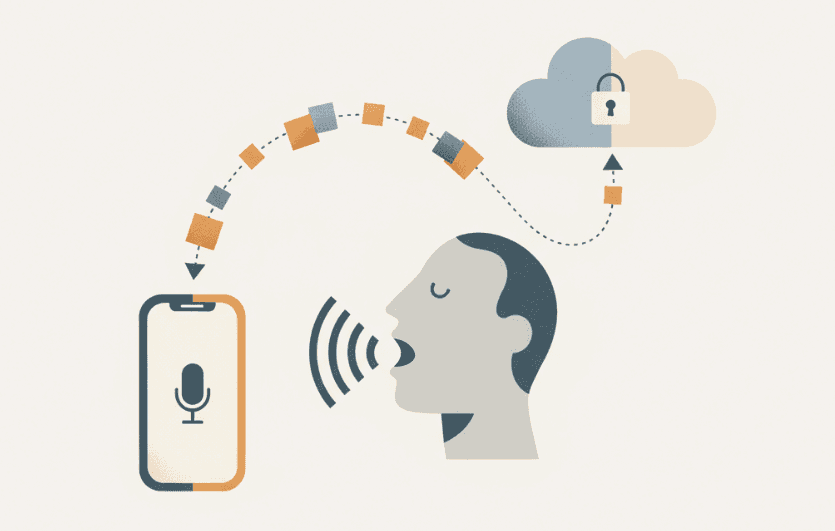
When you press a hotkey to start dictating, your device's microphone captures your voice and encodes it as an audio stream (or short audio segments) for speech recognition. Speech recognition software then analyzes the sound waves and converts them into written text.
The privacy question starts here: where does that audio get processed? Most voice dictation tools send your recording to remote servers in the cloud, where computers run the speech-to-text conversion. Your spoken words travel across the internet, get processed on external infrastructure, and the resulting text returns to your device.
Other tools, like the best voice dictation software for Mac, process everything locally on your computer, so your audio never leaves your device. The tradeoff is that local processing requires more computing power and may deliver lower accuracy than cloud-based options.
Your voice data passes through multiple points: capture, transmission (if cloud-based), processing, and delivery of the final text. Each step creates privacy and security risks, especially when dictating confidential information, client details, or proprietary business content.
Common Privacy Concerns with Voice Dictation at Work
The biggest question we hear: "Is someone listening to my conversations?" When you dictate sensitive client information, financial data, or confidential business plans, you want assurance that your words aren't being recorded, stored, or accessed by unauthorized parties.
Privacy and security concerns remain barriers to adoption, as many consumers and organizations remain skeptical about how their speech data is collected, stored, and used.
Here are the most common privacy concerns in workplace settings:
Who has access to my voice recordings after I dictate, and does the vendor store my audio files permanently or temporarily?
Can employees at the dictation company listen to my recordings, and will my voice data be used to train AI models without my consent?
What happens if I accidentally dictate passwords, customer details, or proprietary information, and can my employer monitor what I'm dictating during work hours?
These are legitimate concerns about workplace privacy, data ownership, and the potential for misuse. The answers vary dramatically depending on which voice dictation tool you choose and how it handles your data.
Data Storage and Transmission Risks
When your voice travels from your device to cloud servers, it creates multiple attack surfaces. Security researchers have reported a considerable rise in voice-related attacks, including voice spoofing and AI-generated impersonation, over the past few years.
The transmission phase is particularly vulnerable. Dictating on public WiFi at coffee shops or airports increases the risk of interception if encryption is misconfigured or if users connect through compromised or malicious networks, which is why voice dictation software for product managers needs strong security. Even on secure networks, data packets moving between your device and remote servers pass through multiple network nodes where interception is possible.
Storage presents another risk dimension. Some services process your audio and immediately delete it, while others retain recordings for hours, days, or indefinitely. Permanent storage creates a long-term liability: if servers are breached, your historical voice data becomes exposed, which is why AI voice tools for email productivity should have clear data deletion policies.
Security Threats Specific to Voice Dictation
Voice recognition systems face distinct security risks beyond typical data breaches. Voice spoofing attacks use recordings or AI-generated audio to impersonate authorized users and trigger commands. Deepfake voice tech can now clone someone's voice from just seconds of audio.
Unauthorized access through voice commands creates another risk, particularly for voice-to-text tools developers use for coding. If dictation software responds to ambient voices in open offices or background audio, it could capture sensitive conversations or execute unintended commands. Someone walking past your desk might accidentally trigger your dictation tool.
Acoustic attacks exploit sound properties. Ultrasonic frequencies inaudible to humans can trigger voice-activated systems without detection. Attackers have also used modified audio files that sound normal to humans but contain hidden commands that voice recognition interprets differently.
Understanding these threats helps IT teams implement proper authentication, require physical trigger mechanisms like hotkeys instead of wake words, and choose tools with anti-spoofing detection.
Compliance Requirements for Workplace Voice Dictation
Workplace voice dictation falls under multiple regulatory frameworks depending on your industry and location.
GDPR and International Privacy Laws
If you handle European customer data, GDPR applies regardless of where your company is based. Voice recordings may be considered biometric data under GDPR when used for unique identification. In those cases, organizations must meet stricter requirements, including explicit consent, defined retention policies, and data processing agreements with vendors.
HIPAA for Healthcare Organizations
Healthcare providers and their business associates must make sure voice dictation tools meet HIPAA requirements. This includes Business Associate Agreements with vendors, strong encryption during transmission, appropriate safeguards for stored data, access controls, and audit logs tracking who accessed voice data.
BIPA and Biometric Privacy
Illinois, Texas, and Washington have biometric privacy laws requiring written consent before collecting voiceprints. If your organization operates in these states and uses voiceprints for identification, employees must explicitly consent before biometric data is collected or processed.
How to Assess Voice Dictation Security
When assessing voice dictation tools for workplace use, start with these security criteria:
Encryption in transit (TLS 1.2 or TLS 1.3) between the client and vendor infrastructure
Data retention policies that clarify whether audio is stored temporarily or deleted immediately after processing
SOC 2 Type II certification validating security controls through third-party audit
Business Associate Agreements for HIPAA-covered entities
Privacy policies explaining who accesses data and for what purposes
Request vendor documentation on server locations, data persistence duration, and whether recordings train AI models, especially for voice recognition software in Slack and team communication.
Best Practices for Secure Voice Dictation at Work
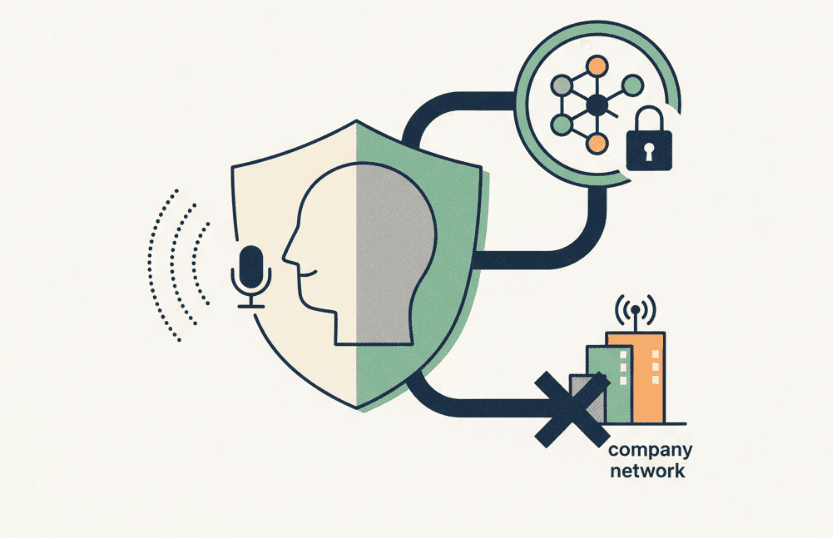
Protecting organizational data with voice dictation starts with network controls. Require dictation on company networks or VPNs instead of public WiFi. Configure firewalls to allow only approved dictation services and block unauthorized speech-to-text tools.
Use access controls that restrict dictation privileges by role. Device management software should control which applications can access microphones and enforce password protection on devices with dictation capabilities.
Employee training prevents common security mistakes:
Don't dictate passwords or authentication codes
Review transcribed text before sending to catch errors that could expose information
Disable dictation features when not actively in use
Avoid dictating in public spaces where conversations can be overheard
A voice dictation policy should cover acceptable use, approved tools, prohibited data types, and incident reporting procedures, particularly when implementing enterprise-grade voice dictation. Document which information classifications can be dictated and which require manual typing. Review the policy annually as threats evolve.
How Willow Handles Voice Dictation Security
Willow is built for professionals who want the speed of modern voice dictation without losing control of their data. When you dictate, your audio is processed in the cloud for high accuracy, then immediately discarded; recordings are not retained, logged, or reused after transcription. All transmission is encrypted, and the system is designed so no one can listen to your voice after transcription. This approach allows Willow to deliver over 3x+ better accuracy than built-in dictation tools while still meeting strict expectations around privacy and data handling.
Beyond security, Willow works everywhere you type on Mac (email, Slack, documents, browsers, and AI tools) activated instantly with a hotkey instead of wake words that can be triggered accidentally. Context awareness helps it understand names, technical terms, and tone, while background noise filtering and Quiet Mode prevent unintended capture in shared spaces. For teams assessing secure voice dictation, Willow offers a way to write faster without storing sensitive audio or adding unnecessary compliance risk. You can learn more or try it yourself with secure voice dictation.
FAQs
What's the difference between cloud-based and on-device voice processing for security?
On-device processing keeps your audio on your local computer, eliminating transmission risks but often with lower accuracy. Cloud-based processing sends audio to external servers for better accuracy and speed, but requires careful vendor selection to protect your data during transmission and processing.
When should I require employees to use a VPN for voice dictation?
Require VPN use whenever employees work outside your office network, especially on public WiFi at coffee shops or airports. This encrypts the connection between their device and your network, protecting voice data from interception during transmission to cloud servers.
Can voice dictation tools comply with HIPAA requirements?
Yes, but only if the vendor provides a Business Associate Agreement, uses strong encryption in transit, applies appropriate safeguards for stored data, maintains access controls, and supports audit logging where required. Healthcare organizations must verify these requirements before allowing staff to use voice dictation for patient information.
Final Thoughts on Protecting Your Voice Data
Protecting your voice data starts with understanding that not all voice dictation tools handle audio the same way. Speed and accuracy matter, but so does knowing where your voice goes, how long it exists, and who can access it after you stop speaking. By applying the security criteria outlined above and choosing tools built with privacy in mind, you can use voice dictation without introducing unnecessary risk. Willow is designed to balance modern cloud-based accuracy with strict data handling practices, so you don’t have to trade performance for peace of mind. If you want a safer approach to writing by voice at work, secure voice dictation makes it possible to move faster while keeping your data protected.
You might use voice dictation every day for emails, reports, or notes without realizing what happens to your voice once you press the mic button. In many cases, your audio doesn’t stay on your computer; it’s sent across the internet to remote servers for processing, raising questions about who can access it, how long it exists, and what risks come with that transfer. Whether voice dictation is secure depends on how audio is captured, transmitted, and handled after transcription. This guide breaks down what actually happens to your voice data, where privacy gaps can appear, and what to look for in secure voice dictation tools used at work.
TLDR:
Voice dictation sends audio to cloud servers for processing, creating privacy risks at capture, transmission, and storage points.
Under GDPR, voice data can be considered biometric data if it is processed for the purpose of uniquely identifying an individual; HIPAA needs vendor agreements and encryption for healthcare use.
On-device processing keeps audio local but may have limitations in language support, contextual understanding, or accuracy compared to large cloud-based models.
Require modern transport encryption (TLS 1.2 or TLS 1.3), audio deletion, and SOC 2 certification when assessing workplace dictation tools.
New modern solutions process voice in the cloud but never store recordings, combining privacy protection with 40%+ better accuracy.
How Voice Dictation Works and Where Your Data Goes
When you press a hotkey to start dictating, your device's microphone captures your voice and encodes it as an audio stream (or short audio segments) for speech recognition. Speech recognition software then analyzes the sound waves and converts them into written text.
The privacy question starts here: where does that audio get processed? Most voice dictation tools send your recording to remote servers in the cloud, where computers run the speech-to-text conversion. Your spoken words travel across the internet, get processed on external infrastructure, and the resulting text returns to your device.
Other tools, like the best voice dictation software for Mac, process everything locally on your computer, so your audio never leaves your device. The tradeoff is that local processing requires more computing power and may deliver lower accuracy than cloud-based options.
Your voice data passes through multiple points: capture, transmission (if cloud-based), processing, and delivery of the final text. Each step creates privacy and security risks, especially when dictating confidential information, client details, or proprietary business content.
Common Privacy Concerns with Voice Dictation at Work
The biggest question we hear: "Is someone listening to my conversations?" When you dictate sensitive client information, financial data, or confidential business plans, you want assurance that your words aren't being recorded, stored, or accessed by unauthorized parties.
Privacy and security concerns remain barriers to adoption, as many consumers and organizations remain skeptical about how their speech data is collected, stored, and used.
Here are the most common privacy concerns in workplace settings:
Who has access to my voice recordings after I dictate, and does the vendor store my audio files permanently or temporarily?
Can employees at the dictation company listen to my recordings, and will my voice data be used to train AI models without my consent?
What happens if I accidentally dictate passwords, customer details, or proprietary information, and can my employer monitor what I'm dictating during work hours?
These are legitimate concerns about workplace privacy, data ownership, and the potential for misuse. The answers vary dramatically depending on which voice dictation tool you choose and how it handles your data.
Data Storage and Transmission Risks
When your voice travels from your device to cloud servers, it creates multiple attack surfaces. Security researchers have reported a considerable rise in voice-related attacks, including voice spoofing and AI-generated impersonation, over the past few years.
The transmission phase is particularly vulnerable. Dictating on public WiFi at coffee shops or airports increases the risk of interception if encryption is misconfigured or if users connect through compromised or malicious networks, which is why voice dictation software for product managers needs strong security. Even on secure networks, data packets moving between your device and remote servers pass through multiple network nodes where interception is possible.
Storage presents another risk dimension. Some services process your audio and immediately delete it, while others retain recordings for hours, days, or indefinitely. Permanent storage creates a long-term liability: if servers are breached, your historical voice data becomes exposed, which is why AI voice tools for email productivity should have clear data deletion policies.
Security Threats Specific to Voice Dictation
Voice recognition systems face distinct security risks beyond typical data breaches. Voice spoofing attacks use recordings or AI-generated audio to impersonate authorized users and trigger commands. Deepfake voice tech can now clone someone's voice from just seconds of audio.
Unauthorized access through voice commands creates another risk, particularly for voice-to-text tools developers use for coding. If dictation software responds to ambient voices in open offices or background audio, it could capture sensitive conversations or execute unintended commands. Someone walking past your desk might accidentally trigger your dictation tool.
Acoustic attacks exploit sound properties. Ultrasonic frequencies inaudible to humans can trigger voice-activated systems without detection. Attackers have also used modified audio files that sound normal to humans but contain hidden commands that voice recognition interprets differently.
Understanding these threats helps IT teams implement proper authentication, require physical trigger mechanisms like hotkeys instead of wake words, and choose tools with anti-spoofing detection.
Compliance Requirements for Workplace Voice Dictation
Workplace voice dictation falls under multiple regulatory frameworks depending on your industry and location.
GDPR and International Privacy Laws
If you handle European customer data, GDPR applies regardless of where your company is based. Voice recordings may be considered biometric data under GDPR when used for unique identification. In those cases, organizations must meet stricter requirements, including explicit consent, defined retention policies, and data processing agreements with vendors.
HIPAA for Healthcare Organizations
Healthcare providers and their business associates must make sure voice dictation tools meet HIPAA requirements. This includes Business Associate Agreements with vendors, strong encryption during transmission, appropriate safeguards for stored data, access controls, and audit logs tracking who accessed voice data.
BIPA and Biometric Privacy
Illinois, Texas, and Washington have biometric privacy laws requiring written consent before collecting voiceprints. If your organization operates in these states and uses voiceprints for identification, employees must explicitly consent before biometric data is collected or processed.
How to Assess Voice Dictation Security
When assessing voice dictation tools for workplace use, start with these security criteria:
Encryption in transit (TLS 1.2 or TLS 1.3) between the client and vendor infrastructure
Data retention policies that clarify whether audio is stored temporarily or deleted immediately after processing
SOC 2 Type II certification validating security controls through third-party audit
Business Associate Agreements for HIPAA-covered entities
Privacy policies explaining who accesses data and for what purposes
Request vendor documentation on server locations, data persistence duration, and whether recordings train AI models, especially for voice recognition software in Slack and team communication.
Best Practices for Secure Voice Dictation at Work
Protecting organizational data with voice dictation starts with network controls. Require dictation on company networks or VPNs instead of public WiFi. Configure firewalls to allow only approved dictation services and block unauthorized speech-to-text tools.
Use access controls that restrict dictation privileges by role. Device management software should control which applications can access microphones and enforce password protection on devices with dictation capabilities.
Employee training prevents common security mistakes:
Don't dictate passwords or authentication codes
Review transcribed text before sending to catch errors that could expose information
Disable dictation features when not actively in use
Avoid dictating in public spaces where conversations can be overheard
A voice dictation policy should cover acceptable use, approved tools, prohibited data types, and incident reporting procedures, particularly when implementing enterprise-grade voice dictation. Document which information classifications can be dictated and which require manual typing. Review the policy annually as threats evolve.
How Willow Handles Voice Dictation Security
Willow is built for professionals who want the speed of modern voice dictation without losing control of their data. When you dictate, your audio is processed in the cloud for high accuracy, then immediately discarded; recordings are not retained, logged, or reused after transcription. All transmission is encrypted, and the system is designed so no one can listen to your voice after transcription. This approach allows Willow to deliver over 3x+ better accuracy than built-in dictation tools while still meeting strict expectations around privacy and data handling.
Beyond security, Willow works everywhere you type on Mac (email, Slack, documents, browsers, and AI tools) activated instantly with a hotkey instead of wake words that can be triggered accidentally. Context awareness helps it understand names, technical terms, and tone, while background noise filtering and Quiet Mode prevent unintended capture in shared spaces. For teams assessing secure voice dictation, Willow offers a way to write faster without storing sensitive audio or adding unnecessary compliance risk. You can learn more or try it yourself with secure voice dictation.
FAQs
What's the difference between cloud-based and on-device voice processing for security?
On-device processing keeps your audio on your local computer, eliminating transmission risks but often with lower accuracy. Cloud-based processing sends audio to external servers for better accuracy and speed, but requires careful vendor selection to protect your data during transmission and processing.
When should I require employees to use a VPN for voice dictation?
Require VPN use whenever employees work outside your office network, especially on public WiFi at coffee shops or airports. This encrypts the connection between their device and your network, protecting voice data from interception during transmission to cloud servers.
Can voice dictation tools comply with HIPAA requirements?
Yes, but only if the vendor provides a Business Associate Agreement, uses strong encryption in transit, applies appropriate safeguards for stored data, maintains access controls, and supports audit logging where required. Healthcare organizations must verify these requirements before allowing staff to use voice dictation for patient information.
Final Thoughts on Protecting Your Voice Data
Protecting your voice data starts with understanding that not all voice dictation tools handle audio the same way. Speed and accuracy matter, but so does knowing where your voice goes, how long it exists, and who can access it after you stop speaking. By applying the security criteria outlined above and choosing tools built with privacy in mind, you can use voice dictation without introducing unnecessary risk. Willow is designed to balance modern cloud-based accuracy with strict data handling practices, so you don’t have to trade performance for peace of mind. If you want a safer approach to writing by voice at work, secure voice dictation makes it possible to move faster while keeping your data protected.

Try Willow for free
Instant, accurate voice dictation. No card required.
Try Willow for free
Instant, accurate voice dictation. No card required.
Other stories you’ll love
Other stories you’ll love


Your keyboard is optional now
" transform="translate(5 5)" width="9.791000051498413px"/></svg>)

The voice-first interface for modern work.
© Willow Care, Inc. 2026. All rights reserved
Your keyboard is optional now
The voice-first interface for modern work.
© Willow Care, Inc. 2026. All rights reserved
Your keyboard is optional now
The voice-first interface for modern work.
© Willow Care, Inc. 2026. All rights reserved