" transform="translate(5 2)" width="10px"/></svg>)

•
5 min read
The 7 Best Speech Recognition Software Tools in March 2026
•
5 min read
The 7 Best Speech Recognition Software Tools in March 2026
Every major operating system ships with free speech recognition software, so it’s fair to ask why you’d need anything else. The difference shows up once you rely on dictation for real work. Built-in tools treat everyone the same, so they repeat mistakes with company names, industry terms, and tone, and the slight lag can pull you out of your flow. Newer tools go further by learning from your corrections, responding in near real time, and working across your everyday apps. We compared 7 dictation tools to show which ones actually improve over time and which ones keep you stuck fixing the same errors.
TLDR:
Speech recognition software converts speech to text at 150 WPM vs. 40 WPM typing for 3x faster output.
Free options like Apple Dictation and Google Docs Voice Typing work for basic use but lack accuracy.
Best tools feature sub-200ms latency, context awareness, and custom vocabulary for technical terms.
Most tools don’t improve over time, so you keep fixing the same mistakes instead of building accuracy.
Some modern dictation systems learn your writing style automatically, deliver 200ms latency, and include SOC 2/HIPAA compliance.
What Speech Recognition Software Is and How It Works
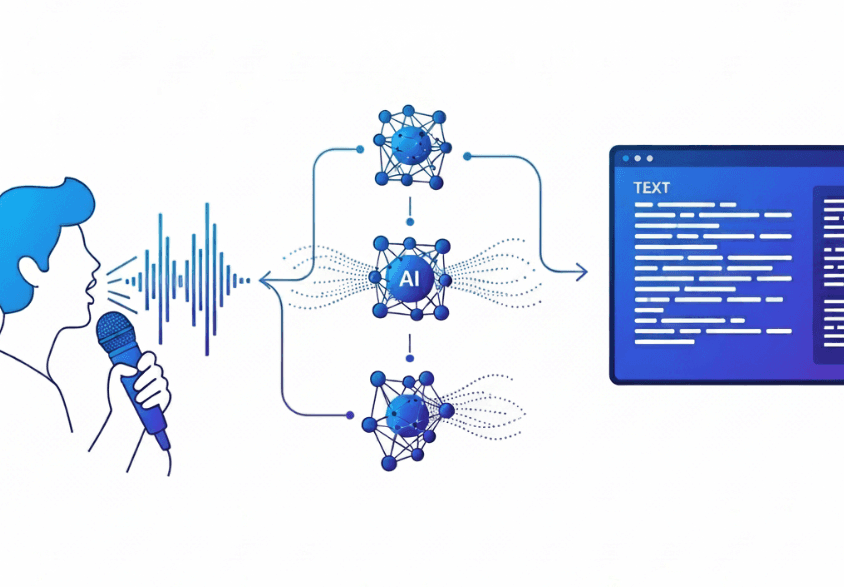
Speech recognition software converts spoken words into written text in real-time. Instead of typing at 40 words per minute, you can speak at 150 words per minute, making dictation three times faster than your keyboard.
Here's how it works: When you speak, the software captures your audio and analyzes the sound waves. AI models trained on millions of hours of speech break down your voice into phonemes, then match those sounds to words and sentences. The best tools go further by learning your writing style over time, which helps them distinguish between "their" and "there" or correctly spell technical terms based on how you actually write.
Key Features That Make Speech Recognition Software Worth Using in 2026
The baseline for serious work is 95% accuracy, but raw accuracy means nothing without context awareness. Can the software tell "right" from "write" based on sentence structure? Does it learn that you work at a company called "Figma" and stop transcribing it as "sigma"? Tools that personalize to your writing style become more accurate for your actual use, cutting editing time down to nearly zero.
If you're waiting two seconds for text to appear, you've already lost your train of thought. Latency under 200 milliseconds keeps you in flow state. Anything above 700ms feels laggy and breaks your rhythm, turning dictation into a frustrating start-stop experience.
Look for custom vocabulary support so industry jargon and team terminology get recognized correctly. Voice commands for formatting like "new paragraph" or "bullet point" save you from toggling back to your keyboard. Works across Gmail, Slack, Notion, or most text fields without switching tools.
Tool | Latency | Accuracy | Learning Capability | Platform Support | Compliance |
|---|---|---|---|---|---|
Willow Voice | 200ms | 3x better than built-in tools | Learns writing style and vocabulary automatically | Mac, Windows, iOS, works across most text fields | SOC 2, HIPAA |
Wispr Flow | 700ms+ | Standard | Limited learning | Mac | None |
Apple Dictation | 700ms+ | Basic | No learning capability | macOS, iOS only | None |
Dragon NaturallySpeaking | Variable | 99% after training | Requires lengthy voice training sessions | Windows primarily | Available in medical versions |
Windows Voice Access | 700ms+ | Can struggle with certain accents or noisy environments | No personalization | Windows 11 only | None |
Google Docs Voice Typing | Variable | Basic | Limited learning | Google Docs only | None |
Free Speech Recognition Software for Every Operating System
Every major operating system includes free voice typing, but the experience varies depending on what you need.
Apple Dictation comes pre-installed on macOS and iOS. Press the microphone button or hit Fn twice to voice type into most text fields. It handles basic transcription without costing anything, though it struggles with technical terms and doesn't learn your writing patterns.
Windows 11 ships with Voice Access for hands-free PC control. The speech-to-text feature works across Windows applications, but accuracy drops with accents or background noise.
Google Docs Voice Typing works through Tools > Voice Typing in any Google Doc. It only functions inside Google Docs, so you can't use it in email, Slack, or other apps where you spend most of your day.
Best Speech Recognition Software for Android Devices
Gboard gives Android users straightforward dictation by tapping the microphone icon on any keyboard. After regular use, Google's AI learns your speech patterns and vocabulary, improving accuracy with continued use. It's free, pre-installed on most Android phones, and works in messaging apps, email, browsers, and note-taking tools.
Google Assistant extends functionality beyond dictation with voice commands that control your phone, compose messages, set reminders, or search the web hands-free. The trade-off is less control over formatting and editing compared to dedicated dictation tools like Wispr Flow or Apple's built-in voice dictation.
Best Speech Recognition Software for iPhone and iOS
Apple Dictation comes pre-installed on every iPhone and activates through the keyboard microphone icon. It handles basic transcription but lacks memory for specialized terms.
Willow's iOS app works as a voice keyboard inside any app. Press Fn to speak, and text appears in under 200 milliseconds. The keyboard switcher lets you toggle between voice and typing without returning to Apple's default keyboard.
Willow learns how you write over time, remembering corrected spellings and adapting to your tone automatically.
Best Speech Recognition Software for Windows and Mac Desktop
Dragon NaturallySpeaking delivers high accuracy but requires lengthy voice training sessions and costs hundreds of dollars upfront. The interface feels dated, and it locks you into specific applications instead of working system-wide across your entire workflow.
Windows Voice Access and Apple Dictation offer free system-wide control through built-in OS features. Both activate via hotkey, but neither learns your writing style or handles technical terminology reliably. Latency hovers above 700ms, which breaks concentration when you're moving fast through emails or documentation.
Willow runs on both Mac and Windows with Fn-key activation that works in Slack, Gmail, Notion, Cursor, or any text field. It learns how you write, remembering corrected terms and adapting tone automatically. At 200ms latency, text appears faster than Wispr Flow or Apple's built-in voice dictation, keeping you in flow state. SOC 2 and HIPAA compliance make it ready for team deployment without privacy concerns.
Dragon Speech Recognition Software and Legacy Alternatives
Dragon NaturallySpeaking by Nuance built its reputation on accuracy exceeding 99% after voice training. For legal and medical professionals handling specialized vocabulary, Dragon became the standard because it could reliably capture technical language that broke other tools.
That accuracy comes with trade-offs. Perpetual licenses start at $700, and Professional versions climb past $1,500. The interface hasn't changed much since the 2000s, requiring dedicated voice training sessions before you see results. Some versions only run on Windows, and switching computers means retraining from scratch.
Dragon works best when locked into a single workstation with predictable workflows. Alternatives like Wispr Flow and Willow offer faster setup without training overhead. Willow learns your writing automatically, and includes SOC 2 and HIPAA compliance for team deployment.
Speech Recognition Software for Students with Disabilities and Accessibility
Speech recognition removes barriers for students with dysgraphia, dyslexia, or motor impairments. Students using speech-to-text produced longer texts, allowing them to focus on ideas instead of mechanics.
Free tools like Apple's built-in voice dictation, Wispr Flow, or Google Docs Voice Typing offer basic access. Willow personalizes over time by learning corrected spellings and adapting to each student's vocabulary, while 200ms latency keeps students in flow without waiting for text.
Privacy and Security in Professional Speech Recognition Software
Voice data contains personally identifiable information that requires strict handling protocols. Organizations in healthcare, legal, and enterprise settings face regulatory requirements around data storage and transmission.
SOC 2 and HIPAA compliance create minimum standards for healthcare, legal, and enterprise settings. These certifications indicate that providers follow strict standards for handling and storing voice data. Speech recognition tools without these credentials may not meet requirements for patient notes, legal briefs, or confidential business records.
Willow delivers 200ms latency through cloud processing while maintaining zero data retention, satisfying both SOC 2 and HIPAA requirements for team environments. The software includes local processing for restricted environments where internet access isn't permitted. Standard dictation tools like Wispr Flow and Apple's built-in voice dictation don't carry enterprise security certifications.
How to Maximize Speech Recognition Accuracy and Speed

Microphone quality matters more than you'd think. Built-in laptop mics pick up keyboard clicks and fan noise that confuse transcription algorithms. A dedicated USB microphone or quality headset isolates your voice and can noticeably reduce errors.
Speak at your normal conversational pace. Slowing down doesn't improve accuracy on AI-powered tools; it just wastes time. The software expects natural rhythm and phrasing, not robotic pronunciation.
Add technical terms, company names, and industry jargon to custom dictionaries before you start speaking. Correcting "Kubernetes" or "Salesforce" once teaches the software permanently, saving dozens of future edits.
Pick quiet spaces when possible, though good software handles coffee shop ambiance. Background conversations confuse voice detection more than steady noise like air conditioning.
The speech recognition market is expected to reach $30 billion in 2026, but your results depend on technique. Tools that learn your writing style improve faster than generic options, turning corrections into personalized accuracy gains.
Why Willow Voice Stands Out for Professional Voice Dictation

Willow solves the problems that standard dictation tools, Wispr Flow, and Apple's built-in voice dictation can't tackle through three key breakthroughs.
First, it learns your writing style automatically, becoming considerably more accurate for your actual use with every correction you make, something standard tools and competitors simply don't offer. Second, 200ms latency is 3.5x faster than competitors stuck at 700ms+, keeping you in flow state instead of constantly waiting for text to catch up. Third, SOC 2 and HIPAA compliance plus shared team dictionaries make it the only dictation software truly built for professional collaboration at scale.
That combination delivers 3x better accuracy than built-in tools and performs strongly across speed, accuracy, and usability while working universally across Gmail, Slack, Notion, Cursor, and any text field on Mac, Windows, and iOS.
Professionals across fast-growing startups and enterprise teams have adopted Willow after finding standard dictation tools and competitors inadequate for high-volume communication workflows. From clearing dense inboxes to writing detailed technical documentation, Willow replaces typing at 40 words per minute with speaking at 150 words per minute, delivering a 3x speed advantage that compounds across every email, message, and document you create, a productivity gain that legacy tools and recent competitors have failed to match.
FAQs
How accurate is speech recognition software in 2026?
The best tools reach 95-98% accuracy, but personalized software like Willow becomes 3x more accurate than built-in options by learning your specific writing style, technical terms, and vocabulary over time.
Can I use speech recognition software if I have an accent?
Yes. AI-powered tools trained on millions of hours of speech handle accents well, and personalized software improves accuracy as it learns your specific speech patterns and corrections.
How long does it take to set up voice dictation software?
Free options like Windows Voice Access and Apple's built-in voice dictation work immediately with no setup, while legacy tools like Dragon require lengthy voice training sessions before reaching full accuracy.
Final Thoughts on Professional Dictation Software
The best speech recognition software comes down to three things: speed, adaptability, and where it actually works. If text shows up instantly, learns how you write, and works across every app you use, dictation stops feeling like a workaround and starts replacing your keyboard for real work. Built-in tools can handle quick notes, but they fall short once accuracy and consistency matter. Willow stands out by learning from your corrections, keeping latency low enough to stay in flow, and working system-wide, making it possible to write faster without constantly fixing errors.
Every major operating system ships with free speech recognition software, so it’s fair to ask why you’d need anything else. The difference shows up once you rely on dictation for real work. Built-in tools treat everyone the same, so they repeat mistakes with company names, industry terms, and tone, and the slight lag can pull you out of your flow. Newer tools go further by learning from your corrections, responding in near real time, and working across your everyday apps. We compared 7 dictation tools to show which ones actually improve over time and which ones keep you stuck fixing the same errors.
TLDR:
Speech recognition software converts speech to text at 150 WPM vs. 40 WPM typing for 3x faster output.
Free options like Apple Dictation and Google Docs Voice Typing work for basic use but lack accuracy.
Best tools feature sub-200ms latency, context awareness, and custom vocabulary for technical terms.
Most tools don’t improve over time, so you keep fixing the same mistakes instead of building accuracy.
Some modern dictation systems learn your writing style automatically, deliver 200ms latency, and include SOC 2/HIPAA compliance.
What Speech Recognition Software Is and How It Works
Speech recognition software converts spoken words into written text in real-time. Instead of typing at 40 words per minute, you can speak at 150 words per minute, making dictation three times faster than your keyboard.
Here's how it works: When you speak, the software captures your audio and analyzes the sound waves. AI models trained on millions of hours of speech break down your voice into phonemes, then match those sounds to words and sentences. The best tools go further by learning your writing style over time, which helps them distinguish between "their" and "there" or correctly spell technical terms based on how you actually write.
Key Features That Make Speech Recognition Software Worth Using in 2026
The baseline for serious work is 95% accuracy, but raw accuracy means nothing without context awareness. Can the software tell "right" from "write" based on sentence structure? Does it learn that you work at a company called "Figma" and stop transcribing it as "sigma"? Tools that personalize to your writing style become more accurate for your actual use, cutting editing time down to nearly zero.
If you're waiting two seconds for text to appear, you've already lost your train of thought. Latency under 200 milliseconds keeps you in flow state. Anything above 700ms feels laggy and breaks your rhythm, turning dictation into a frustrating start-stop experience.
Look for custom vocabulary support so industry jargon and team terminology get recognized correctly. Voice commands for formatting like "new paragraph" or "bullet point" save you from toggling back to your keyboard. Works across Gmail, Slack, Notion, or most text fields without switching tools.
Tool | Latency | Accuracy | Learning Capability | Platform Support | Compliance |
|---|---|---|---|---|---|
Willow Voice | 200ms | 3x better than built-in tools | Learns writing style and vocabulary automatically | Mac, Windows, iOS, works across most text fields | SOC 2, HIPAA |
Wispr Flow | 700ms+ | Standard | Limited learning | Mac | None |
Apple Dictation | 700ms+ | Basic | No learning capability | macOS, iOS only | None |
Dragon NaturallySpeaking | Variable | 99% after training | Requires lengthy voice training sessions | Windows primarily | Available in medical versions |
Windows Voice Access | 700ms+ | Can struggle with certain accents or noisy environments | No personalization | Windows 11 only | None |
Google Docs Voice Typing | Variable | Basic | Limited learning | Google Docs only | None |
Free Speech Recognition Software for Every Operating System
Every major operating system includes free voice typing, but the experience varies depending on what you need.
Apple Dictation comes pre-installed on macOS and iOS. Press the microphone button or hit Fn twice to voice type into most text fields. It handles basic transcription without costing anything, though it struggles with technical terms and doesn't learn your writing patterns.
Windows 11 ships with Voice Access for hands-free PC control. The speech-to-text feature works across Windows applications, but accuracy drops with accents or background noise.
Google Docs Voice Typing works through Tools > Voice Typing in any Google Doc. It only functions inside Google Docs, so you can't use it in email, Slack, or other apps where you spend most of your day.
Best Speech Recognition Software for Android Devices
Gboard gives Android users straightforward dictation by tapping the microphone icon on any keyboard. After regular use, Google's AI learns your speech patterns and vocabulary, improving accuracy with continued use. It's free, pre-installed on most Android phones, and works in messaging apps, email, browsers, and note-taking tools.
Google Assistant extends functionality beyond dictation with voice commands that control your phone, compose messages, set reminders, or search the web hands-free. The trade-off is less control over formatting and editing compared to dedicated dictation tools like Wispr Flow or Apple's built-in voice dictation.
Best Speech Recognition Software for iPhone and iOS
Apple Dictation comes pre-installed on every iPhone and activates through the keyboard microphone icon. It handles basic transcription but lacks memory for specialized terms.
Willow's iOS app works as a voice keyboard inside any app. Press Fn to speak, and text appears in under 200 milliseconds. The keyboard switcher lets you toggle between voice and typing without returning to Apple's default keyboard.
Willow learns how you write over time, remembering corrected spellings and adapting to your tone automatically.
Best Speech Recognition Software for Windows and Mac Desktop
Dragon NaturallySpeaking delivers high accuracy but requires lengthy voice training sessions and costs hundreds of dollars upfront. The interface feels dated, and it locks you into specific applications instead of working system-wide across your entire workflow.
Windows Voice Access and Apple Dictation offer free system-wide control through built-in OS features. Both activate via hotkey, but neither learns your writing style or handles technical terminology reliably. Latency hovers above 700ms, which breaks concentration when you're moving fast through emails or documentation.
Willow runs on both Mac and Windows with Fn-key activation that works in Slack, Gmail, Notion, Cursor, or any text field. It learns how you write, remembering corrected terms and adapting tone automatically. At 200ms latency, text appears faster than Wispr Flow or Apple's built-in voice dictation, keeping you in flow state. SOC 2 and HIPAA compliance make it ready for team deployment without privacy concerns.
Dragon Speech Recognition Software and Legacy Alternatives
Dragon NaturallySpeaking by Nuance built its reputation on accuracy exceeding 99% after voice training. For legal and medical professionals handling specialized vocabulary, Dragon became the standard because it could reliably capture technical language that broke other tools.
That accuracy comes with trade-offs. Perpetual licenses start at $700, and Professional versions climb past $1,500. The interface hasn't changed much since the 2000s, requiring dedicated voice training sessions before you see results. Some versions only run on Windows, and switching computers means retraining from scratch.
Dragon works best when locked into a single workstation with predictable workflows. Alternatives like Wispr Flow and Willow offer faster setup without training overhead. Willow learns your writing automatically, and includes SOC 2 and HIPAA compliance for team deployment.
Speech Recognition Software for Students with Disabilities and Accessibility
Speech recognition removes barriers for students with dysgraphia, dyslexia, or motor impairments. Students using speech-to-text produced longer texts, allowing them to focus on ideas instead of mechanics.
Free tools like Apple's built-in voice dictation, Wispr Flow, or Google Docs Voice Typing offer basic access. Willow personalizes over time by learning corrected spellings and adapting to each student's vocabulary, while 200ms latency keeps students in flow without waiting for text.
Privacy and Security in Professional Speech Recognition Software
Voice data contains personally identifiable information that requires strict handling protocols. Organizations in healthcare, legal, and enterprise settings face regulatory requirements around data storage and transmission.
SOC 2 and HIPAA compliance create minimum standards for healthcare, legal, and enterprise settings. These certifications indicate that providers follow strict standards for handling and storing voice data. Speech recognition tools without these credentials may not meet requirements for patient notes, legal briefs, or confidential business records.
Willow delivers 200ms latency through cloud processing while maintaining zero data retention, satisfying both SOC 2 and HIPAA requirements for team environments. The software includes local processing for restricted environments where internet access isn't permitted. Standard dictation tools like Wispr Flow and Apple's built-in voice dictation don't carry enterprise security certifications.
How to Maximize Speech Recognition Accuracy and Speed
Microphone quality matters more than you'd think. Built-in laptop mics pick up keyboard clicks and fan noise that confuse transcription algorithms. A dedicated USB microphone or quality headset isolates your voice and can noticeably reduce errors.
Speak at your normal conversational pace. Slowing down doesn't improve accuracy on AI-powered tools; it just wastes time. The software expects natural rhythm and phrasing, not robotic pronunciation.
Add technical terms, company names, and industry jargon to custom dictionaries before you start speaking. Correcting "Kubernetes" or "Salesforce" once teaches the software permanently, saving dozens of future edits.
Pick quiet spaces when possible, though good software handles coffee shop ambiance. Background conversations confuse voice detection more than steady noise like air conditioning.
The speech recognition market is expected to reach $30 billion in 2026, but your results depend on technique. Tools that learn your writing style improve faster than generic options, turning corrections into personalized accuracy gains.
Why Willow Voice Stands Out for Professional Voice Dictation
Willow solves the problems that standard dictation tools, Wispr Flow, and Apple's built-in voice dictation can't tackle through three key breakthroughs.
First, it learns your writing style automatically, becoming considerably more accurate for your actual use with every correction you make, something standard tools and competitors simply don't offer. Second, 200ms latency is 3.5x faster than competitors stuck at 700ms+, keeping you in flow state instead of constantly waiting for text to catch up. Third, SOC 2 and HIPAA compliance plus shared team dictionaries make it the only dictation software truly built for professional collaboration at scale.
That combination delivers 3x better accuracy than built-in tools and performs strongly across speed, accuracy, and usability while working universally across Gmail, Slack, Notion, Cursor, and any text field on Mac, Windows, and iOS.
Professionals across fast-growing startups and enterprise teams have adopted Willow after finding standard dictation tools and competitors inadequate for high-volume communication workflows. From clearing dense inboxes to writing detailed technical documentation, Willow replaces typing at 40 words per minute with speaking at 150 words per minute, delivering a 3x speed advantage that compounds across every email, message, and document you create, a productivity gain that legacy tools and recent competitors have failed to match.
FAQs
How accurate is speech recognition software in 2026?
The best tools reach 95-98% accuracy, but personalized software like Willow becomes 3x more accurate than built-in options by learning your specific writing style, technical terms, and vocabulary over time.
Can I use speech recognition software if I have an accent?
Yes. AI-powered tools trained on millions of hours of speech handle accents well, and personalized software improves accuracy as it learns your specific speech patterns and corrections.
How long does it take to set up voice dictation software?
Free options like Windows Voice Access and Apple's built-in voice dictation work immediately with no setup, while legacy tools like Dragon require lengthy voice training sessions before reaching full accuracy.
Final Thoughts on Professional Dictation Software
The best speech recognition software comes down to three things: speed, adaptability, and where it actually works. If text shows up instantly, learns how you write, and works across every app you use, dictation stops feeling like a workaround and starts replacing your keyboard for real work. Built-in tools can handle quick notes, but they fall short once accuracy and consistency matter. Willow stands out by learning from your corrections, keeping latency low enough to stay in flow, and working system-wide, making it possible to write faster without constantly fixing errors.

Try Willow for free
Instant, accurate voice dictation. No card required.
Try Willow for free
Instant, accurate voice dictation. No card required.
Other stories you’ll love
Other stories you’ll love


Your keyboard is optional now
" transform="translate(5 5)" width="9.791000051498413px"/></svg>)

The voice-first interface for modern work.
© Willow Care, Inc. 2026. All rights reserved
Your keyboard is optional now
The voice-first interface for modern work.
© Willow Care, Inc. 2026. All rights reserved
Your keyboard is optional now
The voice-first interface for modern work.
© Willow Care, Inc. 2026. All rights reserved