" transform="translate(5 2)" width="10px"/></svg>)

•
5 min read
Voice Dictation for Gemini: How Willow Delivers Faster, Smarter AI Voice Input in May 2026
•
5 min read
Voice Dictation for Gemini: How Willow Delivers Faster, Smarter AI Voice Input in May 2026
You speak at around 150 words per minute but type closer to 40, which means voice dictation for Gemini should speed up your workflow by a lot. In practice, most built-in voice tools create as many problems as they solve. They lag, they miss context, and they can't handle the kind of detailed, formatted prompts that get Gemini to give you a useful first response. What you actually need is a voice input layer that works wherever you're typing, learns the vocabulary you use most, and responds fast enough that you stay in your train of thought instead of waiting for text to catch up.
TLDR:
Voice dictation can move your Gemini workflow 3x faster since you speak at 150 words per minute but type around 40.
Built-in voice tools from Google and browsers tend to struggle with technical vocabulary, longer prompts, and multi-app workflows.
Speaking your prompts adds around 30% more context than typing, which can improve Gemini's response quality and reduce follow-up questions.
Willow Voice can transcribe at around 200ms with 98%+ accuracy, learn your vocabulary over time, and work across all apps including Gemini.
A system-wide voice dictation layer requires no per-app setup, so you get consistent voice input whether you are in Gemini, Docs, email, or a code editor.
What Is Voice Dictation for Gemini?
Voice dictation for Gemini means speaking your prompts directly into Google's Gemini interface instead of typing them. You speak aloud and your words are transcribed as text input. A typical person types around 40 words per minute but speaks at 150 words per minute, so the speed difference is real.
Where Built-In Options Fall Short
Google's native voice input and most browser-level dictation options weren't built with AI workflows in mind. They work for short commands but tend to struggle with:
Longer, complex prompts where punctuation and formatting affect how Gemini interprets your request
Technical vocabulary, proper nouns, or domain-specific terms that generic speech recognition gets wrong
Workflows where you're switching between Gemini and other tabs or apps, since most built-in tools only activate in one field at a time
Purpose-built dictation software sits above your apps and works wherever your cursor is, including inside Gemini.
How to Use Voice Dictation in Google Gemini
On the Web (gemini.google.com)
Click inside the prompt field and tap the microphone icon on the right side of the input bar. Speak your prompt using voice dictation and your words are transcribed directly into the field. Accuracy depends on your browser's built-in speech recognition and can vary by accent, background noise, and vocabulary.
In the Gemini Mobile App
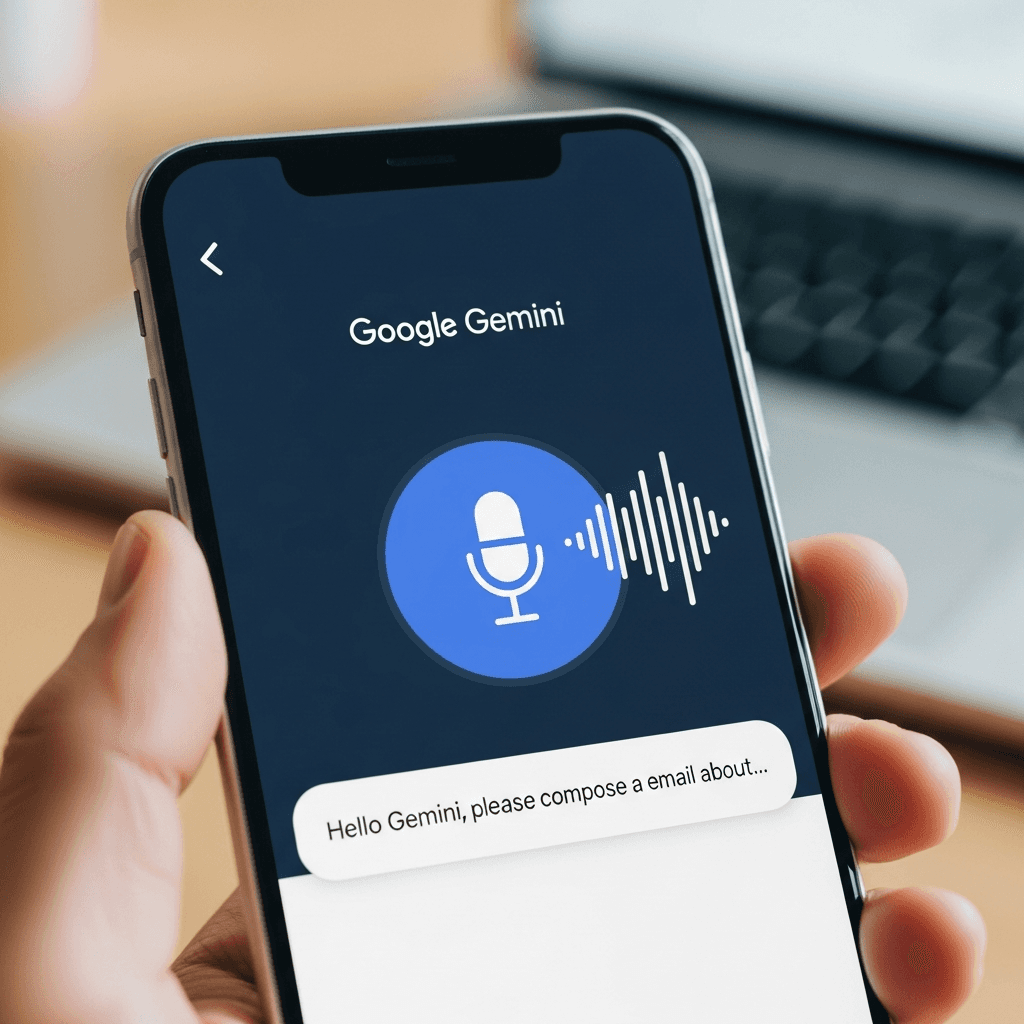
Tap the microphone icon in the message bar at the bottom of the screen. Speak your prompt using voice input, then tap the icon again to stop. The app transcribes and drops it into the text field, ready to send.
With Gemini Live
Gemini Live opens a real-time audio conversation instead of converting speech to text. Tap the Live option from the app's home screen to start. The exchange stays in voice throughout with no text to review mid-session. This works well for exploratory back-and-forth but loses the precision of a prompt you can refine before sending.
Google's Rambler Feature in Gboard for Android
Google's Rambler feature in Gboard gives Android users a way to speak freely into the keyboard and receive a condensed, cleaned-up version of what they said. Instead of transcribing word-for-word, Rambler summarizes your spoken input before inserting text.
The limitation is scope. Rambler is built for short, casual inputs inside Gboard. It does not carry context across apps, does not learn your vocabulary over time, and accuracy on proper nouns or technical terms tends to drop without that kind of adaptation. For Gemini users, its app-bound design means you are working within Gboard's constraints instead of speaking freely across your workflow.
How This Compares to a Purpose-Built Voice Input Layer
A purpose-built voice dictation tool sits above the keyboard entirely, working inside Gemini, Gmail, Docs, Slack, or any other app without switching contexts. Where Rambler summarizes, a purpose-built AI dictation tool transcribes with ~200ms latency and adapts to your vocabulary over time, reaching 98%+ accuracy on the names, phrases, and terminology that generic keyboard tools tend to miss.
Gemini Live Audio Capabilities
Gemini Live is Google's real-time conversational AI feature for back-and-forth audio exchanges. It runs inside the Gemini app and has expanded to web and select third-party integrations. Its audio input is designed for conversational turns, not for placing dictated text into documents, emails, or code editors. That handoff requires a separate layer.
What Gemini's Built-In Voice Input Can and Can't Do
Gemini Live handles turn-based spoken queries well but has no way to route transcribed text into third-party apps or browser fields.
Accuracy on proper nouns and technical vocabulary can vary, since the model targets conversational fluency over verbatim transcription.
There is no vocabulary learning, so corrections in one session don't carry forward to the next.
Gemini Live was built to converse, and it does that well. Getting voice input to work across your full workflow requires something built for that job.
Why Voice Input Improves AI Prompting Quality
When you type a prompt into Gemini, you filter your thoughts. You compress ideas into fewer lines and drop context that feels too long to write out. Speaking changes that. Voice prompting produces longer, more context-rich prompts because the cognitive cost of adding detail drops. Research suggests spoken language carries contextual information through prosody and intonation that written input lacks.

A few reasons this matters for Gemini:
Fuller prompts give Gemini clearer signal, which tends to reduce the back-and-forth needed to reach a usable answer.
Speaking lets a complete idea form before any correction happens, removing the editing bottleneck that interrupts typed thought.
Qualifications and specific constraints come naturally in speech but often get cut when typing feels laborious.
The net effect is that voice prompts often produce more complete responses, reducing the follow-up prompts needed to reach a useful output.
Third-Party Voice Dictation Tools That Work with Gemini
Since Gemini has no native voice dictation built in, third-party AI speech to text tools fill that gap by capturing your speech and dropping transcribed text directly into the input field. The experience varies depending on which tool you choose.
The main options worth knowing about:
Willow Voice works system-wide with around 200ms latency. It learns your vocabulary and phrasing over time, which means less editing before you send.
Wispr Flow is a well-regarded option for Mac users that works across apps with solid general-purpose accuracy, though it is not optimized for AI workflows or technical vocabulary.
Apple's built-in dictation works in any text field including Gemini in a browser, but latency runs higher and accuracy drops with names, jargon, and longer prompts.
The tradeoff comes down to speed, accuracy over time, and setup. For regular Gemini users, a purpose-built voice layer that adapts to your habits will outperform a system-level fallback.
Tool | Latency | Accuracy Over Time | Where It Works | |
|---|---|---|---|---|
Willow Voice | Around 200ms with text appearing almost as you finish speaking | Learns your vocabulary and phrasing patterns to reach 98%+ accuracy with fewer errors | System-wide across all apps including Gemini with no per-app setup | |
Wispr Flow | Not specified in detail but standard for third-party tools | Solid general-purpose accuracy without optimization for AI workflows or technical vocabulary | Works across Mac apps with a clean interface | |
Apple Built-in Dictation | Higher latency than specialized tools with noticeable lag | Weaker accuracy with names, jargon, and longer prompts compared to specialized tools | Available in any text field including Gemini in browser but requires system-level activation | |
Google Gboard Rambler | Keyboard-level processing speed | Summarizes instead of transcribes verbatim with limited adaptation to user vocabulary | Android only within Gboard with no cross-app context or learning | |
Gemini Native Voice Input | Browser or device-dependent speed | Generic speech recognition struggles with technical terms and proper nouns | Built into Gemini web interface and mobile app with microphone icon activation |
Voice Dictation for Gemini: How Willow Delivers Faster, Smarter AI Voice Input

Willow Voice is an AI dictation tool built to work across every app you use, including Gemini. Where browser extensions and built-in voice tools often stumble on context, formatting, and speed, Willow takes a different approach.
A few things set it apart for Gemini users:
Willow responds in roughly 200ms, so your words appear almost the instant you finish speaking. Competing tools typically run at 700ms or more, which creates a noticeable lag that can break your train of thought mid-prompt.
Willow learns your vocabulary over time, picking up the names, phrases, and writing patterns you use most. The more you use it, the fewer corrections you need to make before sending a prompt.
Because Willow works at the OS level, it activates in Gemini whether you're in a browser tab, a Google Workspace app, or anywhere else. No per-app setup required.
Accuracy sits at 98% or higher, with roughly 3x fewer errors than built-in dictation tools, which matters when you're constructing longer or more detailed prompts.
At 150 words per minute versus around 40 for typing, the speed difference is real enough to change how you interact with Gemini day to day.
FAQs
Can I use voice dictation with Gemini without installing extra software?
Yes. Gemini includes a built-in microphone icon in the web interface and mobile app that transcribes speech using your browser or device's native recognition. Accuracy with proper nouns, technical terms, and longer prompts tends to be weaker, so expect some manual editing before sending.
Voice dictation for Gemini: Gboard's Rambler vs. a tool like Willow?
Rambler works only within Gboard on Android and summarizes speech instead of transcribing verbatim, which limits precision and context retention. A specific tool works system-wide across all apps including Gemini, transcribes at ~200ms latency with 98%+ accuracy, and learns your vocabulary over time so you edit less.
How does speaking prompts instead of typing improve Gemini's responses?
Spoken prompts tend to include around 30% more contextual detail than typed ones because the cognitive cost of adding nuance drops when you're not hunting keys. More context gives Gemini clearer signal, reducing the back-and-forth needed to reach a useful answer.
What is Gemini Live and can it replace voice dictation tools?
Gemini Live handles spoken back-and-forth exchanges inside the Gemini app. It's built for turn-based audio conversations, not for dictating text into other apps like Gmail, Docs, or code editors. For voice input that lands as text across your workflow, you'll need a separate dictation layer.
Final Thoughts on Voice Dictation for Gemini
Voice dictation for Gemini is one of the more practical ways to get more out of your AI workflow without changing what you already do. The gap between how fast you speak and how fast you type is real, and it compounds across every prompt, every follow-up, and every session. Closing that gap means picking a dictation layer that keeps up with how you actually work. Willow Voice is built for exactly that. It works system-wide, learns your vocabulary over time, and transcribes at around 200ms, fast enough that your train of thought stays intact. If you're using Gemini regularly, it's worth seeing what the workflow feels like when voice input stops being the bottleneck.
You speak at around 150 words per minute but type closer to 40, which means voice dictation for Gemini should speed up your workflow by a lot. In practice, most built-in voice tools create as many problems as they solve. They lag, they miss context, and they can't handle the kind of detailed, formatted prompts that get Gemini to give you a useful first response. What you actually need is a voice input layer that works wherever you're typing, learns the vocabulary you use most, and responds fast enough that you stay in your train of thought instead of waiting for text to catch up.
TLDR:
Voice dictation can move your Gemini workflow 3x faster since you speak at 150 words per minute but type around 40.
Built-in voice tools from Google and browsers tend to struggle with technical vocabulary, longer prompts, and multi-app workflows.
Speaking your prompts adds around 30% more context than typing, which can improve Gemini's response quality and reduce follow-up questions.
Willow Voice can transcribe at around 200ms with 98%+ accuracy, learn your vocabulary over time, and work across all apps including Gemini.
A system-wide voice dictation layer requires no per-app setup, so you get consistent voice input whether you are in Gemini, Docs, email, or a code editor.
What Is Voice Dictation for Gemini?
Voice dictation for Gemini means speaking your prompts directly into Google's Gemini interface instead of typing them. You speak aloud and your words are transcribed as text input. A typical person types around 40 words per minute but speaks at 150 words per minute, so the speed difference is real.
Where Built-In Options Fall Short
Google's native voice input and most browser-level dictation options weren't built with AI workflows in mind. They work for short commands but tend to struggle with:
Longer, complex prompts where punctuation and formatting affect how Gemini interprets your request
Technical vocabulary, proper nouns, or domain-specific terms that generic speech recognition gets wrong
Workflows where you're switching between Gemini and other tabs or apps, since most built-in tools only activate in one field at a time
Purpose-built dictation software sits above your apps and works wherever your cursor is, including inside Gemini.
How to Use Voice Dictation in Google Gemini
On the Web (gemini.google.com)
Click inside the prompt field and tap the microphone icon on the right side of the input bar. Speak your prompt using voice dictation and your words are transcribed directly into the field. Accuracy depends on your browser's built-in speech recognition and can vary by accent, background noise, and vocabulary.
In the Gemini Mobile App
Tap the microphone icon in the message bar at the bottom of the screen. Speak your prompt using voice input, then tap the icon again to stop. The app transcribes and drops it into the text field, ready to send.
With Gemini Live
Gemini Live opens a real-time audio conversation instead of converting speech to text. Tap the Live option from the app's home screen to start. The exchange stays in voice throughout with no text to review mid-session. This works well for exploratory back-and-forth but loses the precision of a prompt you can refine before sending.
Google's Rambler Feature in Gboard for Android
Google's Rambler feature in Gboard gives Android users a way to speak freely into the keyboard and receive a condensed, cleaned-up version of what they said. Instead of transcribing word-for-word, Rambler summarizes your spoken input before inserting text.
The limitation is scope. Rambler is built for short, casual inputs inside Gboard. It does not carry context across apps, does not learn your vocabulary over time, and accuracy on proper nouns or technical terms tends to drop without that kind of adaptation. For Gemini users, its app-bound design means you are working within Gboard's constraints instead of speaking freely across your workflow.
How This Compares to a Purpose-Built Voice Input Layer
A purpose-built voice dictation tool sits above the keyboard entirely, working inside Gemini, Gmail, Docs, Slack, or any other app without switching contexts. Where Rambler summarizes, a purpose-built AI dictation tool transcribes with ~200ms latency and adapts to your vocabulary over time, reaching 98%+ accuracy on the names, phrases, and terminology that generic keyboard tools tend to miss.
Gemini Live Audio Capabilities
Gemini Live is Google's real-time conversational AI feature for back-and-forth audio exchanges. It runs inside the Gemini app and has expanded to web and select third-party integrations. Its audio input is designed for conversational turns, not for placing dictated text into documents, emails, or code editors. That handoff requires a separate layer.
What Gemini's Built-In Voice Input Can and Can't Do
Gemini Live handles turn-based spoken queries well but has no way to route transcribed text into third-party apps or browser fields.
Accuracy on proper nouns and technical vocabulary can vary, since the model targets conversational fluency over verbatim transcription.
There is no vocabulary learning, so corrections in one session don't carry forward to the next.
Gemini Live was built to converse, and it does that well. Getting voice input to work across your full workflow requires something built for that job.
Why Voice Input Improves AI Prompting Quality
When you type a prompt into Gemini, you filter your thoughts. You compress ideas into fewer lines and drop context that feels too long to write out. Speaking changes that. Voice prompting produces longer, more context-rich prompts because the cognitive cost of adding detail drops. Research suggests spoken language carries contextual information through prosody and intonation that written input lacks.
A few reasons this matters for Gemini:
Fuller prompts give Gemini clearer signal, which tends to reduce the back-and-forth needed to reach a usable answer.
Speaking lets a complete idea form before any correction happens, removing the editing bottleneck that interrupts typed thought.
Qualifications and specific constraints come naturally in speech but often get cut when typing feels laborious.
The net effect is that voice prompts often produce more complete responses, reducing the follow-up prompts needed to reach a useful output.
Third-Party Voice Dictation Tools That Work with Gemini
Since Gemini has no native voice dictation built in, third-party AI speech to text tools fill that gap by capturing your speech and dropping transcribed text directly into the input field. The experience varies depending on which tool you choose.
The main options worth knowing about:
Willow Voice works system-wide with around 200ms latency. It learns your vocabulary and phrasing over time, which means less editing before you send.
Wispr Flow is a well-regarded option for Mac users that works across apps with solid general-purpose accuracy, though it is not optimized for AI workflows or technical vocabulary.
Apple's built-in dictation works in any text field including Gemini in a browser, but latency runs higher and accuracy drops with names, jargon, and longer prompts.
The tradeoff comes down to speed, accuracy over time, and setup. For regular Gemini users, a purpose-built voice layer that adapts to your habits will outperform a system-level fallback.
Tool | Latency | Accuracy Over Time | Where It Works | |
|---|---|---|---|---|
Willow Voice | Around 200ms with text appearing almost as you finish speaking | Learns your vocabulary and phrasing patterns to reach 98%+ accuracy with fewer errors | System-wide across all apps including Gemini with no per-app setup | |
Wispr Flow | Not specified in detail but standard for third-party tools | Solid general-purpose accuracy without optimization for AI workflows or technical vocabulary | Works across Mac apps with a clean interface | |
Apple Built-in Dictation | Higher latency than specialized tools with noticeable lag | Weaker accuracy with names, jargon, and longer prompts compared to specialized tools | Available in any text field including Gemini in browser but requires system-level activation | |
Google Gboard Rambler | Keyboard-level processing speed | Summarizes instead of transcribes verbatim with limited adaptation to user vocabulary | Android only within Gboard with no cross-app context or learning | |
Gemini Native Voice Input | Browser or device-dependent speed | Generic speech recognition struggles with technical terms and proper nouns | Built into Gemini web interface and mobile app with microphone icon activation |
Voice Dictation for Gemini: How Willow Delivers Faster, Smarter AI Voice Input
Willow Voice is an AI dictation tool built to work across every app you use, including Gemini. Where browser extensions and built-in voice tools often stumble on context, formatting, and speed, Willow takes a different approach.
A few things set it apart for Gemini users:
Willow responds in roughly 200ms, so your words appear almost the instant you finish speaking. Competing tools typically run at 700ms or more, which creates a noticeable lag that can break your train of thought mid-prompt.
Willow learns your vocabulary over time, picking up the names, phrases, and writing patterns you use most. The more you use it, the fewer corrections you need to make before sending a prompt.
Because Willow works at the OS level, it activates in Gemini whether you're in a browser tab, a Google Workspace app, or anywhere else. No per-app setup required.
Accuracy sits at 98% or higher, with roughly 3x fewer errors than built-in dictation tools, which matters when you're constructing longer or more detailed prompts.
At 150 words per minute versus around 40 for typing, the speed difference is real enough to change how you interact with Gemini day to day.
FAQs
Can I use voice dictation with Gemini without installing extra software?
Yes. Gemini includes a built-in microphone icon in the web interface and mobile app that transcribes speech using your browser or device's native recognition. Accuracy with proper nouns, technical terms, and longer prompts tends to be weaker, so expect some manual editing before sending.
Voice dictation for Gemini: Gboard's Rambler vs. a tool like Willow?
Rambler works only within Gboard on Android and summarizes speech instead of transcribing verbatim, which limits precision and context retention. A specific tool works system-wide across all apps including Gemini, transcribes at ~200ms latency with 98%+ accuracy, and learns your vocabulary over time so you edit less.
How does speaking prompts instead of typing improve Gemini's responses?
Spoken prompts tend to include around 30% more contextual detail than typed ones because the cognitive cost of adding nuance drops when you're not hunting keys. More context gives Gemini clearer signal, reducing the back-and-forth needed to reach a useful answer.
What is Gemini Live and can it replace voice dictation tools?
Gemini Live handles spoken back-and-forth exchanges inside the Gemini app. It's built for turn-based audio conversations, not for dictating text into other apps like Gmail, Docs, or code editors. For voice input that lands as text across your workflow, you'll need a separate dictation layer.
Final Thoughts on Voice Dictation for Gemini
Voice dictation for Gemini is one of the more practical ways to get more out of your AI workflow without changing what you already do. The gap between how fast you speak and how fast you type is real, and it compounds across every prompt, every follow-up, and every session. Closing that gap means picking a dictation layer that keeps up with how you actually work. Willow Voice is built for exactly that. It works system-wide, learns your vocabulary over time, and transcribes at around 200ms, fast enough that your train of thought stays intact. If you're using Gemini regularly, it's worth seeing what the workflow feels like when voice input stops being the bottleneck.

Try Willow for free
Instant, accurate voice dictation. No card required.
Try Willow for free
Instant, accurate voice dictation. No card required.
Other stories you’ll love
Other stories you’ll love


Your keyboard is optional now
" transform="translate(5 5)" width="9.791000051498413px"/></svg>)

The voice-first interface for modern work.
© Willow Care, Inc. 2026. All rights reserved
Your keyboard is optional now
The voice-first interface for modern work.
© Willow Care, Inc. 2026. All rights reserved
Your keyboard is optional now
The voice-first interface for modern work.
© Willow Care, Inc. 2026. All rights reserved