" transform="translate(5 2)" width="10px"/></svg>)

•
5 min read
How to Write Meeting Follow-Up Emails: Complete Guide (May 2026)
•
5 min read
How to Write Meeting Follow-Up Emails: Complete Guide (May 2026)
Your last meeting probably felt productive in the moment. But without a follow-up email, action items slip, deadlines go unspoken, and the next call starts with everyone asking what was decided. Almost half of meetings end without a clear next step, which is why the same topics keep circling back. When you know how to write meeting follow-up emails, you create a written record that assigns ownership, sets deadlines, and gives your team a single reference point. It takes five minutes and prevents hours of clarification later.
TLDR:
48% of meetings end without clear next steps; follow-ups turn verbal agreements into written records.
Send your follow-up within 24 hours and include five components: thank you, recap, decisions, action items, next steps.
Every action item needs a named owner and a specific deadline to prevent tasks from slipping.
Subject lines under 50 characters get opened; use formulas like "Action items: [Meeting Topic]."
Some tools can transcribe at 150 WPM with ~200ms latency, letting you speak follow-ups while details are fresh.
Why Meeting Follow-Up Emails Matter
Research shows that 48% of meetings end without a clear next step. Follow-up emails fix that gap. They turn verbal agreements into written records, assign ownership to action items, and give everyone a reference point if priorities shift later.
For professionals managing multiple projects, that written record matters more than it might seem. Memory fades, interpretations diverge, and without something in writing, the same conversation often needs to happen twice.
Follow-up emails also signal professionalism. Sending one within 24 hours shows you were paying attention and that you take commitments seriously.
Effective meeting agendas not being set up upfront results in in no next steps after the meeting. Follow-up emails close that gap by turning verbal agreements into written records, assigning ownership to action items, and giving everyone a reference point when priorities shift.
For professionals juggling multiple projects, that written record matters. Meeting recall research shows memory fades quickly after a meeting ends, interpretations diverge, and without something documented, the same conversation often needs to happen twice.
Follow-up emails also signal professionalism. Sending one within 24 hours shows you were engaged and take commitments seriously, which builds trust with colleagues, clients, and stakeholders alike.
When to Send a Meeting Follow-Up Email
Timing matters more than most people realize. Send a follow-up too late and the details fade, action items slip, and momentum stalls. Send one too quickly and it can feel reactive instead of considered.
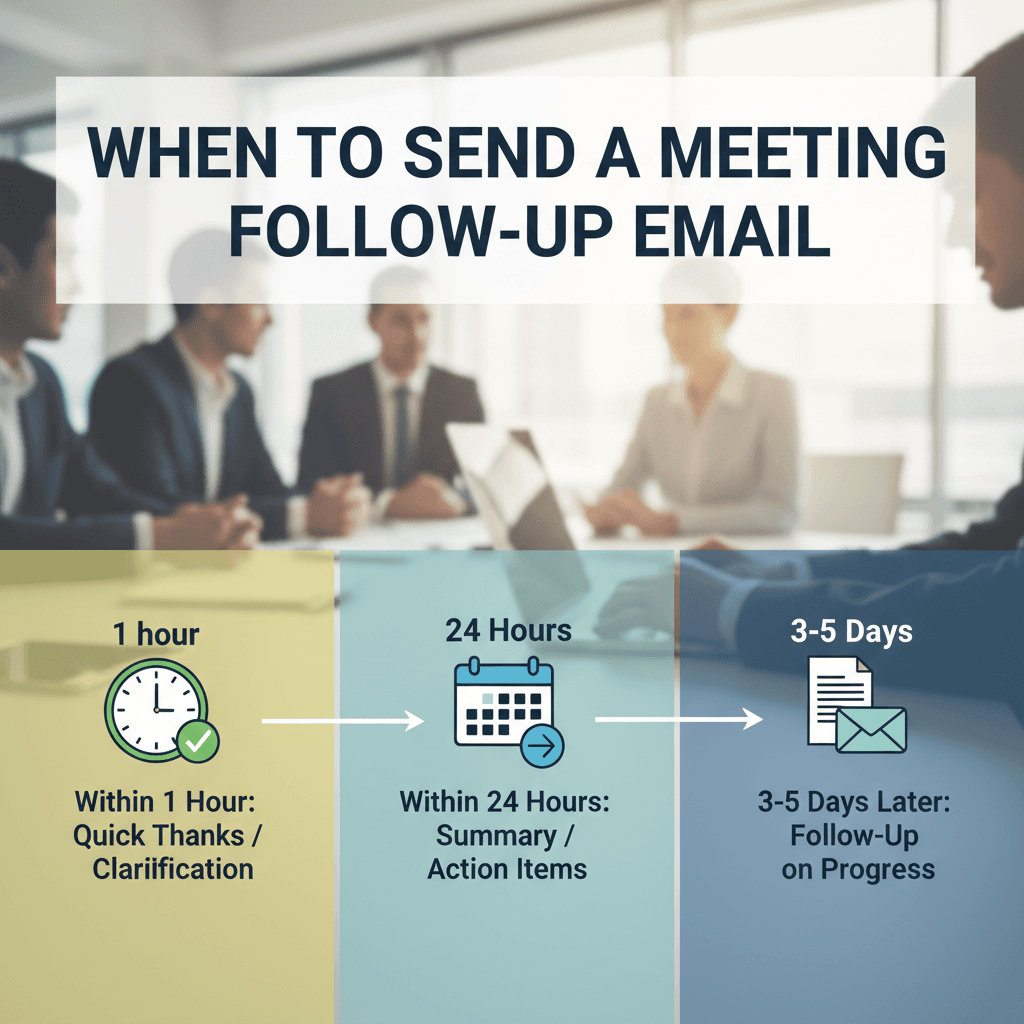
As a general rule, aim to send your follow-up within 24 hours of the meeting. This window keeps the conversation fresh for everyone involved and signals that you took the discussion seriously.
A few situations where timing changes slightly:
For a quick internal sync, same-day follow-ups work well and are often expected.
For a longer strategic meeting or external client call, within a few hours is ideal, giving you just enough time to organize your notes and apply email productivity best practices.
If the meeting ran long or ended late in the day, first thing the next morning is perfectly acceptable.
Integral Components of an Effective Meeting Follow-Up Email
Every effective follow-up email shares the same skeleton, regardless of meeting type. Get these five components right and you'll rarely need a second email to clarify what happened.
Component | What to Include |
|---|---|
Thank you | A brief acknowledgment of attendees' time, particularly for external participants |
Meeting recap | A short summary of the main discussion points |
Key decisions | Any conclusions or agreements the group reached |
Action items | Who owns what, with specific deadlines attached |
Next steps | A scheduled follow-up date, or a clear path forward if one wasn't set |
Not every meeting will need all five in equal depth. A quick internal sync might skip the formal thank-you. A client call probably warrants all of them. The structure scales to fit the context.
How to Write a Meeting Recap That Adds Value
A good follow-up email does more than confirm what was discussed. It gives attendees something they can act on, reference later, and share with colleagues who weren't in the room. Executives write these follow-ups faster when they have the right tools.
Start with a one or two sentence summary of the meeting's purpose and outcome. Keep it brief enough that someone skimming can prepare themselves in seconds.
From there, your recap should cover three things:
Decisions made, so there's no ambiguity about what was agreed upon and who agreed to it.
Action items with clear ownership and deadlines, because vague next steps rarely get done.
Any open questions that still need resolution, along with who is responsible for following up on each one.
Close by confirming the next touchpoint, whether that's a scheduled meeting, a deadline to watch, or a simple reply deadline.
Clarifying Action Items and Ownership
Every meeting produces action items, but they only move forward when someone owns them.
Use your follow-up email to make ownership explicit:
List each action item as a standalone line with the responsible person's name attached. Vague group ownership leads to assumptions, and assumptions lead to things falling through the cracks. Document ownership immediately after each meeting to prevent tasks from slipping.
Include a due date next to each item. "Soon" and "end of week" mean different things to different people, so a specific date removes ambiguity.
If an item is blocked by another deliverable, note the dependency so the owner knows what needs to happen first.
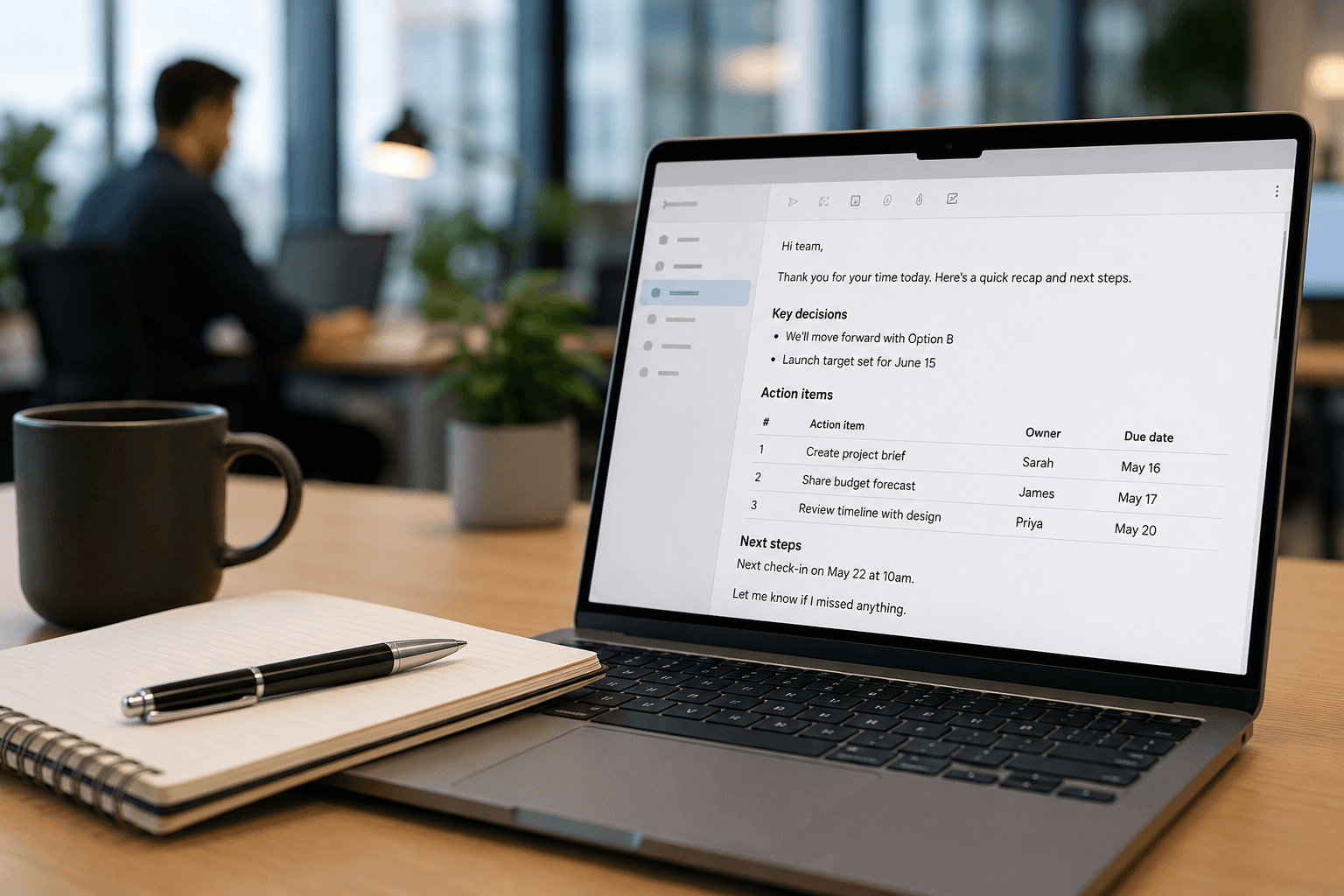
A simple format works well here: the action item, the owner, and the deadline in three adjacent columns or a short bulleted list.
Writing Follow-Up Emails for Different Meeting Types
Different meeting types call for different follow-up approaches. A one-on-one check-in has different stakes than a client pitch or an all-hands debrief, and your email should reflect that.
One-on-One Meetings
Keep it brief. Summarize any commitments made, confirm next steps, and leave room for the other person to add anything you missed.
Client or Sales Meetings
Recap the client's stated goals before listing your proposed next steps. This shows you were listening, beyond simply presenting. Customer success managers apply this technique to strengthen client relationships.
Team or Project Meetings
Focus on decisions made and who owns what. A clear owner-per-action table prevents confusion later. Sales reps use this structure to keep deals moving forward.
Interviews
Send within 24 hours. Restate your interest and reference one specific moment from the conversation to make it personal.
Subject Lines That Get Your Follow-Up Email Opened
The subject line is the first thing recipients see, and it shapes whether your follow-up gets read or ignored.
Keep subject lines short, specific, and tied to the meeting itself. Vague lines like "Following up" get skipped; specific ones get opened.
Subject Line Formulas That Work
"Next steps from [Meeting Topic] on [Date]" signals there's something actionable inside, which helps keep teams aligned across multiple priorities.
"Action items: [Meeting Topic]" works well when the recipient owns a deliverable.
"Quick question from our [Date] call" suits shorter, conversational follow-ups.
"Recap + next steps: [Project Name]" is effective for project-based meetings where multiple people are looped in.
Keep to under 50 characters so the full line appears on mobile without getting cut off. Email subject line character limits vary by device, with some mobile inboxes showing as few as 33 characters.
How to Keep Follow-Up Emails Concise and Scannable
Busy readers scan before they read. Keep your follow-up to three or four short paragraphs, and lead with the most time-sensitive item so recipients know within seconds whether they need to act.
A few habits that make a real difference:
Use a numbered list for action items instead of burying them in prose. Each item should name the owner, the task, and the due date on the same line so nothing gets missed. Managers who write faster emails rely on this formatting to save time.
Keep sentences short. If a sentence runs past two lines, split it.
Leave white space between paragraphs. Dense blocks of text slow readers down and invite skimming past the parts that matter.
Cut any throat-clearing. Phrases like "As per our discussion today" or "I just wanted to circle back" add length without adding meaning.
The goal is a follow-up someone can process in under a minute and forward to a colleague without editing.
Common Mistakes to Avoid in Meeting Follow-Up Emails
A few mistakes consistently undermine otherwise solid follow-ups.
Sending too late. Details blur quickly after a meeting, and a delayed email signals the conversation wasn't a priority.
Vague summaries. "We aligned on next steps" tells no one anything. Name the actual decision and who made it.
Information overload. Not every detail from the meeting belongs in the follow-up. Keep it to decisions, action items, and anything that needs a response. Learning to write client emails by voice helps you stay focused on what matters.
Skipping ownership. Listing tasks without names attached almost guarantees they slip. Every action item needs a clear owner and a deadline.
Wrong tone for the relationship. A casual internal check-in and a formal client summary warrant very different registers.
Using Voice Dictation to Write Meeting Follow-Ups Faster with Willow

Typing out meeting follow-ups takes longer than most people expect. You finish a one-hour call, then spend another 20 minutes reconstructing what was said and formatting it into something readable.
Willow Voice cuts that gap. Speak your follow-up out loud right after the meeting while everything is still fresh, and Willow transcribes at around 150 WPM with roughly 200ms latency, so your thoughts land on screen almost as fast as you say them. Comparing AI voice tools for email productivity shows how Willow's speed advantage adds up over time. Over time, Willow learns your phrasing and vocabulary, which means less correcting and less re-reading before you hit send.
It works across your email client, notes app, or wherever you write, with no copy-paste step in between.
FAQs
How to write meeting follow-up emails faster without spending 20 minutes typing?
Use voice dictation immediately after the meeting while details are fresh. Willow Voice transcribes at around 150 WPM with roughly 200ms latency, so you can speak your entire follow-up naturally and have clean text appear almost instantly across your email client or notes app.
When should you send a meeting follow-up email?
Send within 24 hours of the meeting to keep details fresh and signal professionalism. For quick internal syncs, same-day is often expected. For strategic or client meetings, within a few hours is ideal. If the meeting ended late, first thing the next morning is perfectly acceptable.
Can you use the same follow-up email template for client meetings and internal syncs?
No. Client meetings warrant a full structure with a thank you, recap of their stated goals, and formal next steps. Internal one-on-ones need only commitments and next steps. The five-component structure scales to fit relationship and context, but the tone and depth should shift accordingly.
Final Thoughts on How to Write Meeting Follow-Up Emails That Actually Work
Knowing how to write meeting follow-up emails well is one of the simplest habits that separates professionals who move things forward from those who keep revisiting the same conversations. Get the timing right, name an owner on every action item, keep the structure tight, and your follow-ups stop feeling like administrative chores and start functioning as accountability tools. The sooner you write one after a meeting, the better. Details are sharpest in the first hour, and tools like Willow Voice let you speak the whole follow-up out loud right after the call, turning fresh thoughts into a clean, ready-to-send email in under a minute. A well-crafted email sent quickly signals to everyone in the room that the conversation mattered and the outcomes will be tracked.
Your last meeting probably felt productive in the moment. But without a follow-up email, action items slip, deadlines go unspoken, and the next call starts with everyone asking what was decided. Almost half of meetings end without a clear next step, which is why the same topics keep circling back. When you know how to write meeting follow-up emails, you create a written record that assigns ownership, sets deadlines, and gives your team a single reference point. It takes five minutes and prevents hours of clarification later.
TLDR:
48% of meetings end without clear next steps; follow-ups turn verbal agreements into written records.
Send your follow-up within 24 hours and include five components: thank you, recap, decisions, action items, next steps.
Every action item needs a named owner and a specific deadline to prevent tasks from slipping.
Subject lines under 50 characters get opened; use formulas like "Action items: [Meeting Topic]."
Some tools can transcribe at 150 WPM with ~200ms latency, letting you speak follow-ups while details are fresh.
Why Meeting Follow-Up Emails Matter
Research shows that 48% of meetings end without a clear next step. Follow-up emails fix that gap. They turn verbal agreements into written records, assign ownership to action items, and give everyone a reference point if priorities shift later.
For professionals managing multiple projects, that written record matters more than it might seem. Memory fades, interpretations diverge, and without something in writing, the same conversation often needs to happen twice.
Follow-up emails also signal professionalism. Sending one within 24 hours shows you were paying attention and that you take commitments seriously.
Effective meeting agendas not being set up upfront results in in no next steps after the meeting. Follow-up emails close that gap by turning verbal agreements into written records, assigning ownership to action items, and giving everyone a reference point when priorities shift.
For professionals juggling multiple projects, that written record matters. Meeting recall research shows memory fades quickly after a meeting ends, interpretations diverge, and without something documented, the same conversation often needs to happen twice.
Follow-up emails also signal professionalism. Sending one within 24 hours shows you were engaged and take commitments seriously, which builds trust with colleagues, clients, and stakeholders alike.
When to Send a Meeting Follow-Up Email
Timing matters more than most people realize. Send a follow-up too late and the details fade, action items slip, and momentum stalls. Send one too quickly and it can feel reactive instead of considered.
As a general rule, aim to send your follow-up within 24 hours of the meeting. This window keeps the conversation fresh for everyone involved and signals that you took the discussion seriously.
A few situations where timing changes slightly:
For a quick internal sync, same-day follow-ups work well and are often expected.
For a longer strategic meeting or external client call, within a few hours is ideal, giving you just enough time to organize your notes and apply email productivity best practices.
If the meeting ran long or ended late in the day, first thing the next morning is perfectly acceptable.
Integral Components of an Effective Meeting Follow-Up Email
Every effective follow-up email shares the same skeleton, regardless of meeting type. Get these five components right and you'll rarely need a second email to clarify what happened.
Component | What to Include |
|---|---|
Thank you | A brief acknowledgment of attendees' time, particularly for external participants |
Meeting recap | A short summary of the main discussion points |
Key decisions | Any conclusions or agreements the group reached |
Action items | Who owns what, with specific deadlines attached |
Next steps | A scheduled follow-up date, or a clear path forward if one wasn't set |
Not every meeting will need all five in equal depth. A quick internal sync might skip the formal thank-you. A client call probably warrants all of them. The structure scales to fit the context.
How to Write a Meeting Recap That Adds Value
A good follow-up email does more than confirm what was discussed. It gives attendees something they can act on, reference later, and share with colleagues who weren't in the room. Executives write these follow-ups faster when they have the right tools.
Start with a one or two sentence summary of the meeting's purpose and outcome. Keep it brief enough that someone skimming can prepare themselves in seconds.
From there, your recap should cover three things:
Decisions made, so there's no ambiguity about what was agreed upon and who agreed to it.
Action items with clear ownership and deadlines, because vague next steps rarely get done.
Any open questions that still need resolution, along with who is responsible for following up on each one.
Close by confirming the next touchpoint, whether that's a scheduled meeting, a deadline to watch, or a simple reply deadline.
Clarifying Action Items and Ownership
Every meeting produces action items, but they only move forward when someone owns them.
Use your follow-up email to make ownership explicit:
List each action item as a standalone line with the responsible person's name attached. Vague group ownership leads to assumptions, and assumptions lead to things falling through the cracks. Document ownership immediately after each meeting to prevent tasks from slipping.
Include a due date next to each item. "Soon" and "end of week" mean different things to different people, so a specific date removes ambiguity.
If an item is blocked by another deliverable, note the dependency so the owner knows what needs to happen first.
A simple format works well here: the action item, the owner, and the deadline in three adjacent columns or a short bulleted list.
Writing Follow-Up Emails for Different Meeting Types
Different meeting types call for different follow-up approaches. A one-on-one check-in has different stakes than a client pitch or an all-hands debrief, and your email should reflect that.
One-on-One Meetings
Keep it brief. Summarize any commitments made, confirm next steps, and leave room for the other person to add anything you missed.
Client or Sales Meetings
Recap the client's stated goals before listing your proposed next steps. This shows you were listening, beyond simply presenting. Customer success managers apply this technique to strengthen client relationships.
Team or Project Meetings
Focus on decisions made and who owns what. A clear owner-per-action table prevents confusion later. Sales reps use this structure to keep deals moving forward.
Interviews
Send within 24 hours. Restate your interest and reference one specific moment from the conversation to make it personal.
Subject Lines That Get Your Follow-Up Email Opened
The subject line is the first thing recipients see, and it shapes whether your follow-up gets read or ignored.
Keep subject lines short, specific, and tied to the meeting itself. Vague lines like "Following up" get skipped; specific ones get opened.
Subject Line Formulas That Work
"Next steps from [Meeting Topic] on [Date]" signals there's something actionable inside, which helps keep teams aligned across multiple priorities.
"Action items: [Meeting Topic]" works well when the recipient owns a deliverable.
"Quick question from our [Date] call" suits shorter, conversational follow-ups.
"Recap + next steps: [Project Name]" is effective for project-based meetings where multiple people are looped in.
Keep to under 50 characters so the full line appears on mobile without getting cut off. Email subject line character limits vary by device, with some mobile inboxes showing as few as 33 characters.
How to Keep Follow-Up Emails Concise and Scannable
Busy readers scan before they read. Keep your follow-up to three or four short paragraphs, and lead with the most time-sensitive item so recipients know within seconds whether they need to act.
A few habits that make a real difference:
Use a numbered list for action items instead of burying them in prose. Each item should name the owner, the task, and the due date on the same line so nothing gets missed. Managers who write faster emails rely on this formatting to save time.
Keep sentences short. If a sentence runs past two lines, split it.
Leave white space between paragraphs. Dense blocks of text slow readers down and invite skimming past the parts that matter.
Cut any throat-clearing. Phrases like "As per our discussion today" or "I just wanted to circle back" add length without adding meaning.
The goal is a follow-up someone can process in under a minute and forward to a colleague without editing.
Common Mistakes to Avoid in Meeting Follow-Up Emails
A few mistakes consistently undermine otherwise solid follow-ups.
Sending too late. Details blur quickly after a meeting, and a delayed email signals the conversation wasn't a priority.
Vague summaries. "We aligned on next steps" tells no one anything. Name the actual decision and who made it.
Information overload. Not every detail from the meeting belongs in the follow-up. Keep it to decisions, action items, and anything that needs a response. Learning to write client emails by voice helps you stay focused on what matters.
Skipping ownership. Listing tasks without names attached almost guarantees they slip. Every action item needs a clear owner and a deadline.
Wrong tone for the relationship. A casual internal check-in and a formal client summary warrant very different registers.
Using Voice Dictation to Write Meeting Follow-Ups Faster with Willow
Typing out meeting follow-ups takes longer than most people expect. You finish a one-hour call, then spend another 20 minutes reconstructing what was said and formatting it into something readable.
Willow Voice cuts that gap. Speak your follow-up out loud right after the meeting while everything is still fresh, and Willow transcribes at around 150 WPM with roughly 200ms latency, so your thoughts land on screen almost as fast as you say them. Comparing AI voice tools for email productivity shows how Willow's speed advantage adds up over time. Over time, Willow learns your phrasing and vocabulary, which means less correcting and less re-reading before you hit send.
It works across your email client, notes app, or wherever you write, with no copy-paste step in between.
FAQs
How to write meeting follow-up emails faster without spending 20 minutes typing?
Use voice dictation immediately after the meeting while details are fresh. Willow Voice transcribes at around 150 WPM with roughly 200ms latency, so you can speak your entire follow-up naturally and have clean text appear almost instantly across your email client or notes app.
When should you send a meeting follow-up email?
Send within 24 hours of the meeting to keep details fresh and signal professionalism. For quick internal syncs, same-day is often expected. For strategic or client meetings, within a few hours is ideal. If the meeting ended late, first thing the next morning is perfectly acceptable.
Can you use the same follow-up email template for client meetings and internal syncs?
No. Client meetings warrant a full structure with a thank you, recap of their stated goals, and formal next steps. Internal one-on-ones need only commitments and next steps. The five-component structure scales to fit relationship and context, but the tone and depth should shift accordingly.
Final Thoughts on How to Write Meeting Follow-Up Emails That Actually Work
Knowing how to write meeting follow-up emails well is one of the simplest habits that separates professionals who move things forward from those who keep revisiting the same conversations. Get the timing right, name an owner on every action item, keep the structure tight, and your follow-ups stop feeling like administrative chores and start functioning as accountability tools. The sooner you write one after a meeting, the better. Details are sharpest in the first hour, and tools like Willow Voice let you speak the whole follow-up out loud right after the call, turning fresh thoughts into a clean, ready-to-send email in under a minute. A well-crafted email sent quickly signals to everyone in the room that the conversation mattered and the outcomes will be tracked.

Try Willow for free
Instant, accurate voice dictation. No card required.
Try Willow for free
Instant, accurate voice dictation. No card required.
Other stories you’ll love
Other stories you’ll love


Your keyboard is optional now
" transform="translate(5 5)" width="9.791000051498413px"/></svg>)

The voice-first interface for modern work.
© Willow Care, Inc. 2026. All rights reserved
Your keyboard is optional now
The voice-first interface for modern work.
© Willow Care, Inc. 2026. All rights reserved
Your keyboard is optional now
The voice-first interface for modern work.
© Willow Care, Inc. 2026. All rights reserved