" transform="translate(5 2)" width="10px"/></svg>)

•
5 min read
Write Faster SOAP Notes: 10 Strategies (June 2026)

•
5 min read
Write Faster SOAP Notes: 10 Strategies (June 2026)
Clinicians often fall behind on charting because every SOAP note starts the same way: a blank screen and a full visit to reconstruct from memory. With 16 minutes spent documenting each encounter, plus additional time after clinic, the backlog builds quickly. Learning how to write faster SOAP notes begins with recognizing how much of your documentation repeats across patients and building a workflow around those patterns. Templates for common visit types, smart phrases for routine exam findings, and real-time note capture during visits reduce the amount you need to type from scratch. Modern voice-based documentation tools can also convert spoken clinical reasoning into structured notes inside your EHR while you work.
TLDR:
Physicians spend 16 minutes per patient on documentation, plus 1-2 hours daily after hours.
Voice dictation lets you document at 150 WPM, compared to 40 WPM with typing, cutting note-taking time by up to 60%.
Custom templates, smart phrases, and real-time capture reduce repetitive typing in SOAP notes.
Documenting key details during the visit prevents time-consuming note reconstruction later.
Some newer solutions, like Willow Voice, run natively on Windows and Mac desktops and include a custom voice keyboard on iOS, covering the mixed-device environments most healthcare organizations already run.
Why Writing Faster SOAP Notes Matters for Healthcare Providers
SOAP notes keep you compliant and your patients safe. But the time they consume comes at a real cost.
More than 77% of healthcare workers report finishing work later than desired or working after hours because of excessive documentation. The numbers get worse when you zoom in: physicians spend an average of 16 minutes per patient encounter on documentation, plus another 1 to 2 hours daily outside scheduled hours finishing charts.
That's time you could spend with patients, your family, or just catching your breath between appointments. Instead, you're stuck clicking through EHR screens or typing the same phrases repeatedly. The ripple effects extend beyond your schedule. When documentation drags, burnout climbs. Patient interactions become rushed. Every extra minute per note multiplies across dozens of daily encounters, translating to thousands of unbillable hours annually.
Faster SOAP notes aren't about cutting corners. They're about reclaiming time for what actually matters in healthcare.
Build Custom SOAP Note Templates for Common Patient Scenarios
Most clinics see the same conditions repeatedly. Upper respiratory infections, diabetes check-ins, hypertension follow-ups, and annual physicals. Typing these from scratch each time wastes energy on documentation that could be pre-structured.
Custom templates give you a starting point for your most common visit types. Build templates that are smart, not bloated. A good template includes the key elements for a specific scenario but leaves room for patient-specific details. A bad template is a wall of pre-filled text that you spend more time deleting than using.
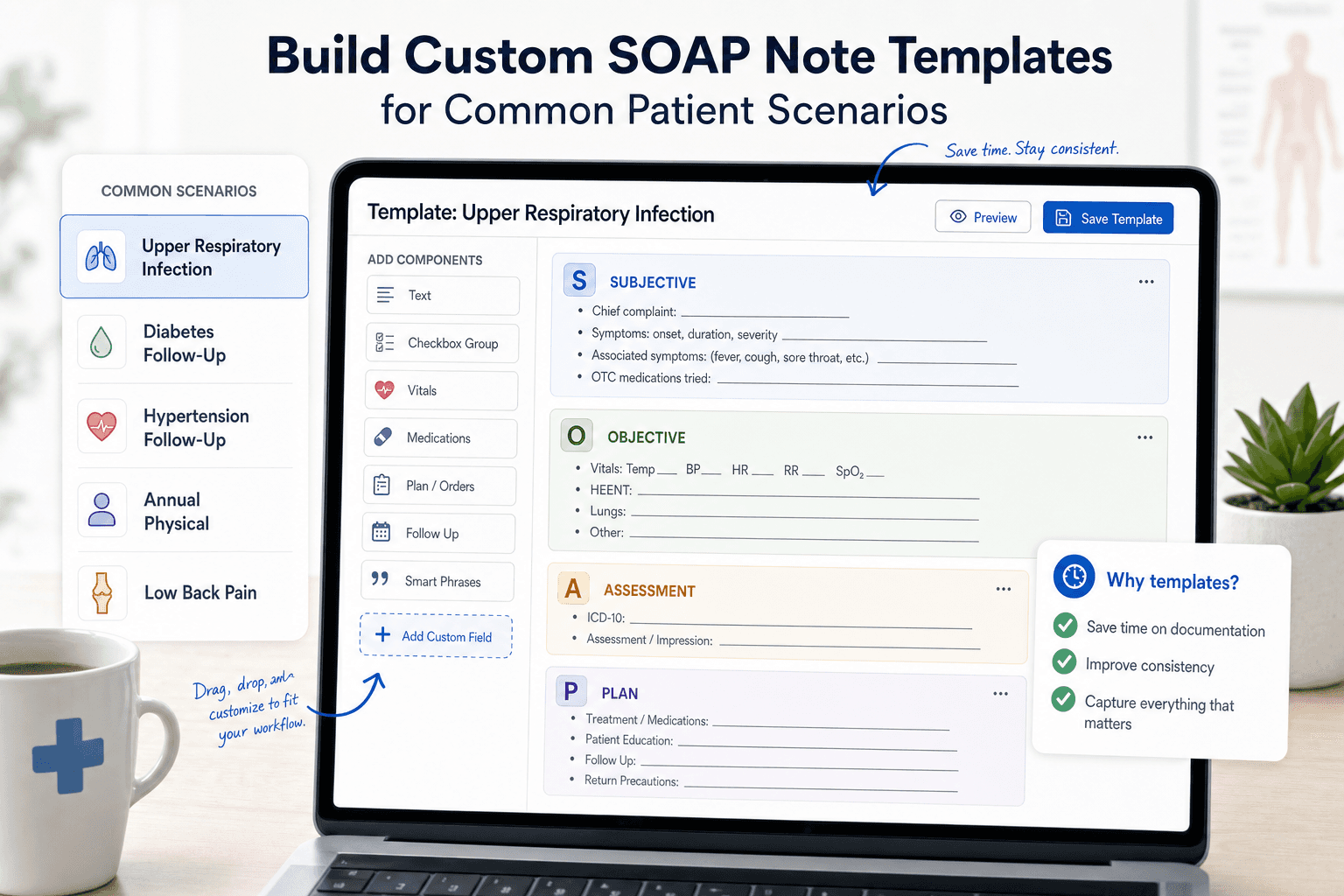
Start with your top five visit types. For each one, map out what consistently appears in the Subjective, Objective, Assessment, and Plan sections.
Pull three to five recent notes from each visit type you want to template.
Identify phrases, exam findings, and plan elements that appear in 80% or more of those notes.
Build a draft template using those repeating elements, grouped by SOAP section.
Leave bracketed placeholders for patient-specific data: [duration], [pain scale 0-10], [current medications].
Add short-text triggers for common branching paths, such as a separate block for smokers vs non-smokers in a respiratory visit.
Test the template on your next five visits of that type and note where you delete, add, or rewrite the same content each time.
Pre-populate fields where the answer is almost always the same, such as "Cardiovascular: Regular rate and rhythm, no murmurs, rubs, or gallops." Leave fields blank where patient variation is high, like chief complaint duration, pain scale readings, or medication dosages. A template that requires more deletions than additions slows you down instead of helping.
After building each template, run it through five actual visits before treating it as final. If you delete the same field every time, remove it. If you keep typing the same addition, build it in. Good templates shrink over time as you identify what belongs and what does not.
Use Smart Phrases and Macros to Eliminate Repetitive Typing
Smart phrases work like keyboard shortcuts for entire sentences or paragraphs. Type a short trigger (like ".normal" or ".chest"), and your EHR expands it into complete text. Instead of typing "Heart: Regular rate and rhythm, no murmurs, rubs, or gallops" twenty times a day, you type ".heart" and move on.
Create 20 to 30 phrases for your most repeated documentation tasks. Focus on normal exam findings first since these appear in nearly every note. Then build phrases for common treatment plans, medication instructions, and follow-up recommendations. Name your phrases intuitively with prefixes that match your workflow: ".normal" for standard findings, ".plan" for treatment protocols, ".pt" for patient education.
Build flexibility into each phrase by leaving brackets or placeholder text for patient-specific details you'll fill in quickly. A phrase reading "Blood pressure [value], pulse [value]" takes seconds to complete, compared with typing the entire sentence.
Smart Phrase Example in Action
Here is what smart phrases look like compared to typing from scratch:
Without a smart phrase (typed): "Cardiovascular: Regular rate and rhythm, no murmurs, rubs, or gallops. Peripheral pulses intact bilaterally. No peripheral edema."
With .cardio trigger: Type ".cardio" and your EHR expands the full sentence instantly. If today's exam differs, change only the exception: "trace bilateral edema" instead of retyping the entire finding. Over 20 patients a day, that single phrase saves roughly 10 minutes. Multiply that across your full phrase library, and the time adds up fast.
Document during the Visit with Strategic Real-Time Capture
Waiting until after the visit to document means reconstructing details from memory. You forget specifics, second-guess yourself, and spend twice as long writing what could have been captured in the moment.
Real-time capture doesn't mean typing while ignoring your patient. Capture keywords and critical data points during natural pauses in the conversation. When a patient describes their symptoms, jot down "sharp chest pain 3 days" or "onset Tuesday evening." During the physical exam, type "crackles bilateral bases" or "swelling +2 ankles."
These fragments take seconds to record but provide anchors for immediate expansion after the patient leaves. You'll spend 2 minutes finishing the note instead of 10 minutes trying to remember whether the pain started on Tuesday or Wednesday.
Sample 15-Minute Visit Documentation Flow
Here is what real-time capture looks like in practice during a typical follow-up visit:
0:00-2:00 - Pre-visit review (60 seconds before the patient enters): Pull up the last note. Confirm medications, last labs, and open issues. Context is loaded before you speak a word.
2:00-8:00 - Subjective capture: While the patient describes their complaint, type 3-5 keyword fragments: "chest tightness, onset Monday, worse with exertion, no radiation." Let them talk; you anchor.
8:00-12:00 - Objective findings: Call out exam findings as you go. "BP 138/88, HR 74, lungs clear, trace ankle edema." Type or speak directly into the objective field.
12:00-14:00 - Assessment and plan (after patient leaves): Speak your clinical reasoning while the encounter is still fresh. Two minutes of dictation covers what would take ten minutes to reconstruct from memory.
14:00-15:00 - Review and sign: Scan the note for accuracy, confirm the plan matches what you discussed, and close the chart.
Duplicate and Modify Previous Notes for Consistent Cases
For return visits where clinical status hasn't changed, reducing charting time is a practical tactic, and when combined with templates and real-time capture, overall documentation time can drop by 50-70%. But this only works when you revise the content, not when pasting it. Change dates, update vitals, adjust exam findings, and modify the plan based on today's visit. If only a few details need updating, make sure the reused note still accurately reflects the current visit, exam, assessment, and plan. This works well for stable chronic disease management but should never be used for new complaints, acute changes, or any visit where status has shifted since the last encounter.
Batch Your Documentation Tasks to Save Time
Block out 5 to 10 minutes between patient clusters instead of waiting until the day's end. See three patients, complete three notes. Details stay sharp because you're documenting 20 minutes ago, not 6 hours later. Batching similar tasks reduces the mental cost of switching between activities. Grouping several notes together creates a flow state where you're not constantly shifting gears. Reserve the final 15 minutes of each half-day session to catch up on any remaining charts, so you leave with a clean slate.
Master Voice Dictation to Accelerate Note Writing
Documentation Method | Speed (Words Per Minute) | Time Per Note (Avg) | Potential Time Savings | Best For |
|---|---|---|---|---|
Manual Typing | 40 WPM | 16 minutes | Baseline | Clinicians new to structured EHR documentation |
Smart Phrases + Templates | 60-80 WPM (effective) | 10-12 minutes | 25-40% | Routine visit types: annual physicals, follow-ups |
Templates + Real-Time Capture | ~80 WPM (effective) | 9-11 minutes | 30-45% | Clinicians who limit screen time during visits |
Basic Voice Dictation | 100-120 WPM | 8-10 minutes | 40-50% | Narrative-heavy sections: HPI, assessment reasoning |
Voice Dictation + Templates | ~140 WPM (effective) | 7-9 minutes | 45-55% | Practices with varied visit types and heavy narrative sections |
AI-Powered Dictation (Willow Voice) | 150 WPM | 6-8 minutes | 50-60% | High-volume practices that need speed and medical accuracy |
AI Dictation + Batch Documentation | 150+ WPM (effective) | 4-6 minutes | 60-75% | High-volume practices with chronic disease management |
Combined Approach (Templates + AI Dictation + Real-Time Capture) | 150+ WPM (effective) | 5-6 minutes | 60-70% | Busy practices that want maximum daily time savings |
Speaking is faster than typing. You can speak at 150 words per minute, while most people type around 40 words per minute. That difference compounds across every note you write. Apple's built-in voice dictation, Windows 11 voice typing (Win + H), Wispr Flow, and similar tools get you started, but accuracy tends to drop with medical terminology, accents, or background noise. Correcting transcription errors on each note can offset a meaningful portion of the speed gains.
AI-powered dictation tools like Willow Voice solve this by learning your writing style over time. The tool remembers corrections to patient names and medications, and delivers text in under 200ms, so you stay in flow state instead of waiting for words to appear.
Training Your Dictation Tool for Medical Accuracy
The fastest path to a well-trained tool is consistent correction. When your dictation tool misreads "metoprolol" or a patient name, correct it immediately instead of leaving it for later. Each correction teaches the tool to recognize that term in your voice going forward. Build your custom dictionary with the drug names, diagnoses, and clinical phrases you use most, and add specialty-specific terms like "HEENT" or "bilateral crackles" from day one. On a shared practice account, shared dictionary entries keep medication names and clinical jargon consistent across your whole team so every provider works from the same trained baseline. Within two to three weeks of active use, recognition accuracy for your specific vocabulary should improve noticeably.
Dictation works best for narrative sections like History of Present Illness or Assessment reasoning, where you're describing instead of filling structured fields. Capture patient quotes during visits, then speak your clinical reasoning immediately after, while details remain fresh.
Optimize Your SOAP Note Workflow with the Right Tools
Your workspace setup impacts every note you write. A second monitor lets you view lab results or previous visits on one screen while documenting on the other, cutting time spent switching between windows.
Learn your EHR's keyboard shortcuts. Tab navigation, quick order entry, and hotkeys for common actions save 3 to 5 seconds per use, adding up to 30 minutes weekly across hundreds of clicks.
Most healthcare IT environments run on Windows desktops. On Windows 11, pressing Win + H opens built-in voice typing across any text field, including your EHR interface, at no cost, making it a practical starting point for testing voice input in your clinical workflow. For practices ready to move beyond the built-in option, a tool like Willow Voice runs natively on Windows and carries the same setup, custom vocabulary, and trained terminology over to Mac laptops and iOS devices, so providers moving between a Windows workstation and a mobile device for bedside charting work from one consistent configuration.
Review charts 60 seconds before each visit. Walking in with the patient's last visit date, current medications, and outstanding orders lets you document faster because the context is already loaded.
Set a same-day completion goal. Notes finished within 24 hours are more accurate and require less mental reconstruction.
Common SOAP Note Mistakes That Slow You Down
Speed improvements only stick when you stop repeating the habits that create the backlog in the first place. Here are the most common mistakes clinicians make and their fixes.
Waiting until the end of the day to chart. Memory fades fast after a full clinic. Fix: batch notes in 5- to 10-minute windows between patient clusters while details are still sharp.
Over-documenting routine negatives. Writing out every normal finding word-for-word burns time on content that adds no clinical value. Fix: build smart phrases for your standard normal exam findings and trigger them with two keystrokes.
Copy-forwarding previous notes without updating them. Pasting the prior visit without revising exam findings and the plan creates inaccurate records. Fix: update every field that changed (vitals, medications, assessment) before signing.
Using vague language in the assessment. Phrases like "patient doing okay" give the next provider nothing to act on. Fix: state the diagnosis, the basis for the decision, and the next clinical step in plain language.
Leaving the plan section generic. "Follow up in two weeks" without specifying what to monitor creates gaps in continuity of care. Fix: name the target ("return if chest tightness worsens or BP exceeds 150/90") so the next encounter has a clear starting point.
Know When to Stop Documenting
"If it wasn't documented, it wasn't done" pushes many clinicians to over-document. But legally defensible documentation differs from transcribing every word spoken during the visit.
Bloated notes create two problems. First, they take longer to write. Second, they take longer for other providers to read when coordinating care. A three-paragraph assessment with every possible differential buried in prose makes the next clinician hunt for what actually matters.
Document clinical reasoning and treatment rationale. Skip the play-by-play of routine elements unless they're relevant to today's decision-making. Your note should answer: What's wrong? What did you do about it? What happens next?
Stop when you've covered what's needed for safe care continuity and compliance. Everything beyond that point is time you're giving away.
Accelerate SOAP Notes with AI-Powered Voice Dictation
For healthcare organizations and private-practice clinics, Willow Voice is built to meet the compliance requirements of clinical documentation demands. Willow is SOC 2 Type II certified, HIPAA compliant, and built on a zero-data-retention architecture: your voice audio is never stored after transcription completes. Signed Business Associate Agreements (BAAs) are available for healthcare organizations, covering patient notes, charting, and clinical documentation workflows.
Willow is not directly integrated with EHR systems like Epic or Cerner, and that is a deliberate design choice. It works as a dictation layer across any app on Windows desktops, Mac laptops, and iOS devices, so you can speak directly into Epic, Cerner, Athenahealth, or any other text field without being locked into a single EHR vendor. One tool covers your entire clinical workflow, regardless of which system your clinic runs or which device your staff uses.
Willow runs natively on Windows and Mac desktops, covering the Windows-based IT environments most healthcare organizations use, and includes a custom voice keyboard on iOS for bedside documentation and mobile charting workflows. At ~200ms latency, text appears faster than built-in and legacy dictation tools running at 700ms or higher, keeping you in flow instead of waiting for words to catch up. Accuracy runs at 98%+, with 3x fewer errors than built-in dictation tools, so medical terms like "metoprolol," "HEENT," and "bilateral crackles" transcribe correctly without manual fixes. The tool learns your writing style over time: correct "metoprolol" or "Dr. Chen" once, and Willow carries that correction into every future note. SOC 2 Type II certification, HIPAA compliance, a zero-data-retention architecture, and a signed BAA are available for healthcare organizations to protect patient data, while shared dictionary terms keep your team aligned on medication names and clinical phrases across every device.
Willow Voice offers a forever-free plan that recharges 2,000 words each week with no credit card required, so you can test it against your actual clinical workflow before committing. Individual plans are $12 per month, billed annually. Team plans are $10 per user per month and include shared custom dictionaries, admin controls, and team leaderboards for practices and clinics rolling out across multiple providers. Enterprise pricing is custom and covers centralized deployment, compliance documentation, and a signed BAA for healthcare organizations. Get started at willowvoice.com/download.
FAQ
Can voice dictation actually save me time on SOAP notes, or does the correction overhead cancel out the speed gains?
Voice dictation at 150 WPM versus 40 WPM typing creates real-time savings when accuracy exceeds 95%, and domain vocabulary is preloaded, shrinking the correction loop to the point where the net gain over typing becomes measurable. When medical terminology like "metoprolol" or "discharge summary" transcribes correctly without manual fixes, you spend less time editing than you would have spent typing the note from scratch.
What's the fastest way to cut documentation time without sacrificing note quality?
Combine real-time capture during visits with custom templates for your top five visit types and voice dictation that handles medical terminology without corrections. Document in 5-10 minute batches between patient clusters while details stay sharp, and use smart phrases for normal exam findings that appear in nearly every note. This approach can reduce per-note time from 16 minutes to 6-8 minutes.
How do I know if a voice dictation tool will actually work with medical terminology?
Test it with your most common drug names, diagnoses, and clinical phrases before committing. A tool built for healthcare should recognize terms like "Metformin," "SOAP note," and "discharge summary" correctly on the first pass without manual dictionary entry, and it should learn patient names and clinic-specific terminology after you correct them once.
Voice dictation tools for clinical documentation: what should I look for beyond speed?
Look for SOC 2 Type II and HIPAA compliance with a signed Business Associate Agreement available for healthcare organizations, zero data retention architecture so voice audio is never stored after transcription completes, medical vocabulary optimization that handles drug names and clinical jargon without corrections, and cross-device support across Windows, Mac, and iOS so you can speak at a Windows workstation, a Mac, or on a mobile device for bedside documentation.
Final Thoughts on How to Write SOAP Notes Faster
Writing SOAP notes faster comes down to removing the friction that turns every chart into a time-consuming task. When clinicians rely on templates, smart phrases, real-time capture during visits, and voice dictation that records clinical reasoning at speaking speed, documentation becomes part of the workflow instead of an after-hours burden. That approach sits at the core of how to write faster SOAP notes: reduce repetitive typing, capture details while the encounter is fresh, and let tools support the structure of your documentation. Solutions like Willow help make this possible by converting spoken clinical reasoning into accurate text that lands directly inside the EHR interfaces clinicians already use, helping providers finish charts faster while maintaining clear, accurate records for patient care.
Clinicians often fall behind on charting because every SOAP note starts the same way: a blank screen and a full visit to reconstruct from memory. With 16 minutes spent documenting each encounter, plus additional time after clinic, the backlog builds quickly. Learning how to write faster SOAP notes begins with recognizing how much of your documentation repeats across patients and building a workflow around those patterns. Templates for common visit types, smart phrases for routine exam findings, and real-time note capture during visits reduce the amount you need to type from scratch. Modern voice-based documentation tools can also convert spoken clinical reasoning into structured notes inside your EHR while you work.
TLDR:
Physicians spend 16 minutes per patient on documentation, plus 1-2 hours daily after hours.
Voice dictation lets you document at 150 WPM, compared to 40 WPM with typing, cutting note-taking time by up to 60%.
Custom templates, smart phrases, and real-time capture reduce repetitive typing in SOAP notes.
Documenting key details during the visit prevents time-consuming note reconstruction later.
Some newer solutions, like Willow Voice, run natively on Windows and Mac desktops and include a custom voice keyboard on iOS, covering the mixed-device environments most healthcare organizations already run.
Why Writing Faster SOAP Notes Matters for Healthcare Providers
SOAP notes keep you compliant and your patients safe. But the time they consume comes at a real cost.
More than 77% of healthcare workers report finishing work later than desired or working after hours because of excessive documentation. The numbers get worse when you zoom in: physicians spend an average of 16 minutes per patient encounter on documentation, plus another 1 to 2 hours daily outside scheduled hours finishing charts.
That's time you could spend with patients, your family, or just catching your breath between appointments. Instead, you're stuck clicking through EHR screens or typing the same phrases repeatedly. The ripple effects extend beyond your schedule. When documentation drags, burnout climbs. Patient interactions become rushed. Every extra minute per note multiplies across dozens of daily encounters, translating to thousands of unbillable hours annually.
Faster SOAP notes aren't about cutting corners. They're about reclaiming time for what actually matters in healthcare.
Build Custom SOAP Note Templates for Common Patient Scenarios
Most clinics see the same conditions repeatedly. Upper respiratory infections, diabetes check-ins, hypertension follow-ups, and annual physicals. Typing these from scratch each time wastes energy on documentation that could be pre-structured.
Custom templates give you a starting point for your most common visit types. Build templates that are smart, not bloated. A good template includes the key elements for a specific scenario but leaves room for patient-specific details. A bad template is a wall of pre-filled text that you spend more time deleting than using.
Start with your top five visit types. For each one, map out what consistently appears in the Subjective, Objective, Assessment, and Plan sections.
Pull three to five recent notes from each visit type you want to template.
Identify phrases, exam findings, and plan elements that appear in 80% or more of those notes.
Build a draft template using those repeating elements, grouped by SOAP section.
Leave bracketed placeholders for patient-specific data: [duration], [pain scale 0-10], [current medications].
Add short-text triggers for common branching paths, such as a separate block for smokers vs non-smokers in a respiratory visit.
Test the template on your next five visits of that type and note where you delete, add, or rewrite the same content each time.
Pre-populate fields where the answer is almost always the same, such as "Cardiovascular: Regular rate and rhythm, no murmurs, rubs, or gallops." Leave fields blank where patient variation is high, like chief complaint duration, pain scale readings, or medication dosages. A template that requires more deletions than additions slows you down instead of helping.
After building each template, run it through five actual visits before treating it as final. If you delete the same field every time, remove it. If you keep typing the same addition, build it in. Good templates shrink over time as you identify what belongs and what does not.
Use Smart Phrases and Macros to Eliminate Repetitive Typing
Smart phrases work like keyboard shortcuts for entire sentences or paragraphs. Type a short trigger (like ".normal" or ".chest"), and your EHR expands it into complete text. Instead of typing "Heart: Regular rate and rhythm, no murmurs, rubs, or gallops" twenty times a day, you type ".heart" and move on.
Create 20 to 30 phrases for your most repeated documentation tasks. Focus on normal exam findings first since these appear in nearly every note. Then build phrases for common treatment plans, medication instructions, and follow-up recommendations. Name your phrases intuitively with prefixes that match your workflow: ".normal" for standard findings, ".plan" for treatment protocols, ".pt" for patient education.
Build flexibility into each phrase by leaving brackets or placeholder text for patient-specific details you'll fill in quickly. A phrase reading "Blood pressure [value], pulse [value]" takes seconds to complete, compared with typing the entire sentence.
Smart Phrase Example in Action
Here is what smart phrases look like compared to typing from scratch:
Without a smart phrase (typed): "Cardiovascular: Regular rate and rhythm, no murmurs, rubs, or gallops. Peripheral pulses intact bilaterally. No peripheral edema."
With .cardio trigger: Type ".cardio" and your EHR expands the full sentence instantly. If today's exam differs, change only the exception: "trace bilateral edema" instead of retyping the entire finding. Over 20 patients a day, that single phrase saves roughly 10 minutes. Multiply that across your full phrase library, and the time adds up fast.
Document during the Visit with Strategic Real-Time Capture
Waiting until after the visit to document means reconstructing details from memory. You forget specifics, second-guess yourself, and spend twice as long writing what could have been captured in the moment.
Real-time capture doesn't mean typing while ignoring your patient. Capture keywords and critical data points during natural pauses in the conversation. When a patient describes their symptoms, jot down "sharp chest pain 3 days" or "onset Tuesday evening." During the physical exam, type "crackles bilateral bases" or "swelling +2 ankles."
These fragments take seconds to record but provide anchors for immediate expansion after the patient leaves. You'll spend 2 minutes finishing the note instead of 10 minutes trying to remember whether the pain started on Tuesday or Wednesday.
Sample 15-Minute Visit Documentation Flow
Here is what real-time capture looks like in practice during a typical follow-up visit:
0:00-2:00 - Pre-visit review (60 seconds before the patient enters): Pull up the last note. Confirm medications, last labs, and open issues. Context is loaded before you speak a word.
2:00-8:00 - Subjective capture: While the patient describes their complaint, type 3-5 keyword fragments: "chest tightness, onset Monday, worse with exertion, no radiation." Let them talk; you anchor.
8:00-12:00 - Objective findings: Call out exam findings as you go. "BP 138/88, HR 74, lungs clear, trace ankle edema." Type or speak directly into the objective field.
12:00-14:00 - Assessment and plan (after patient leaves): Speak your clinical reasoning while the encounter is still fresh. Two minutes of dictation covers what would take ten minutes to reconstruct from memory.
14:00-15:00 - Review and sign: Scan the note for accuracy, confirm the plan matches what you discussed, and close the chart.
Duplicate and Modify Previous Notes for Consistent Cases
For return visits where clinical status hasn't changed, reducing charting time is a practical tactic, and when combined with templates and real-time capture, overall documentation time can drop by 50-70%. But this only works when you revise the content, not when pasting it. Change dates, update vitals, adjust exam findings, and modify the plan based on today's visit. If only a few details need updating, make sure the reused note still accurately reflects the current visit, exam, assessment, and plan. This works well for stable chronic disease management but should never be used for new complaints, acute changes, or any visit where status has shifted since the last encounter.
Batch Your Documentation Tasks to Save Time
Block out 5 to 10 minutes between patient clusters instead of waiting until the day's end. See three patients, complete three notes. Details stay sharp because you're documenting 20 minutes ago, not 6 hours later. Batching similar tasks reduces the mental cost of switching between activities. Grouping several notes together creates a flow state where you're not constantly shifting gears. Reserve the final 15 minutes of each half-day session to catch up on any remaining charts, so you leave with a clean slate.
Master Voice Dictation to Accelerate Note Writing
Documentation Method | Speed (Words Per Minute) | Time Per Note (Avg) | Potential Time Savings | Best For |
|---|---|---|---|---|
Manual Typing | 40 WPM | 16 minutes | Baseline | Clinicians new to structured EHR documentation |
Smart Phrases + Templates | 60-80 WPM (effective) | 10-12 minutes | 25-40% | Routine visit types: annual physicals, follow-ups |
Templates + Real-Time Capture | ~80 WPM (effective) | 9-11 minutes | 30-45% | Clinicians who limit screen time during visits |
Basic Voice Dictation | 100-120 WPM | 8-10 minutes | 40-50% | Narrative-heavy sections: HPI, assessment reasoning |
Voice Dictation + Templates | ~140 WPM (effective) | 7-9 minutes | 45-55% | Practices with varied visit types and heavy narrative sections |
AI-Powered Dictation (Willow Voice) | 150 WPM | 6-8 minutes | 50-60% | High-volume practices that need speed and medical accuracy |
AI Dictation + Batch Documentation | 150+ WPM (effective) | 4-6 minutes | 60-75% | High-volume practices with chronic disease management |
Combined Approach (Templates + AI Dictation + Real-Time Capture) | 150+ WPM (effective) | 5-6 minutes | 60-70% | Busy practices that want maximum daily time savings |
Speaking is faster than typing. You can speak at 150 words per minute, while most people type around 40 words per minute. That difference compounds across every note you write. Apple's built-in voice dictation, Windows 11 voice typing (Win + H), Wispr Flow, and similar tools get you started, but accuracy tends to drop with medical terminology, accents, or background noise. Correcting transcription errors on each note can offset a meaningful portion of the speed gains.
AI-powered dictation tools like Willow Voice solve this by learning your writing style over time. The tool remembers corrections to patient names and medications, and delivers text in under 200ms, so you stay in flow state instead of waiting for words to appear.
Training Your Dictation Tool for Medical Accuracy
The fastest path to a well-trained tool is consistent correction. When your dictation tool misreads "metoprolol" or a patient name, correct it immediately instead of leaving it for later. Each correction teaches the tool to recognize that term in your voice going forward. Build your custom dictionary with the drug names, diagnoses, and clinical phrases you use most, and add specialty-specific terms like "HEENT" or "bilateral crackles" from day one. On a shared practice account, shared dictionary entries keep medication names and clinical jargon consistent across your whole team so every provider works from the same trained baseline. Within two to three weeks of active use, recognition accuracy for your specific vocabulary should improve noticeably.
Dictation works best for narrative sections like History of Present Illness or Assessment reasoning, where you're describing instead of filling structured fields. Capture patient quotes during visits, then speak your clinical reasoning immediately after, while details remain fresh.
Optimize Your SOAP Note Workflow with the Right Tools
Your workspace setup impacts every note you write. A second monitor lets you view lab results or previous visits on one screen while documenting on the other, cutting time spent switching between windows.
Learn your EHR's keyboard shortcuts. Tab navigation, quick order entry, and hotkeys for common actions save 3 to 5 seconds per use, adding up to 30 minutes weekly across hundreds of clicks.
Most healthcare IT environments run on Windows desktops. On Windows 11, pressing Win + H opens built-in voice typing across any text field, including your EHR interface, at no cost, making it a practical starting point for testing voice input in your clinical workflow. For practices ready to move beyond the built-in option, a tool like Willow Voice runs natively on Windows and carries the same setup, custom vocabulary, and trained terminology over to Mac laptops and iOS devices, so providers moving between a Windows workstation and a mobile device for bedside charting work from one consistent configuration.
Review charts 60 seconds before each visit. Walking in with the patient's last visit date, current medications, and outstanding orders lets you document faster because the context is already loaded.
Set a same-day completion goal. Notes finished within 24 hours are more accurate and require less mental reconstruction.
Common SOAP Note Mistakes That Slow You Down
Speed improvements only stick when you stop repeating the habits that create the backlog in the first place. Here are the most common mistakes clinicians make and their fixes.
Waiting until the end of the day to chart. Memory fades fast after a full clinic. Fix: batch notes in 5- to 10-minute windows between patient clusters while details are still sharp.
Over-documenting routine negatives. Writing out every normal finding word-for-word burns time on content that adds no clinical value. Fix: build smart phrases for your standard normal exam findings and trigger them with two keystrokes.
Copy-forwarding previous notes without updating them. Pasting the prior visit without revising exam findings and the plan creates inaccurate records. Fix: update every field that changed (vitals, medications, assessment) before signing.
Using vague language in the assessment. Phrases like "patient doing okay" give the next provider nothing to act on. Fix: state the diagnosis, the basis for the decision, and the next clinical step in plain language.
Leaving the plan section generic. "Follow up in two weeks" without specifying what to monitor creates gaps in continuity of care. Fix: name the target ("return if chest tightness worsens or BP exceeds 150/90") so the next encounter has a clear starting point.
Know When to Stop Documenting
"If it wasn't documented, it wasn't done" pushes many clinicians to over-document. But legally defensible documentation differs from transcribing every word spoken during the visit.
Bloated notes create two problems. First, they take longer to write. Second, they take longer for other providers to read when coordinating care. A three-paragraph assessment with every possible differential buried in prose makes the next clinician hunt for what actually matters.
Document clinical reasoning and treatment rationale. Skip the play-by-play of routine elements unless they're relevant to today's decision-making. Your note should answer: What's wrong? What did you do about it? What happens next?
Stop when you've covered what's needed for safe care continuity and compliance. Everything beyond that point is time you're giving away.
Accelerate SOAP Notes with AI-Powered Voice Dictation
For healthcare organizations and private-practice clinics, Willow Voice is built to meet the compliance requirements of clinical documentation demands. Willow is SOC 2 Type II certified, HIPAA compliant, and built on a zero-data-retention architecture: your voice audio is never stored after transcription completes. Signed Business Associate Agreements (BAAs) are available for healthcare organizations, covering patient notes, charting, and clinical documentation workflows.
Willow is not directly integrated with EHR systems like Epic or Cerner, and that is a deliberate design choice. It works as a dictation layer across any app on Windows desktops, Mac laptops, and iOS devices, so you can speak directly into Epic, Cerner, Athenahealth, or any other text field without being locked into a single EHR vendor. One tool covers your entire clinical workflow, regardless of which system your clinic runs or which device your staff uses.
Willow runs natively on Windows and Mac desktops, covering the Windows-based IT environments most healthcare organizations use, and includes a custom voice keyboard on iOS for bedside documentation and mobile charting workflows. At ~200ms latency, text appears faster than built-in and legacy dictation tools running at 700ms or higher, keeping you in flow instead of waiting for words to catch up. Accuracy runs at 98%+, with 3x fewer errors than built-in dictation tools, so medical terms like "metoprolol," "HEENT," and "bilateral crackles" transcribe correctly without manual fixes. The tool learns your writing style over time: correct "metoprolol" or "Dr. Chen" once, and Willow carries that correction into every future note. SOC 2 Type II certification, HIPAA compliance, a zero-data-retention architecture, and a signed BAA are available for healthcare organizations to protect patient data, while shared dictionary terms keep your team aligned on medication names and clinical phrases across every device.
Willow Voice offers a forever-free plan that recharges 2,000 words each week with no credit card required, so you can test it against your actual clinical workflow before committing. Individual plans are $12 per month, billed annually. Team plans are $10 per user per month and include shared custom dictionaries, admin controls, and team leaderboards for practices and clinics rolling out across multiple providers. Enterprise pricing is custom and covers centralized deployment, compliance documentation, and a signed BAA for healthcare organizations. Get started at willowvoice.com/download.
FAQ
Can voice dictation actually save me time on SOAP notes, or does the correction overhead cancel out the speed gains?
Voice dictation at 150 WPM versus 40 WPM typing creates real-time savings when accuracy exceeds 95%, and domain vocabulary is preloaded, shrinking the correction loop to the point where the net gain over typing becomes measurable. When medical terminology like "metoprolol" or "discharge summary" transcribes correctly without manual fixes, you spend less time editing than you would have spent typing the note from scratch.
What's the fastest way to cut documentation time without sacrificing note quality?
Combine real-time capture during visits with custom templates for your top five visit types and voice dictation that handles medical terminology without corrections. Document in 5-10 minute batches between patient clusters while details stay sharp, and use smart phrases for normal exam findings that appear in nearly every note. This approach can reduce per-note time from 16 minutes to 6-8 minutes.
How do I know if a voice dictation tool will actually work with medical terminology?
Test it with your most common drug names, diagnoses, and clinical phrases before committing. A tool built for healthcare should recognize terms like "Metformin," "SOAP note," and "discharge summary" correctly on the first pass without manual dictionary entry, and it should learn patient names and clinic-specific terminology after you correct them once.
Voice dictation tools for clinical documentation: what should I look for beyond speed?
Look for SOC 2 Type II and HIPAA compliance with a signed Business Associate Agreement available for healthcare organizations, zero data retention architecture so voice audio is never stored after transcription completes, medical vocabulary optimization that handles drug names and clinical jargon without corrections, and cross-device support across Windows, Mac, and iOS so you can speak at a Windows workstation, a Mac, or on a mobile device for bedside documentation.
Final Thoughts on How to Write SOAP Notes Faster
Writing SOAP notes faster comes down to removing the friction that turns every chart into a time-consuming task. When clinicians rely on templates, smart phrases, real-time capture during visits, and voice dictation that records clinical reasoning at speaking speed, documentation becomes part of the workflow instead of an after-hours burden. That approach sits at the core of how to write faster SOAP notes: reduce repetitive typing, capture details while the encounter is fresh, and let tools support the structure of your documentation. Solutions like Willow help make this possible by converting spoken clinical reasoning into accurate text that lands directly inside the EHR interfaces clinicians already use, helping providers finish charts faster while maintaining clear, accurate records for patient care.

Try Willow for free
Instant, accurate voice dictation. No card required.
Try Willow for free
Instant, accurate voice dictation. No card required.
Other stories you’ll love
Other stories you’ll love


Your keyboard is optional now
" transform="translate(5 5)" width="9.791000051498413px"/></svg>)

The voice-first interface for modern work.
© Willow Care, Inc. 2026. All rights reserved
Your keyboard is optional now
The voice-first interface for modern work.
© Willow Care, Inc. 2026. All rights reserved
Your keyboard is optional now
The voice-first interface for modern work.
© Willow Care, Inc. 2026. All rights reserved