" transform="translate(5 2)" width="10px"/></svg>)

•
5 min read
Willow vs Wispr Flow for Sales Teams: Which Tool Wins? August 2026

•
5 min read
Willow vs Wispr Flow for Sales Teams: Which Tool Wins? August 2026
When sales teams assess AI dictation, two tools come up consistently: Willow Voice and Wispr Flow. Both transcribe fast, both work across apps, and both have solid individual use cases. But looking at Wispr Flow for sales teams more closely reveals where the comparison changes; at the team level, where org-wide vocabulary consistency, native Windows and Mac support for mixed-device sales environments, and admin visibility into adoption make the choice clear for anyone running a real enterprise rollout.
TLDR:
Wispr Flow works well for individual reps but lacks shared dictionaries, admin controls, and Windows support for sales teams
The latency gap matters more than it sounds: Willow Voice processes at ~200ms vs. Wispr Flow's ~700ms across a full day of CRM updates and follow-ups
Shared custom dictionaries let your whole team load product names and deal terminology once, so every rep transcribes consistently from day one
Wispr Flow's pricing is structured around individual users, so team deployment, admin visibility, and compliance coverage can raise the effective cost
Willow Voice is SOC 2 Type II and HIPAA compliant with zero data retention architecture, built for teams selling into compliance-sensitive industries
Willow vs. Wispr Flow: At a Glance
Feature | Willow Voice | Wispr Flow |
|---|---|---|
Latency | ~200ms | ~700ms |
Device support | Mac, Windows, iOS | Mac, iOS |
Accuracy | 98%+ | Strong general accuracy |
Custom vocabulary | Personal + team-shared dictionaries | Personal only |
Team features | Shared dictionaries, leaderboards, admin controls | Not available |
SOC 2 Type II | Yes | Yes |
HIPAA | Yes | Yes (certain plans) |
Pricing model | Per seat, team plans available | Individual-focused |
Wispr Flow is a well-built tool for individual use. The gap shows up when a sales team needs consistent vocabulary across reps, admin visibility into adoption, and org-wide deployment without per-user setup.
Speed and Accuracy Inside the Sales Day
A sales rep's day runs on speed. Qualification calls, follow-up emails, CRM updates, proposal notes: each one a small tax on time that compounds across a team of twenty. The Salesforce State of Sales report finds that reps spend only about 30% of their week actually selling, with admin tasks, CRM logging, and follow-up documentation accounting for the rest. Stanford research on speech vs. typing puts average speaking speed at roughly three times average typing speed, which means the ceiling on voice gains is real, but only if the tool keeps up and the output requires minimal correction.
Willow's ~200ms latency keeps text appearing fast enough that the next thought doesn't stall. For enterprise sales teams, that speed advantage compounds across distributed orgs where reps work on Windows desktops, MacBooks, and phones throughout the day. More relevant still, the shared custom dictionary lets revenue ops or an enablement lead load in approved terminology once, covering product names, objection-handling phrases, and competitor references, and every rep in the org transcribes consistently from day one regardless of device or location.
That gap between gross speed and net speed matters here. A tool that transcribes at ~700ms and requires manual correction on proper nouns trades one kind of friction for another. For a full Willow vs Wispr Flow breakdown, see our dedicated comparison. When domain vocabulary is pre-loaded and accuracy runs high enough that the correction loop shrinks to near zero, voice input yields a real time gain over typing, not because the tool is faster in isolation, but because the rework disappears.
Team Features Built for How Sales Teams Actually Work
Both tools have features that sound relevant to sales teams on the surface. The differences show up when you look at where each one actually fits inside a sales workflow.
Willow Voice for Sales Teams: Built Around the Team Layer

Sales teams have a vocabulary problem that individual tools don't solve. Product names, pricing tier labels, persona descriptors, competitive terms, and internal methodology language all need to transcribe correctly, for every rep, from day one. McKinsey research on collaboration tools finds that better communication and coordination can raise knowledge worker output by 20 to 25 percent, a gain that compounds when every rep works from the same consistent vocabulary.
Willow's shared custom dictionaries let teams load that vocabulary once and distribute it org-wide. A new rep recording their first call recap by voice gets the same transcription accuracy as someone six months in. Codebase auto-tagging, while built for developer environments, reflects the same underlying logic: terminology travels with the team, not the individual.
Team leaderboards surface usage and time-saved data across the group, giving revenue leaders visibility into where voice adoption is taking hold and where reps are still typing through tasks they could be handling with voice. If you need voice to text tools for other professional contexts, see our consultant-focused guide. That kind of visibility is difficult to get from an individual-use tool.
For organizations with compliance requirements, Willow Voice is SOC 2 Type II and HIPAA compliant, with zero data retention architecture as a baseline across all plan tiers, not a plan-level option. Admin controls and org-wide deployment are built into the product from the ground up, not added after the fact. Sales teams running across Windows workstations and MacBooks work from the same vocabulary and configuration without per-device setup, which matters most for IT teams managing a mixed-device fleet during rollout.
Privacy, Compliance, and Security for Sales Teams
Sales conversations carry sensitive information. Prospect pain points, deal structures, pricing discussions, competitive intelligence shared under NDA; the audio flowing through a dictation tool during a rep's workday is not generic data. Gartner's enterprise AI adoption research predicts that 40% of enterprise applications will include task-specific AI agents by the end of 2026, making how those tools handle security, compliance, and deployment a central procurement question for IT and sales leadership. For a full look at voice dictation security and privacy, see our dedicated guide.
Wispr Flow is SOC 2 Type II and ISO 27001 certified, which covers most general business requirements. For standard B2B sales teams, that baseline is likely sufficient.
Where the tools diverge is in how compliance is built into the product itself. Willow Voice is SOC 2 Type II and HIPAA compliant, with zero data retention as a baseline architectural property across every plan tier, not a paid upgrade or enterprise negotiation. For sales teams operating in healthcare, financial services, or other compliance-sensitive verticals, that distinction matters during procurement: the tool handling your audio is already built for those constraints, not retrofitted to meet them, and it clears enterprise security review without initiating a separate compliance review cycle.
On the team management side, Wispr Flow offers individual-level privacy controls but has no publicly documented enterprise admin console or org-level usage visibility. Willow's admin controls let IT teams and sales managers configure deployment settings, manage users, and roll out shared vocabulary across the org from a central dashboard, whether reps are on Windows workstations or MacBooks, without relying on each rep to configure their own setup correctly.
Pricing: What Sales Teams Actually Pay
Wispr Flow offers a free tier with limited usage and a Pro plan at $15/month (billed annually), which covers most individual sales reps who want AI-powered dictation across their browser workflow.
Willow Voice runs $12/month per seat at the team tier, which includes shared custom dictionaries, admin controls, SOC 2 Type II and HIPAA compliance, and cross-device vocabulary sync across Mac, Windows, and iOS. You can review all Willow Voice pricing plans before committing.
Where the Cost Gap Opens Up
The per-seat comparison looks close at first glance. The difference shows up at the team level.
Wispr Flow's pricing is structured around individual users. Shared vocabulary, admin-level visibility into team usage, and org-wide deployment controls are not part of its core offering, so sales teams wanting those capabilities are either going without or adding separate tooling to fill the gap.
Willow's team tier includes leaderboards that surface usage and time-saved data across the group, giving sales managers visibility into adoption without building a separate reporting layer. That kind of admin infrastructure is priced into the seat, not added on.
For teams operating in compliance-sensitive industries or those with procurement requirements, Willow's compliance posture is built in at every tier. There is no separate compliance upgrade to unlock SOC 2 or HIPAA coverage.
If a sales org is comparing purely on individual rep cost, the two tools are close. If the comparison includes team deployment, admin controls, and compliance overhead, the effective cost of Wispr Flow tends to rise once the missing infrastructure is accounted for.
Why Willow Voice Is Built for Sales Teams
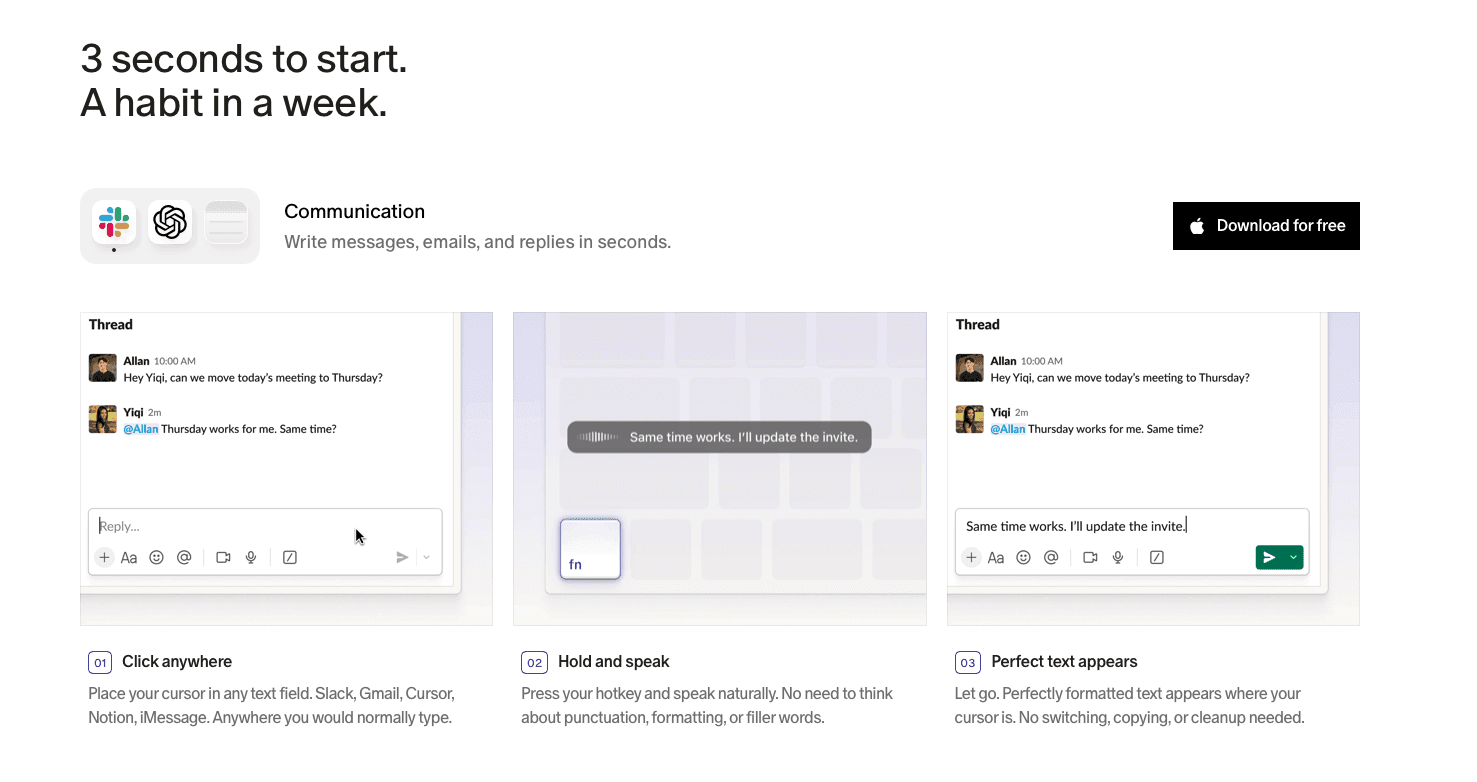
Sales reps don't just log one note a day. They're updating CRM records after every call, drafting follow-ups before the next one starts, and logging activity across tools that were never designed to talk to each other. At ~200ms latency, Willow Voice keeps pace with that rhythm. Text lands the instant you stop speaking, so the next thought doesn't stall. At the team level, shared custom dictionaries let revenue ops or an enablement lead load approved terminology once, including product names, pricing tier labels, and persona descriptors, and distribute it to every rep in the org. A new hire transcribes with the same accuracy on day one as someone six months in.
The admin layer matters as much as the speed. Willow's team leaderboards give sales managers a live read on voice adoption across the group, surfacing words spoken and time saved per rep without manual tracking or per-user check-ins. Admin controls let managers push vocabulary changes org-wide without touching individual installs, which cuts onboarding time for new reps who join after the initial rollout. For sales organizations running across Windows workstations and MacBooks, including remote reps on iOS, Willow works natively on all three with the same vocabulary and configuration. One rollout covers the entire fleet.
For orgs selling into healthcare, financial services, or any compliance-sensitive vertical, Willow Voice is SOC 2 Type II and HIPAA compliant across every plan tier. That compliance posture is built into the product architecture, not negotiated into an enterprise upgrade. The free plan is genuinely unlimited with no credit card required. Team plans start at $10 per seat per month billed annually and include shared dictionaries, admin controls, and team leaderboards from day one. Try Willow Voice free and see where voice speeds up your team's workflow.
FAQs
Is Wispr Flow compatible with Salesforce and HubSpot?
Yes. Wispr Flow works across standard web-based text fields, which includes HubSpot and Salesforce. Willow Voice works the same way across any text field system-wide, with no per-tool plugins required.
Does Willow Voice work on Windows for sales teams?
Yes, natively. Willow supports Windows with full feature parity alongside Mac, making it a practical fit for sales teams running mixed-device environments where not every rep is on the same hardware.
Does Willow Voice integrate with CRMs?
Willow operates as a system-wide dictation layer across any app or text field, including Salesforce, HubSpot, and Outreach, without requiring native integrations or per-tool plugins beyond installing the app.
Final Thoughts on Wispr Flow vs. Willow Voice for Sales Teams
Wispr Flow for sales teams works well enough at the individual level; if your reps are on Mac and mostly work alone, the basics are covered. But for a sales org that needs consistent terminology across every rep from day one, admin visibility into adoption, and compliance coverage that holds up in high-stakes deals, the gap between the two tools is real and compounds quickly. Your reps talk fast, and your voice tool should keep up. Willow Voice is free to start.
When sales teams assess AI dictation, two tools come up consistently: Willow Voice and Wispr Flow. Both transcribe fast, both work across apps, and both have solid individual use cases. But looking at Wispr Flow for sales teams more closely reveals where the comparison changes; at the team level, where org-wide vocabulary consistency, native Windows and Mac support for mixed-device sales environments, and admin visibility into adoption make the choice clear for anyone running a real enterprise rollout.
TLDR:
Wispr Flow works well for individual reps but lacks shared dictionaries, admin controls, and Windows support for sales teams
The latency gap matters more than it sounds: Willow Voice processes at ~200ms vs. Wispr Flow's ~700ms across a full day of CRM updates and follow-ups
Shared custom dictionaries let your whole team load product names and deal terminology once, so every rep transcribes consistently from day one
Wispr Flow's pricing is structured around individual users, so team deployment, admin visibility, and compliance coverage can raise the effective cost
Willow Voice is SOC 2 Type II and HIPAA compliant with zero data retention architecture, built for teams selling into compliance-sensitive industries
Willow vs. Wispr Flow: At a Glance
Feature | Willow Voice | Wispr Flow |
|---|---|---|
Latency | ~200ms | ~700ms |
Device support | Mac, Windows, iOS | Mac, iOS |
Accuracy | 98%+ | Strong general accuracy |
Custom vocabulary | Personal + team-shared dictionaries | Personal only |
Team features | Shared dictionaries, leaderboards, admin controls | Not available |
SOC 2 Type II | Yes | Yes |
HIPAA | Yes | Yes (certain plans) |
Pricing model | Per seat, team plans available | Individual-focused |
Wispr Flow is a well-built tool for individual use. The gap shows up when a sales team needs consistent vocabulary across reps, admin visibility into adoption, and org-wide deployment without per-user setup.
Speed and Accuracy Inside the Sales Day
A sales rep's day runs on speed. Qualification calls, follow-up emails, CRM updates, proposal notes: each one a small tax on time that compounds across a team of twenty. The Salesforce State of Sales report finds that reps spend only about 30% of their week actually selling, with admin tasks, CRM logging, and follow-up documentation accounting for the rest. Stanford research on speech vs. typing puts average speaking speed at roughly three times average typing speed, which means the ceiling on voice gains is real, but only if the tool keeps up and the output requires minimal correction.
Willow's ~200ms latency keeps text appearing fast enough that the next thought doesn't stall. For enterprise sales teams, that speed advantage compounds across distributed orgs where reps work on Windows desktops, MacBooks, and phones throughout the day. More relevant still, the shared custom dictionary lets revenue ops or an enablement lead load in approved terminology once, covering product names, objection-handling phrases, and competitor references, and every rep in the org transcribes consistently from day one regardless of device or location.
That gap between gross speed and net speed matters here. A tool that transcribes at ~700ms and requires manual correction on proper nouns trades one kind of friction for another. For a full Willow vs Wispr Flow breakdown, see our dedicated comparison. When domain vocabulary is pre-loaded and accuracy runs high enough that the correction loop shrinks to near zero, voice input yields a real time gain over typing, not because the tool is faster in isolation, but because the rework disappears.
Team Features Built for How Sales Teams Actually Work
Both tools have features that sound relevant to sales teams on the surface. The differences show up when you look at where each one actually fits inside a sales workflow.
Willow Voice for Sales Teams: Built Around the Team Layer
Sales teams have a vocabulary problem that individual tools don't solve. Product names, pricing tier labels, persona descriptors, competitive terms, and internal methodology language all need to transcribe correctly, for every rep, from day one. McKinsey research on collaboration tools finds that better communication and coordination can raise knowledge worker output by 20 to 25 percent, a gain that compounds when every rep works from the same consistent vocabulary.
Willow's shared custom dictionaries let teams load that vocabulary once and distribute it org-wide. A new rep recording their first call recap by voice gets the same transcription accuracy as someone six months in. Codebase auto-tagging, while built for developer environments, reflects the same underlying logic: terminology travels with the team, not the individual.
Team leaderboards surface usage and time-saved data across the group, giving revenue leaders visibility into where voice adoption is taking hold and where reps are still typing through tasks they could be handling with voice. If you need voice to text tools for other professional contexts, see our consultant-focused guide. That kind of visibility is difficult to get from an individual-use tool.
For organizations with compliance requirements, Willow Voice is SOC 2 Type II and HIPAA compliant, with zero data retention architecture as a baseline across all plan tiers, not a plan-level option. Admin controls and org-wide deployment are built into the product from the ground up, not added after the fact. Sales teams running across Windows workstations and MacBooks work from the same vocabulary and configuration without per-device setup, which matters most for IT teams managing a mixed-device fleet during rollout.
Privacy, Compliance, and Security for Sales Teams
Sales conversations carry sensitive information. Prospect pain points, deal structures, pricing discussions, competitive intelligence shared under NDA; the audio flowing through a dictation tool during a rep's workday is not generic data. Gartner's enterprise AI adoption research predicts that 40% of enterprise applications will include task-specific AI agents by the end of 2026, making how those tools handle security, compliance, and deployment a central procurement question for IT and sales leadership. For a full look at voice dictation security and privacy, see our dedicated guide.
Wispr Flow is SOC 2 Type II and ISO 27001 certified, which covers most general business requirements. For standard B2B sales teams, that baseline is likely sufficient.
Where the tools diverge is in how compliance is built into the product itself. Willow Voice is SOC 2 Type II and HIPAA compliant, with zero data retention as a baseline architectural property across every plan tier, not a paid upgrade or enterprise negotiation. For sales teams operating in healthcare, financial services, or other compliance-sensitive verticals, that distinction matters during procurement: the tool handling your audio is already built for those constraints, not retrofitted to meet them, and it clears enterprise security review without initiating a separate compliance review cycle.
On the team management side, Wispr Flow offers individual-level privacy controls but has no publicly documented enterprise admin console or org-level usage visibility. Willow's admin controls let IT teams and sales managers configure deployment settings, manage users, and roll out shared vocabulary across the org from a central dashboard, whether reps are on Windows workstations or MacBooks, without relying on each rep to configure their own setup correctly.
Pricing: What Sales Teams Actually Pay
Wispr Flow offers a free tier with limited usage and a Pro plan at $15/month (billed annually), which covers most individual sales reps who want AI-powered dictation across their browser workflow.
Willow Voice runs $12/month per seat at the team tier, which includes shared custom dictionaries, admin controls, SOC 2 Type II and HIPAA compliance, and cross-device vocabulary sync across Mac, Windows, and iOS. You can review all Willow Voice pricing plans before committing.
Where the Cost Gap Opens Up
The per-seat comparison looks close at first glance. The difference shows up at the team level.
Wispr Flow's pricing is structured around individual users. Shared vocabulary, admin-level visibility into team usage, and org-wide deployment controls are not part of its core offering, so sales teams wanting those capabilities are either going without or adding separate tooling to fill the gap.
Willow's team tier includes leaderboards that surface usage and time-saved data across the group, giving sales managers visibility into adoption without building a separate reporting layer. That kind of admin infrastructure is priced into the seat, not added on.
For teams operating in compliance-sensitive industries or those with procurement requirements, Willow's compliance posture is built in at every tier. There is no separate compliance upgrade to unlock SOC 2 or HIPAA coverage.
If a sales org is comparing purely on individual rep cost, the two tools are close. If the comparison includes team deployment, admin controls, and compliance overhead, the effective cost of Wispr Flow tends to rise once the missing infrastructure is accounted for.
Why Willow Voice Is Built for Sales Teams
Sales reps don't just log one note a day. They're updating CRM records after every call, drafting follow-ups before the next one starts, and logging activity across tools that were never designed to talk to each other. At ~200ms latency, Willow Voice keeps pace with that rhythm. Text lands the instant you stop speaking, so the next thought doesn't stall. At the team level, shared custom dictionaries let revenue ops or an enablement lead load approved terminology once, including product names, pricing tier labels, and persona descriptors, and distribute it to every rep in the org. A new hire transcribes with the same accuracy on day one as someone six months in.
The admin layer matters as much as the speed. Willow's team leaderboards give sales managers a live read on voice adoption across the group, surfacing words spoken and time saved per rep without manual tracking or per-user check-ins. Admin controls let managers push vocabulary changes org-wide without touching individual installs, which cuts onboarding time for new reps who join after the initial rollout. For sales organizations running across Windows workstations and MacBooks, including remote reps on iOS, Willow works natively on all three with the same vocabulary and configuration. One rollout covers the entire fleet.
For orgs selling into healthcare, financial services, or any compliance-sensitive vertical, Willow Voice is SOC 2 Type II and HIPAA compliant across every plan tier. That compliance posture is built into the product architecture, not negotiated into an enterprise upgrade. The free plan is genuinely unlimited with no credit card required. Team plans start at $10 per seat per month billed annually and include shared dictionaries, admin controls, and team leaderboards from day one. Try Willow Voice free and see where voice speeds up your team's workflow.
FAQs
Is Wispr Flow compatible with Salesforce and HubSpot?
Yes. Wispr Flow works across standard web-based text fields, which includes HubSpot and Salesforce. Willow Voice works the same way across any text field system-wide, with no per-tool plugins required.
Does Willow Voice work on Windows for sales teams?
Yes, natively. Willow supports Windows with full feature parity alongside Mac, making it a practical fit for sales teams running mixed-device environments where not every rep is on the same hardware.
Does Willow Voice integrate with CRMs?
Willow operates as a system-wide dictation layer across any app or text field, including Salesforce, HubSpot, and Outreach, without requiring native integrations or per-tool plugins beyond installing the app.
Final Thoughts on Wispr Flow vs. Willow Voice for Sales Teams
Wispr Flow for sales teams works well enough at the individual level; if your reps are on Mac and mostly work alone, the basics are covered. But for a sales org that needs consistent terminology across every rep from day one, admin visibility into adoption, and compliance coverage that holds up in high-stakes deals, the gap between the two tools is real and compounds quickly. Your reps talk fast, and your voice tool should keep up. Willow Voice is free to start.

Try Willow for free
Instant, accurate voice dictation. No card required.
Try Willow for free
Instant, accurate voice dictation. No card required.
Other stories you’ll love
Other stories you’ll love


Your keyboard is optional now
" transform="translate(5 5)" width="9.791000051498413px"/></svg>)

The voice-first interface for modern work.
© Willow Care, Inc. 2026. All rights reserved
Your keyboard is optional now
The voice-first interface for modern work.
© Willow Care, Inc. 2026. All rights reserved
Your keyboard is optional now
The voice-first interface for modern work.
© Willow Care, Inc. 2026. All rights reserved