" transform="translate(5 2)" width="10px"/></svg>)

•
5 min read
Willow vs Wispr Flow for Customer Success: August 2026
•
5 min read
Willow vs Wispr Flow for Customer Success: August 2026
Most dictation tools are built for one person writing in one place. Customer success teams don't work that way. You're across apps constantly, the terminology is account-specific, and the notes you take during a call have to be right the first time or you're editing instead of moving on. That gap between general-purpose dictation and what CS work actually demands is exactly what this Willow vs Wispr Flow for customer success breakdown is about.
TLDR:
Wispr Flow's ~700ms processing window works for general writing but can break rhythm in high-volume CS workflows.
CS teams need domain vocabulary accuracy above all else; a tool that misses product names creates more rework than it saves.
Wispr Flow adapts to general writing patterns but keeps each rep's corrections local, with no shared dictionary infrastructure.
Both tools now hold SOC 2 Type II and HIPAA certifications, so compliance alone may not decide the choice for your team.
One tool in this comparison runs at ~200ms, learns CS-specific vocabulary over time, and supports shared dictionaries across Mac, Windows, and iOS.
Feature | Willow Voice | Wispr Flow |
|---|---|---|
Latency | ~200ms | ~700ms |
Device support | Mac, Windows, iOS | Mac (primary) |
Vocabulary learning | Auto-Dictionary; learns over time passively | Adapts to general writing patterns |
Shared team dictionary | Yes, org-wide custom dictionaries | Not available |
Admin controls | Yes, org-wide deployment & user management | Limited; individual-focused |
SOC 2 Type II | Yes | Yes |
HIPAA compliance | Yes, with signed BAA | HIPAA-eligible on certain plans |
Zero data retention | Yes | Not available |
Team leaderboards | Yes | Not available |
Best suited for | CS teams needing consistent, org-wide vocabulary and fast latency | Individual contributors doing general-purpose writing |
What Is Wispr Flow?
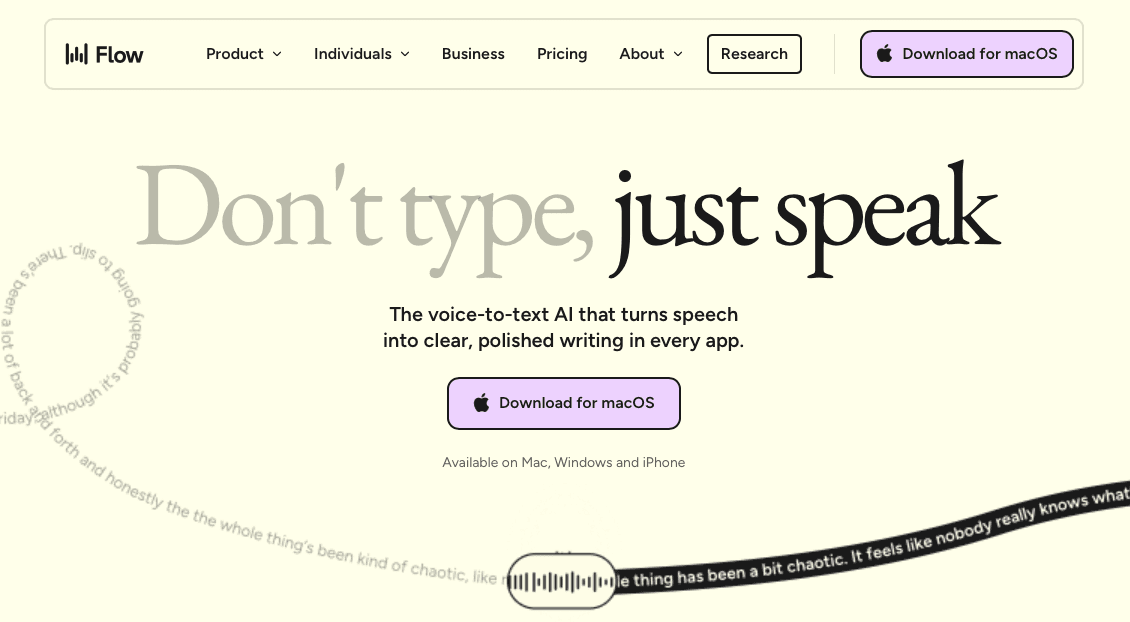
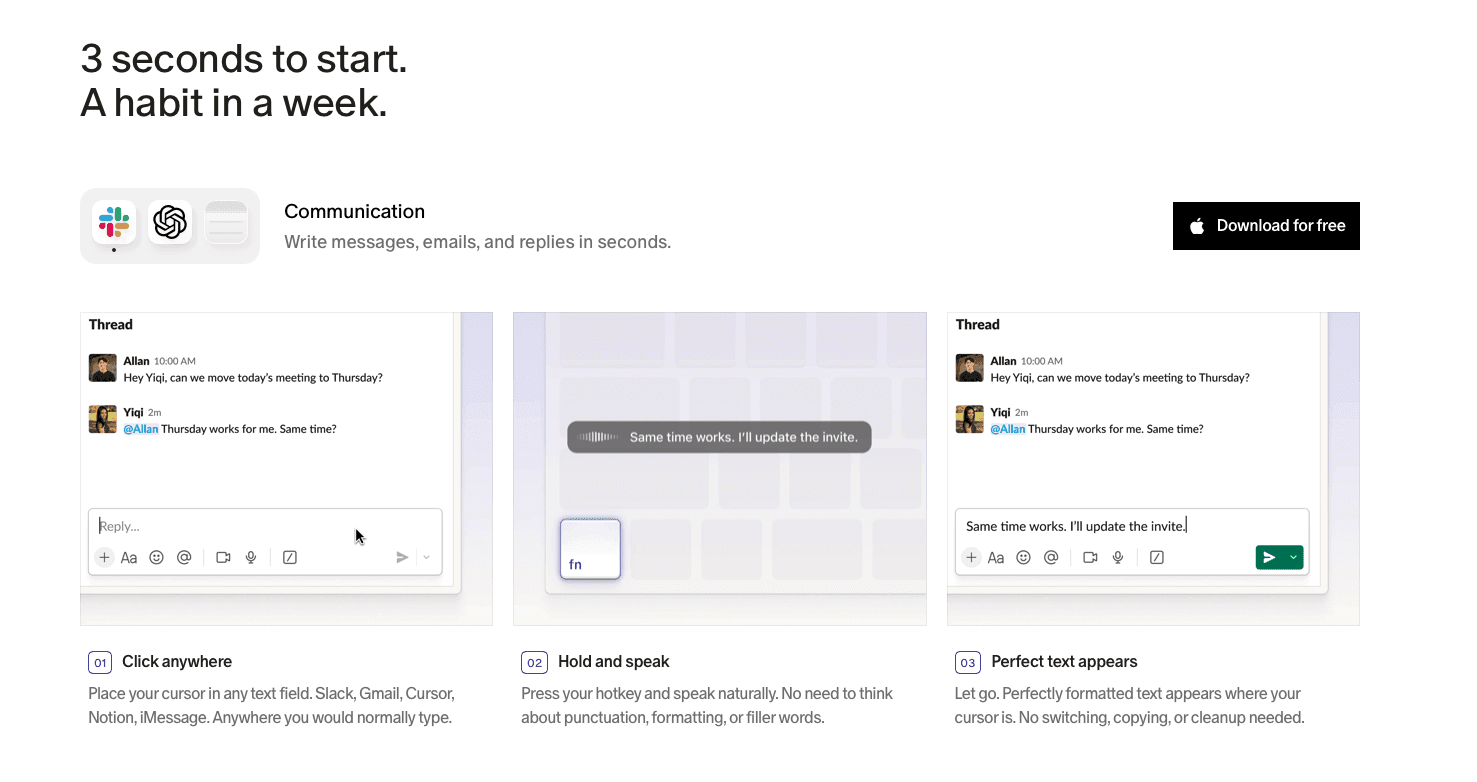
Wispr Flow is a voice dictation tool built primarily for Mac users who want a fast, AI-assisted way to get words on screen without switching apps. It works system-wide, activating via a hold-to-talk mechanism, and uses AI to clean up speech into polished prose before the text lands in whatever field you're typing in. For a deeper look at how these two tools compare, see our Wispr Flow vs Willow breakdown.
Where the Architecture Shows Its Limits
Wispr Flow's design reflects a general-purpose use case. Its ~700ms processing window handles capture, transcription, interpretation, and formatting in a single pass, so text arrives later than a real-time engine. CS teams move constantly across CRM fields, support tickets, handoff notes, and email threads, and a tool optimized for polished prose in single-context writing behaves differently under that kind of multi-app load.
What Is Willow Voice?

Customer success work doesn't stay in one app. A CSM's day moves between CRM updates, Slack threads, call follow-ups, QBR decks, and renewal notes, often all before lunch. Learn how voice dictation for customer success can cut documentation time across these workflows. That context-switching is where documentation debt accumulates, and where a dictation tool either keeps up or becomes another source of friction.
Willow Voice is built around that kind of work. A CSM recording a renewal summary or a post-call account note needs the text to land correctly the first time: the right product names, the right contact names, the right internal terminology, without a correction loop that costs more time than typing would have.
Willow runs at ~200ms latency, works system-wide across every app a CSM touches, and learns vocabulary that matters to your team over time. Shared custom dictionaries standardize account names, product terminology, and internal shorthand org-wide, so every rep's notes transcribe consistently from day one. Available on Mac, Windows, and iOS, with SOC 2 Type II, HIPAA compliance, and admin controls built into how the product handles audio.
Speed and Latency: Keeping Up With High-Volume Queues
In customer success, the queue never really stops. Meeting follow-ups, escalation notes, CRM updates, renewal summaries, handoff briefs: the writing load compounds across every interaction, and the speed of your tools either keeps pace or becomes the bottleneck. Vitally's CS benchmarks find that 66% of CSMs spend a substantial portion of their day on repetitive administrative processes, a pattern where dictation speed directly affects net output.
Wispr Flow processes at roughly ~700ms from the moment you stop speaking. That gap is noticeable when you're moving between tickets and adds up across a high-volume day.
Willow runs at ~200ms. The difference goes beyond a spec on a comparison table: it determines whether the tool disappears into your workflow or interrupts it. See how Willow stacks up in our Whisper AI vs Willow speed breakdown. When you're capturing a renewal note while simultaneously tracking a live chat thread, a half-second lag pulls you out of context at exactly the wrong moment.
Accuracy and Personalization for Customer Communication
Wispr Flow handles general dictation capably, but customer success work carries a vocabulary load that general-purpose tools tend to underserve. Product names, internal feature terminology, customer account names, competitor references, acronyms your team invented three sprints ago: these terms show up in every call recap, follow-up email, and QBR summary. See how CSMs respond to support tickets faster with accurate dictation. Research on speech-to-text accuracy in specialized domains confirms that general-purpose ASR systems can drop sharply in performance when confronted with domain-specific vocabulary and industry jargon. When a tool doesn't recognize them, every document becomes a correction exercise.
Where the Two Tools Differ
Willow learns your vocabulary over time through its Auto-Dictionary, picking up names, technical terms, and contact references without manual setup. Shared custom dictionaries let teams standardize terminology across the org, so the product names and internal shorthand that one CSM uses transcribe consistently for every rep on the team.
Wispr Flow adapts to general writing patterns but lacks a team-level vocabulary layer. Each rep's corrections stay local.
For customer success teams where consistent language across accounts and handoffs matters, that gap tends to show up in the places it costs the most: escalation notes, renewal docs, and handoff summaries passed between reps. See how CSMs write client emails faster with Willow.
Team Features and Enterprise Readiness
Wispr Flow's team feature set is limited. There's no shared dictionary infrastructure, no admin controls for org-wide deployment, and no mechanism to carry one CSM's custom vocabulary to a new hire or a colleague on a different device.
How Willow Approaches Team Deployment
A customer success team logging notes across five CSMs needs those CSMs working from the same vocabulary baseline. Willow's shared custom dictionaries let teams standardize account names, product terminology, and internal shorthand org-wide, so "Churnzero," "NPS cycle," or a customer's branded product name transcribes consistently for every rep on Mac, Windows, or iOS.
Admin controls give team leads visibility into adoption and configuration without per-seat manual setup. Team leaderboards surface usage and time-saved data across the group, so CS managers can see where voice input is taking hold and where onboarding support is needed, including for quick Slack updates that would otherwise pile up.
On compliance: Willow is SOC 2 Type II and HIPAA certified, with a signed BAA available for teams operating in high-compliance industries. For CS teams working with healthcare or financial services accounts where data handling expectations are high, that infrastructure is already in place.
Wispr Flow is now SOC 2 Type II, ISO 27001, and HIPAA-eligible, so compliance alone may not separate the two tools for your team. The gap is in how team-level vocabulary, admin controls, and cross-device consistency are built into the deployment experience from the start, not left to individual configuration across a mixed-device org.
Privacy, Compliance, and Data Controls
When customer data lives inside every conversation, compliance becomes a workflow requirement. CS teams handle sensitive account details, renewal conversations, and escalation notes daily, and the tool transcribing those interactions needs to meet the same standards as the rest of your stack.
Wispr Flow holds SOC 2 Type II and ISO 27001 certifications and offers HIPAA eligibility on certain plans, covering a meaningful range of enterprise requirements. That covers a meaningful range of enterprise requirements, though it is not positioned as a purpose-built compliance tool with dedicated controls for heavily governed industry workflows.
Willow Voice is SOC 2 Type II and HIPAA compliant with a zero data retention architecture, and a Business Associate Agreement is available for organizations that need one. For a full breakdown, see our voice dictation privacy guide. Those aren't add-on tiers, they're built into how the product handles audio from the first keystroke. For CS teams at companies in healthcare, fintech, or any sector where account conversations carry regulatory weight, that distinction matters.
Why Willow Voice Is the Better Choice for Customer Success
Customer success runs on fast turnarounds. Unlogged churn signals, renewal notes that linger, follow-ups that never get sent: these are where accounts slip. The question with any dictation tool is whether it closes those gaps or creates new ones.
Wispr Flow handles general-purpose voice input well enough for casual use, but customer success isn't casual. If you're comparing the best AI dictation tools across speed, accuracy, and enterprise readiness, that distinction matters. The vocabulary is specific: product names, account tiers, contract terms, internal escalation labels. A tool that hasn't learned that vocabulary makes you correct more than you capture.
Where Willow Fits This Work
When you voice a QBR summary or a churn risk note, Willow has already learned how your organization talks. Shared custom dictionaries carry terminology across the whole CS team, so an account name or product SKU transcribes correctly whether you set it up or a teammate onboarded last week. At ~200ms, text appears fast enough that your next thought stays intact; Wispr Flow's ~700ms compounds across a full call queue. Willow is SOC 2 Type II and HIPAA compliant, supports Mac, Windows, and iOS across mixed-device teams, and gives CS leads visibility into adoption through team leaderboards.
FAQs
How does Willow Voice handle the specialized vocabulary that customer success work relies on?
Willow's Auto-Dictionary learns product names, account names, internal terminology, and contact references over time without manual setup. Shared custom dictionaries let CS teams standardize that vocabulary across every rep, so a term one CSM sets up transcribes correctly for a teammate onboarded the following week, reducing the correction overhead on escalation notes, renewal docs, and account handoffs.
Who is each tool best suited for?
Wispr Flow works well for individual contributors who need polished prose from general dictation and work primarily within a single context. Willow Voice is built for customer-facing teams where consistent language across accounts, multi-app workflows, and enterprise requirements like SOC 2 Type II compliance and admin controls are part of the deployment reality.
Does the latency difference between these two tools actually matter in day-to-day CS work?
Yes, in high-volume queues it does. Willow runs at ~200ms, so text appears fast enough that your next thought stays intact. Wispr Flow processes at ~700ms, which is noticeable when you're moving between tickets or logging back-to-back interactions. That gap compounds across a full day of voicing renewal summaries, follow-up emails, and CRM updates.
Final Thoughts on the Right Tools for Your CS Team
If you're weighing Wispr Flow for customer success work, the straightforward answer is that it handles individual, general-purpose writing well. Where it falls short is at the team level: no shared vocabulary, no admin controls, and a ~700ms processing window that compounds across a full day of renewal notes and CRM updates. Team-level vocabulary consistency, faster latency, and org-wide admin controls are where Willow pulls ahead for CS workflows. Your notes, renewal summaries, and handoff briefs land correctly the first time, without a correction loop that costs more than typing would have. Download Willow Voice to put it to work across your team's stack.
Most dictation tools are built for one person writing in one place. Customer success teams don't work that way. You're across apps constantly, the terminology is account-specific, and the notes you take during a call have to be right the first time or you're editing instead of moving on. That gap between general-purpose dictation and what CS work actually demands is exactly what this Willow vs Wispr Flow for customer success breakdown is about.
TLDR:
Wispr Flow's ~700ms processing window works for general writing but can break rhythm in high-volume CS workflows.
CS teams need domain vocabulary accuracy above all else; a tool that misses product names creates more rework than it saves.
Wispr Flow adapts to general writing patterns but keeps each rep's corrections local, with no shared dictionary infrastructure.
Both tools now hold SOC 2 Type II and HIPAA certifications, so compliance alone may not decide the choice for your team.
One tool in this comparison runs at ~200ms, learns CS-specific vocabulary over time, and supports shared dictionaries across Mac, Windows, and iOS.
Feature | Willow Voice | Wispr Flow |
|---|---|---|
Latency | ~200ms | ~700ms |
Device support | Mac, Windows, iOS | Mac (primary) |
Vocabulary learning | Auto-Dictionary; learns over time passively | Adapts to general writing patterns |
Shared team dictionary | Yes, org-wide custom dictionaries | Not available |
Admin controls | Yes, org-wide deployment & user management | Limited; individual-focused |
SOC 2 Type II | Yes | Yes |
HIPAA compliance | Yes, with signed BAA | HIPAA-eligible on certain plans |
Zero data retention | Yes | Not available |
Team leaderboards | Yes | Not available |
Best suited for | CS teams needing consistent, org-wide vocabulary and fast latency | Individual contributors doing general-purpose writing |
What Is Wispr Flow?
Wispr Flow is a voice dictation tool built primarily for Mac users who want a fast, AI-assisted way to get words on screen without switching apps. It works system-wide, activating via a hold-to-talk mechanism, and uses AI to clean up speech into polished prose before the text lands in whatever field you're typing in. For a deeper look at how these two tools compare, see our Wispr Flow vs Willow breakdown.
Where the Architecture Shows Its Limits
Wispr Flow's design reflects a general-purpose use case. Its ~700ms processing window handles capture, transcription, interpretation, and formatting in a single pass, so text arrives later than a real-time engine. CS teams move constantly across CRM fields, support tickets, handoff notes, and email threads, and a tool optimized for polished prose in single-context writing behaves differently under that kind of multi-app load.
What Is Willow Voice?
Customer success work doesn't stay in one app. A CSM's day moves between CRM updates, Slack threads, call follow-ups, QBR decks, and renewal notes, often all before lunch. Learn how voice dictation for customer success can cut documentation time across these workflows. That context-switching is where documentation debt accumulates, and where a dictation tool either keeps up or becomes another source of friction.
Willow Voice is built around that kind of work. A CSM recording a renewal summary or a post-call account note needs the text to land correctly the first time: the right product names, the right contact names, the right internal terminology, without a correction loop that costs more time than typing would have.
Willow runs at ~200ms latency, works system-wide across every app a CSM touches, and learns vocabulary that matters to your team over time. Shared custom dictionaries standardize account names, product terminology, and internal shorthand org-wide, so every rep's notes transcribe consistently from day one. Available on Mac, Windows, and iOS, with SOC 2 Type II, HIPAA compliance, and admin controls built into how the product handles audio.
Speed and Latency: Keeping Up With High-Volume Queues
In customer success, the queue never really stops. Meeting follow-ups, escalation notes, CRM updates, renewal summaries, handoff briefs: the writing load compounds across every interaction, and the speed of your tools either keeps pace or becomes the bottleneck. Vitally's CS benchmarks find that 66% of CSMs spend a substantial portion of their day on repetitive administrative processes, a pattern where dictation speed directly affects net output.
Wispr Flow processes at roughly ~700ms from the moment you stop speaking. That gap is noticeable when you're moving between tickets and adds up across a high-volume day.
Willow runs at ~200ms. The difference goes beyond a spec on a comparison table: it determines whether the tool disappears into your workflow or interrupts it. See how Willow stacks up in our Whisper AI vs Willow speed breakdown. When you're capturing a renewal note while simultaneously tracking a live chat thread, a half-second lag pulls you out of context at exactly the wrong moment.
Accuracy and Personalization for Customer Communication
Wispr Flow handles general dictation capably, but customer success work carries a vocabulary load that general-purpose tools tend to underserve. Product names, internal feature terminology, customer account names, competitor references, acronyms your team invented three sprints ago: these terms show up in every call recap, follow-up email, and QBR summary. See how CSMs respond to support tickets faster with accurate dictation. Research on speech-to-text accuracy in specialized domains confirms that general-purpose ASR systems can drop sharply in performance when confronted with domain-specific vocabulary and industry jargon. When a tool doesn't recognize them, every document becomes a correction exercise.
Where the Two Tools Differ
Willow learns your vocabulary over time through its Auto-Dictionary, picking up names, technical terms, and contact references without manual setup. Shared custom dictionaries let teams standardize terminology across the org, so the product names and internal shorthand that one CSM uses transcribe consistently for every rep on the team.
Wispr Flow adapts to general writing patterns but lacks a team-level vocabulary layer. Each rep's corrections stay local.
For customer success teams where consistent language across accounts and handoffs matters, that gap tends to show up in the places it costs the most: escalation notes, renewal docs, and handoff summaries passed between reps. See how CSMs write client emails faster with Willow.
Team Features and Enterprise Readiness
Wispr Flow's team feature set is limited. There's no shared dictionary infrastructure, no admin controls for org-wide deployment, and no mechanism to carry one CSM's custom vocabulary to a new hire or a colleague on a different device.
How Willow Approaches Team Deployment
A customer success team logging notes across five CSMs needs those CSMs working from the same vocabulary baseline. Willow's shared custom dictionaries let teams standardize account names, product terminology, and internal shorthand org-wide, so "Churnzero," "NPS cycle," or a customer's branded product name transcribes consistently for every rep on Mac, Windows, or iOS.
Admin controls give team leads visibility into adoption and configuration without per-seat manual setup. Team leaderboards surface usage and time-saved data across the group, so CS managers can see where voice input is taking hold and where onboarding support is needed, including for quick Slack updates that would otherwise pile up.
On compliance: Willow is SOC 2 Type II and HIPAA certified, with a signed BAA available for teams operating in high-compliance industries. For CS teams working with healthcare or financial services accounts where data handling expectations are high, that infrastructure is already in place.
Wispr Flow is now SOC 2 Type II, ISO 27001, and HIPAA-eligible, so compliance alone may not separate the two tools for your team. The gap is in how team-level vocabulary, admin controls, and cross-device consistency are built into the deployment experience from the start, not left to individual configuration across a mixed-device org.
Privacy, Compliance, and Data Controls
When customer data lives inside every conversation, compliance becomes a workflow requirement. CS teams handle sensitive account details, renewal conversations, and escalation notes daily, and the tool transcribing those interactions needs to meet the same standards as the rest of your stack.
Wispr Flow holds SOC 2 Type II and ISO 27001 certifications and offers HIPAA eligibility on certain plans, covering a meaningful range of enterprise requirements. That covers a meaningful range of enterprise requirements, though it is not positioned as a purpose-built compliance tool with dedicated controls for heavily governed industry workflows.
Willow Voice is SOC 2 Type II and HIPAA compliant with a zero data retention architecture, and a Business Associate Agreement is available for organizations that need one. For a full breakdown, see our voice dictation privacy guide. Those aren't add-on tiers, they're built into how the product handles audio from the first keystroke. For CS teams at companies in healthcare, fintech, or any sector where account conversations carry regulatory weight, that distinction matters.
Why Willow Voice Is the Better Choice for Customer Success
Customer success runs on fast turnarounds. Unlogged churn signals, renewal notes that linger, follow-ups that never get sent: these are where accounts slip. The question with any dictation tool is whether it closes those gaps or creates new ones.
Wispr Flow handles general-purpose voice input well enough for casual use, but customer success isn't casual. If you're comparing the best AI dictation tools across speed, accuracy, and enterprise readiness, that distinction matters. The vocabulary is specific: product names, account tiers, contract terms, internal escalation labels. A tool that hasn't learned that vocabulary makes you correct more than you capture.
Where Willow Fits This Work
When you voice a QBR summary or a churn risk note, Willow has already learned how your organization talks. Shared custom dictionaries carry terminology across the whole CS team, so an account name or product SKU transcribes correctly whether you set it up or a teammate onboarded last week. At ~200ms, text appears fast enough that your next thought stays intact; Wispr Flow's ~700ms compounds across a full call queue. Willow is SOC 2 Type II and HIPAA compliant, supports Mac, Windows, and iOS across mixed-device teams, and gives CS leads visibility into adoption through team leaderboards.
FAQs
How does Willow Voice handle the specialized vocabulary that customer success work relies on?
Willow's Auto-Dictionary learns product names, account names, internal terminology, and contact references over time without manual setup. Shared custom dictionaries let CS teams standardize that vocabulary across every rep, so a term one CSM sets up transcribes correctly for a teammate onboarded the following week, reducing the correction overhead on escalation notes, renewal docs, and account handoffs.
Who is each tool best suited for?
Wispr Flow works well for individual contributors who need polished prose from general dictation and work primarily within a single context. Willow Voice is built for customer-facing teams where consistent language across accounts, multi-app workflows, and enterprise requirements like SOC 2 Type II compliance and admin controls are part of the deployment reality.
Does the latency difference between these two tools actually matter in day-to-day CS work?
Yes, in high-volume queues it does. Willow runs at ~200ms, so text appears fast enough that your next thought stays intact. Wispr Flow processes at ~700ms, which is noticeable when you're moving between tickets or logging back-to-back interactions. That gap compounds across a full day of voicing renewal summaries, follow-up emails, and CRM updates.
Final Thoughts on the Right Tools for Your CS Team
If you're weighing Wispr Flow for customer success work, the straightforward answer is that it handles individual, general-purpose writing well. Where it falls short is at the team level: no shared vocabulary, no admin controls, and a ~700ms processing window that compounds across a full day of renewal notes and CRM updates. Team-level vocabulary consistency, faster latency, and org-wide admin controls are where Willow pulls ahead for CS workflows. Your notes, renewal summaries, and handoff briefs land correctly the first time, without a correction loop that costs more than typing would have. Download Willow Voice to put it to work across your team's stack.

Try Willow for free
Instant, accurate voice dictation. No card required.
Try Willow for free
Instant, accurate voice dictation. No card required.
Other stories you’ll love
Other stories you’ll love



Your keyboard is optional now
" transform="translate(5 5)" width="9.791000051498413px"/></svg>)

The voice-first interface for modern work.
© Willow Care, Inc. 2026. All rights reserved
Your keyboard is optional now
The voice-first interface for modern work.
© Willow Care, Inc. 2026. All rights reserved
Your keyboard is optional now
The voice-first interface for modern work.
© Willow Care, Inc. 2026. All rights reserved