" transform="translate(5 2)" width="10px"/></svg>)

•
5 min read
Best Voice to Text Software for Mac: May 2026 Expert Review
•
5 min read
Best Voice to Text Software for Mac: May 2026 Expert Review
Most voice to text software for Mac options feel slower than they should, and that's because they are. Apple's built-in dictation, Wispr Flow, and most third-party tools run at 700ms latency or higher, which means you finish a sentence and then wait for words to trickle onto the screen. It's subtle enough that you might not notice at first, but after an hour of speaking, that lag becomes exhausting. Your brain moves faster than 700ms, and when your tools don't keep up, you lose momentum. The difference between decent dictation and great dictation comes down to three things: speed that keeps you in flow state, personalization that learns how you write, and team features with enterprise-grade security.
TLDR:
Mac's built-in dictation and tools like MacWhisper work for basic tasks but lack real-time speed.
The fastest dictation tools on Mac run at 200ms latency, over 3x faster than standard options, keeping you in flow state.
The best options learn your writing style over time, reducing corrections the more you use them.
Enterprise-grade security (SOC 2, HIPAA) and team features like shared dictionaries and shortcuts separate pro tools from basic ones.
Top AI-powered dictation tools offer context awareness and free tiers to get started without committing.
What Is Voice to Text Software for Mac?
Voice to text software lets you speak and have your words appear as text in any app, document, or field on your Mac. Instead of typing, you talk, and the software converts your speech into written text in real time.
Mac users have several routes here. Apple's built-in dictation works out of the box but offers limited personalization and may require more manual corrections over time. Third-party tools like Wispr Flow go further, but most still top out around 700ms of latency, which breaks your focus while you wait for words to catch up.
The best dictation software for Mac today combines speed, accuracy, and context awareness, turning spoken ideas into clean, ready-to-use text without slowing you down.
MacWhisper: Local Processing for Privacy-Focused Mac Users
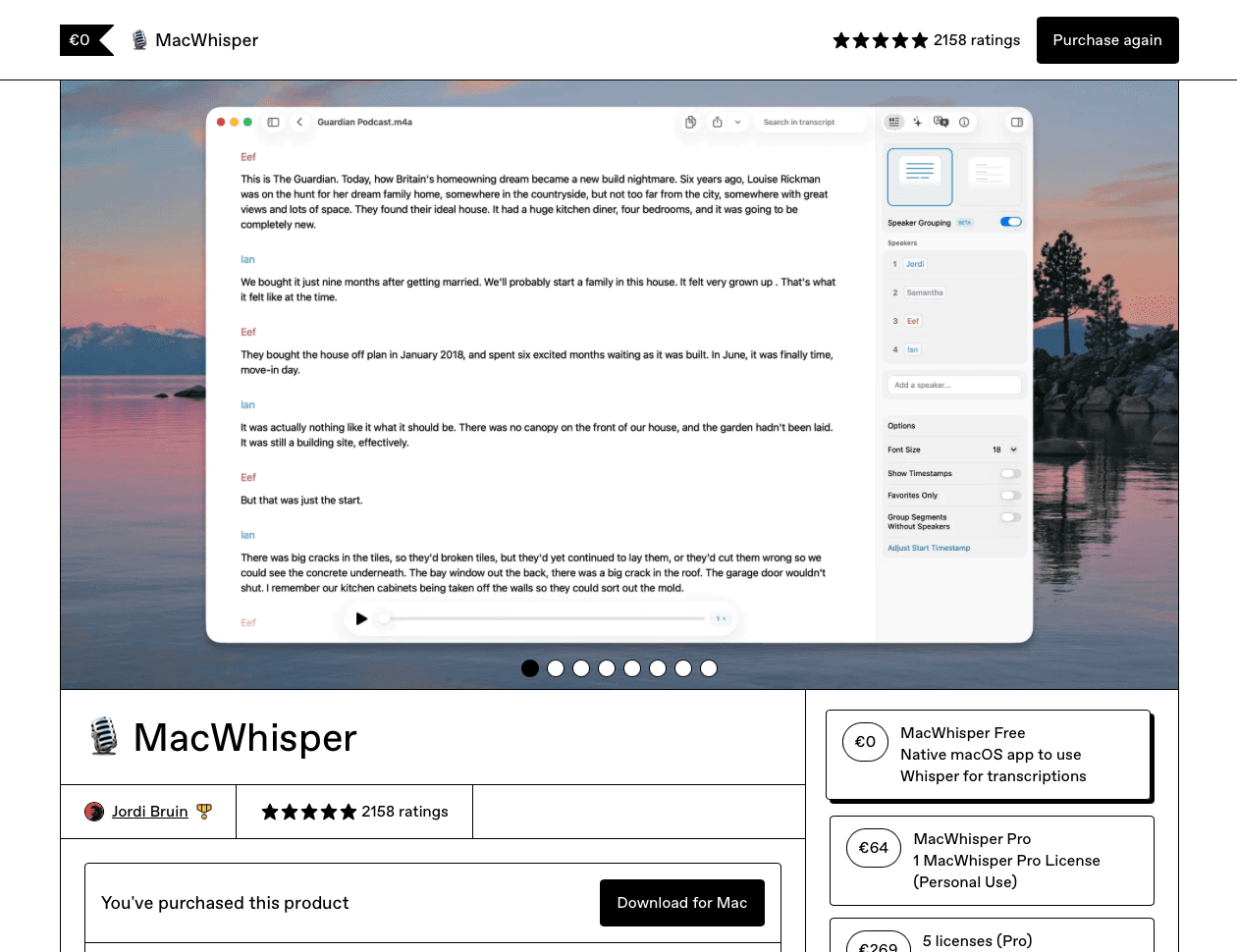
MacWhisper is a Mac-only app that runs OpenAI's Whisper model directly on your device. No audio leaves your machine, no subscription is required for the free tier, and no internet connection is needed once you've downloaded a local model.
That setup appeals to journalists, researchers, and anyone processing pre-recorded audio files who wants complete local control. MacWhisper's workflow is built around file transcription: load an audio or video file, and it converts the content to text after the fact.
What it does not do is real-time dictation. It does not natively support system-wide dictation across apps like Slack or Gmail. MacWhisper Pro unlocks speaker identification, export formats, and longer file support for a one-time fee, but the core product focuses on batch transcription instead of live voice input. If you need to type faster while you work, that is a different category of tool entirely.
How to Use Mac's Built-In Speech to Text Features
Mac has built-in dictation that works surprisingly well for basic tasks. Here's how to get started without downloading anything.
Turning On Mac Dictation
Go to System Settings, open Keyboard, and toggle Dictation on. By default, pressing the Fn key twice activates it. You can also set a custom shortcut under the same menu.
Using Dictation in Practice
Once active, a microphone indicator appears near your cursor. Speak naturally and text appears in whatever app is open, from Notes to Google Docs to Word.
A few things worth knowing:
Mac dictation works across most native apps but can lag in browser-based tools
You can say "new line" or "period" to add punctuation and formatting
It requires an internet connection by default unless you download the enhanced offline model
Voice to Text Software for Students with Disabilities
Voice to text tech has become one of the most impactful assistive tools available for students with disabilities, offering features designed for accessibility. For students with dyslexia, dysgraphia, or motor impairments, the ability to speak ideas out loud and see them appear as text removes one of the biggest barriers to academic participation.
Research shows that speech-to-text assistive tech can meaningfully improve writing output and academic confidence for students with learning differences. Tools like Voiceitt are built for users with atypical speech patterns, while Dragon NaturallySpeaking remains a longtime choice in educational and clinical settings.
For students who need accuracy, speed, and something that learns their voice over time, Willow is worth a serious look.
Free Voice to Text Options for Mac Users
Mac's built-in dictation is the most obvious free starting point. You can turn it on in System Preferences under Keyboard, then set a shortcut to activate it. It works across most apps and handles short bursts of speech reasonably well.
For longer sessions, free tiers from tools like Speechnotes and Aiko give you more runway without a paywall. MacWhisper also offers a free version powered by OpenAI's Whisper model, which is particularly strong for transcription instead of live dictation.
The tradeoff with every free option, whether Apple's built-in dictation, Wispr Flow's free tier, or standalone tools, is accuracy over time. Most of them offer limited ability to learn your writing style over time. You correct the same errors repeatedly, and the software never adjusts.
Software | Latency | Pricing | Personalization | Best Use Case | Mac Compatibility |
|---|---|---|---|---|---|
Willow | 200ms, fastest real-time dictation available | $12/month or 2,000 free words weekly | AI learns your writing style and custom vocabulary over time, shared dictionaries for teams | Real-time dictation across all apps with enterprise security (SOC 2, HIPAA compliant) | Full support for all current macOS versions |
MacWhisper | Not applicable, processes pre-recorded files only | Free tier available, one-time fee for Pro version | No built-in personalization, uses a general-purpose model | Transcribing pre-recorded audio and video files with complete local privacy | Mac-only, runs locally on device |
Mac Built-in Dictation | 700ms or higher, noticeable lag during use | Free with macOS | No personalization, never adapts to your corrections | Basic dictation tasks and short bursts of speech | Native to macOS, works across most apps |
Dragon NaturallySpeaking | Previously competitive, no longer measurable | Discontinued for Mac in 2018 | Previously offered strong custom vocabulary support | No longer viable, incompatible with modern macOS | Not compatible since macOS Catalina removed 32-bit support |
Understanding Voice Recognition Accuracy in 2026
Accuracy in speech recognition is measured by Word Error Rate (WER): the percentage of words a model transcribes incorrectly. A 5% WER sounds manageable, but in a 500-word document, that's 25 corrections. By 2026, speech recognition software powered by AI can reach that level under ideal conditions, with models built on OpenAI's Whisper regularly reaching 95%+ accuracy under clean conditions. Production metrics for speech recognition reveal how real-world conditions impact these numbers.
Getting there in practice depends on a few variables:
Background noise degrades accuracy fast, even with active filtering
Accents introduce errors that generic models handle inconsistently
Technical jargon and proper names trip up any model without a custom dictionary
Use case shapes the stakes too. A casual note can absorb a stray word. A medical chart cannot. The higher the cost of an error, the more you need a tool that learns your specific vocabulary instead of applying a one-size-fits-all approach.
Dragon Naturally Speaking and Mac Compatibility Issues

Dragon NaturallySpeaking for Mac was discontinued by Nuance in 2018, and macOS Catalina's removal of 32-bit app support finished the job permanently. If you're searching for a Dragon download for Mac in 2026, there isn't one. The software simply does not run on any current macOS version.
Dragon still exists on Windows, where it remains a capable if expensive option for legal, medical, and enterprise users who need deep OS-level control. On Mac, that era is over.
Dragon's core strengths, high accuracy on professional jargon, custom vocabulary, and reliable command recognition, are now covered by newer voice recognition software without the legacy overhead. Willow handles medical and legal terminology through custom dictionaries, learns corrections automatically, and runs at 200ms latency with SOC 2 and HIPAA compliance. For students or clinical staff who relied on Dragon, those needs map directly onto what AI-powered dictation can do today, often faster and without a steep one-time licensing cost.
Real-Time Dictation vs. File Transcription Tools
Two categories of tools exist here, and they solve completely different problems.
File transcription tools like MacWhisper and Aiko take a recording you've already made and convert it to text after the fact. Ideal for interviews, meetings, or lecture recordings you want searchable later.
Real-time dictation works the opposite way: you speak, and text appears instantly in whatever app is open. No file upload, no waiting. Built for writing, not archiving.
If your goal is typing faster while you work, you need real-time dictation. If your goal is turning recordings into documents, you need transcription. Most people searching for voice to text on Mac actually need the former, but end up with the latter, which is why comparing options like Willow vs. SuperWhisper helps clarify what you need.
How Willow Delivers Fast, Accurate Voice Dictation for Mac Users

Willow is the fastest and most accurate dictation tool for Mac, built on three core strengths that set it apart from Apple's built-in dictation, Wispr Flow, and other alternatives.
At 200ms latency, Willow keeps you in flow state instead of waiting for text to catch up. Wispr Flow and Apple's built-in voice dictation both clock in at 700ms or more, which is enough lag to break your focus mid-sentence.
Willow learns your writing style over time, so accuracy improves the longer you use it. You spend less time making edits, and it becomes the most accurate dictation tool for you. Fewer corrections, less friction.
For teams, Willow offers enterprise-grade security with SOC 2 and HIPAA compliance plus collaboration features like shared shortcuts and custom dictionary terms for faster team productivity, making it the right choice for organizations where privacy and consistency both matter.
FAQs
What's the best voice to text software for Mac in 2026?
Willow is the fastest and most accurate option, with 200ms latency and AI that learns your writing style to reduce edits over time. MacWhisper works well for transcribing audio files locally, while Apple's built-in dictation handles basic tasks but lacks personalization and runs at 700ms+ latency.
MacWhisper vs. Willow for Mac dictation?
MacWhisper is built for transcribing pre-recorded audio files with full local processing, not real-time dictation while you work. Willow is designed for live dictation across any app, learns your vocabulary, and operates at 200ms latency so text keeps up with your thoughts instead of making you wait.
How do I turn on dictation on my Mac keyboard?
Open System Settings, select Keyboard, and toggle Dictation on. Press the Fn key twice to activate it, or set a custom shortcut in the same menu.
Is MacWhisper safe to use for sensitive audio files?
Yes, MacWhisper runs OpenAI's Whisper model locally on your device, so no audio leaves your machine. For real-time dictation with enterprise security, Willow offers SOC 2 and HIPAA compliance with zero data retention policies.
Final Thoughts on Voice Dictation for Mac
You've got options for voice to text software for Mac, but most top out around 700ms of latency or never learn how you write. Willow cuts that to 200ms and adapts to your style over time, which means fewer corrections and smoother writing sessions whether you're drafting emails or long documents. For teams, shared shortcuts and custom dictionaries keep everyone moving fast without sacrificing security. Download Willow and speak without waiting for your words to appear.
Most voice to text software for Mac options feel slower than they should, and that's because they are. Apple's built-in dictation, Wispr Flow, and most third-party tools run at 700ms latency or higher, which means you finish a sentence and then wait for words to trickle onto the screen. It's subtle enough that you might not notice at first, but after an hour of speaking, that lag becomes exhausting. Your brain moves faster than 700ms, and when your tools don't keep up, you lose momentum. The difference between decent dictation and great dictation comes down to three things: speed that keeps you in flow state, personalization that learns how you write, and team features with enterprise-grade security.
TLDR:
Mac's built-in dictation and tools like MacWhisper work for basic tasks but lack real-time speed.
The fastest dictation tools on Mac run at 200ms latency, over 3x faster than standard options, keeping you in flow state.
The best options learn your writing style over time, reducing corrections the more you use them.
Enterprise-grade security (SOC 2, HIPAA) and team features like shared dictionaries and shortcuts separate pro tools from basic ones.
Top AI-powered dictation tools offer context awareness and free tiers to get started without committing.
What Is Voice to Text Software for Mac?
Voice to text software lets you speak and have your words appear as text in any app, document, or field on your Mac. Instead of typing, you talk, and the software converts your speech into written text in real time.
Mac users have several routes here. Apple's built-in dictation works out of the box but offers limited personalization and may require more manual corrections over time. Third-party tools like Wispr Flow go further, but most still top out around 700ms of latency, which breaks your focus while you wait for words to catch up.
The best dictation software for Mac today combines speed, accuracy, and context awareness, turning spoken ideas into clean, ready-to-use text without slowing you down.
MacWhisper: Local Processing for Privacy-Focused Mac Users
MacWhisper is a Mac-only app that runs OpenAI's Whisper model directly on your device. No audio leaves your machine, no subscription is required for the free tier, and no internet connection is needed once you've downloaded a local model.
That setup appeals to journalists, researchers, and anyone processing pre-recorded audio files who wants complete local control. MacWhisper's workflow is built around file transcription: load an audio or video file, and it converts the content to text after the fact.
What it does not do is real-time dictation. It does not natively support system-wide dictation across apps like Slack or Gmail. MacWhisper Pro unlocks speaker identification, export formats, and longer file support for a one-time fee, but the core product focuses on batch transcription instead of live voice input. If you need to type faster while you work, that is a different category of tool entirely.
How to Use Mac's Built-In Speech to Text Features
Mac has built-in dictation that works surprisingly well for basic tasks. Here's how to get started without downloading anything.
Turning On Mac Dictation
Go to System Settings, open Keyboard, and toggle Dictation on. By default, pressing the Fn key twice activates it. You can also set a custom shortcut under the same menu.
Using Dictation in Practice
Once active, a microphone indicator appears near your cursor. Speak naturally and text appears in whatever app is open, from Notes to Google Docs to Word.
A few things worth knowing:
Mac dictation works across most native apps but can lag in browser-based tools
You can say "new line" or "period" to add punctuation and formatting
It requires an internet connection by default unless you download the enhanced offline model
Voice to Text Software for Students with Disabilities
Voice to text tech has become one of the most impactful assistive tools available for students with disabilities, offering features designed for accessibility. For students with dyslexia, dysgraphia, or motor impairments, the ability to speak ideas out loud and see them appear as text removes one of the biggest barriers to academic participation.
Research shows that speech-to-text assistive tech can meaningfully improve writing output and academic confidence for students with learning differences. Tools like Voiceitt are built for users with atypical speech patterns, while Dragon NaturallySpeaking remains a longtime choice in educational and clinical settings.
For students who need accuracy, speed, and something that learns their voice over time, Willow is worth a serious look.
Free Voice to Text Options for Mac Users
Mac's built-in dictation is the most obvious free starting point. You can turn it on in System Preferences under Keyboard, then set a shortcut to activate it. It works across most apps and handles short bursts of speech reasonably well.
For longer sessions, free tiers from tools like Speechnotes and Aiko give you more runway without a paywall. MacWhisper also offers a free version powered by OpenAI's Whisper model, which is particularly strong for transcription instead of live dictation.
The tradeoff with every free option, whether Apple's built-in dictation, Wispr Flow's free tier, or standalone tools, is accuracy over time. Most of them offer limited ability to learn your writing style over time. You correct the same errors repeatedly, and the software never adjusts.
Software | Latency | Pricing | Personalization | Best Use Case | Mac Compatibility |
|---|---|---|---|---|---|
Willow | 200ms, fastest real-time dictation available | $12/month or 2,000 free words weekly | AI learns your writing style and custom vocabulary over time, shared dictionaries for teams | Real-time dictation across all apps with enterprise security (SOC 2, HIPAA compliant) | Full support for all current macOS versions |
MacWhisper | Not applicable, processes pre-recorded files only | Free tier available, one-time fee for Pro version | No built-in personalization, uses a general-purpose model | Transcribing pre-recorded audio and video files with complete local privacy | Mac-only, runs locally on device |
Mac Built-in Dictation | 700ms or higher, noticeable lag during use | Free with macOS | No personalization, never adapts to your corrections | Basic dictation tasks and short bursts of speech | Native to macOS, works across most apps |
Dragon NaturallySpeaking | Previously competitive, no longer measurable | Discontinued for Mac in 2018 | Previously offered strong custom vocabulary support | No longer viable, incompatible with modern macOS | Not compatible since macOS Catalina removed 32-bit support |
Understanding Voice Recognition Accuracy in 2026
Accuracy in speech recognition is measured by Word Error Rate (WER): the percentage of words a model transcribes incorrectly. A 5% WER sounds manageable, but in a 500-word document, that's 25 corrections. By 2026, speech recognition software powered by AI can reach that level under ideal conditions, with models built on OpenAI's Whisper regularly reaching 95%+ accuracy under clean conditions. Production metrics for speech recognition reveal how real-world conditions impact these numbers.
Getting there in practice depends on a few variables:
Background noise degrades accuracy fast, even with active filtering
Accents introduce errors that generic models handle inconsistently
Technical jargon and proper names trip up any model without a custom dictionary
Use case shapes the stakes too. A casual note can absorb a stray word. A medical chart cannot. The higher the cost of an error, the more you need a tool that learns your specific vocabulary instead of applying a one-size-fits-all approach.
Dragon Naturally Speaking and Mac Compatibility Issues
Dragon NaturallySpeaking for Mac was discontinued by Nuance in 2018, and macOS Catalina's removal of 32-bit app support finished the job permanently. If you're searching for a Dragon download for Mac in 2026, there isn't one. The software simply does not run on any current macOS version.
Dragon still exists on Windows, where it remains a capable if expensive option for legal, medical, and enterprise users who need deep OS-level control. On Mac, that era is over.
Dragon's core strengths, high accuracy on professional jargon, custom vocabulary, and reliable command recognition, are now covered by newer voice recognition software without the legacy overhead. Willow handles medical and legal terminology through custom dictionaries, learns corrections automatically, and runs at 200ms latency with SOC 2 and HIPAA compliance. For students or clinical staff who relied on Dragon, those needs map directly onto what AI-powered dictation can do today, often faster and without a steep one-time licensing cost.
Real-Time Dictation vs. File Transcription Tools
Two categories of tools exist here, and they solve completely different problems.
File transcription tools like MacWhisper and Aiko take a recording you've already made and convert it to text after the fact. Ideal for interviews, meetings, or lecture recordings you want searchable later.
Real-time dictation works the opposite way: you speak, and text appears instantly in whatever app is open. No file upload, no waiting. Built for writing, not archiving.
If your goal is typing faster while you work, you need real-time dictation. If your goal is turning recordings into documents, you need transcription. Most people searching for voice to text on Mac actually need the former, but end up with the latter, which is why comparing options like Willow vs. SuperWhisper helps clarify what you need.
How Willow Delivers Fast, Accurate Voice Dictation for Mac Users
Willow is the fastest and most accurate dictation tool for Mac, built on three core strengths that set it apart from Apple's built-in dictation, Wispr Flow, and other alternatives.
At 200ms latency, Willow keeps you in flow state instead of waiting for text to catch up. Wispr Flow and Apple's built-in voice dictation both clock in at 700ms or more, which is enough lag to break your focus mid-sentence.
Willow learns your writing style over time, so accuracy improves the longer you use it. You spend less time making edits, and it becomes the most accurate dictation tool for you. Fewer corrections, less friction.
For teams, Willow offers enterprise-grade security with SOC 2 and HIPAA compliance plus collaboration features like shared shortcuts and custom dictionary terms for faster team productivity, making it the right choice for organizations where privacy and consistency both matter.
FAQs
What's the best voice to text software for Mac in 2026?
Willow is the fastest and most accurate option, with 200ms latency and AI that learns your writing style to reduce edits over time. MacWhisper works well for transcribing audio files locally, while Apple's built-in dictation handles basic tasks but lacks personalization and runs at 700ms+ latency.
MacWhisper vs. Willow for Mac dictation?
MacWhisper is built for transcribing pre-recorded audio files with full local processing, not real-time dictation while you work. Willow is designed for live dictation across any app, learns your vocabulary, and operates at 200ms latency so text keeps up with your thoughts instead of making you wait.
How do I turn on dictation on my Mac keyboard?
Open System Settings, select Keyboard, and toggle Dictation on. Press the Fn key twice to activate it, or set a custom shortcut in the same menu.
Is MacWhisper safe to use for sensitive audio files?
Yes, MacWhisper runs OpenAI's Whisper model locally on your device, so no audio leaves your machine. For real-time dictation with enterprise security, Willow offers SOC 2 and HIPAA compliance with zero data retention policies.
Final Thoughts on Voice Dictation for Mac
You've got options for voice to text software for Mac, but most top out around 700ms of latency or never learn how you write. Willow cuts that to 200ms and adapts to your style over time, which means fewer corrections and smoother writing sessions whether you're drafting emails or long documents. For teams, shared shortcuts and custom dictionaries keep everyone moving fast without sacrificing security. Download Willow and speak without waiting for your words to appear.

Try Willow for free
Instant, accurate voice dictation. No card required.
Try Willow for free
Instant, accurate voice dictation. No card required.
Other stories you’ll love
Other stories you’ll love


Your keyboard is optional now
" transform="translate(5 5)" width="9.791000051498413px"/></svg>)

The voice-first interface for modern work.
© Willow Care, Inc. 2026. All rights reserved
Your keyboard is optional now
The voice-first interface for modern work.
© Willow Care, Inc. 2026. All rights reserved
Your keyboard is optional now
The voice-first interface for modern work.
© Willow Care, Inc. 2026. All rights reserved