" transform="translate(5 2)" width="10px"/></svg>)

•
5 min read
Best Speech to Text for Cursor AI Editor June 2026

•
5 min read
Best Speech to Text for Cursor AI Editor June 2026
When you're weighing speech-to-text options for Cursor, you're balancing speed against accuracy, convenience against reliability, and built-in simplicity against specialized features. Some developers stick with what's already installed on their machine, while others hunt for tools that actually understand coding workflows. The choice between basic dictation and AI speech-to-text built for developers can make or break your productivity when you're trying to write detailed prompts. Here's a breakdown of the top options and how each holds up in real developer workflows.
TLDR:
Willow Voice leads with universal app support, sub-second latency, and developer-focused features
Apple's built-in dictation has 30-second time limits that disrupt complex AI prompts
Windows Speech Recognition lacks reliability for thinking-out-loud coding approaches
Superwhisper requires custom setup or manual copy-paste workflows that break coding flow
Willow runs natively on Mac, Windows, and iOS, covering mixed-device engineering teams
Enterprise teams get shared custom dictionaries, SOC 2 Type II compliance, and codebase auto-tagging for Cursor and Windsurf
Why Use Speech to Text in Cursor
Speech-to-text for Cursor uses voice dictation tools to convert spoken words into code, prompts, and text directly in the Cursor code editor. These tools allow hands-free, fast, and accurate text entry, which is particularly useful in AI-powered coding environments where developers can speak their intent and have AI editors generate code.
You probably know this, but it's called "vibe coding," and it allows developers to literally speak their code into existence. With AI-powered coding tools like Cursor paired with voice interfaces, we're seeing a complete change in the developer workflow.
This shift has gone mainstream. Vibe coding adoption data for 2026 shows that AI-assisted development has moved from early-adopter territory into standard engineering practice, with AI-generated code now accounting for a large share of new commits across companies of all sizes. If you're using Cursor regularly, the quality of your voice input tool now directly and measurably impacts how much you ship.
The focus here is on improving Cursor's AI features for developers who want to work faster than typing allows. Voice input runs at around 150 words per minute versus the 40 words per minute typical for typing, which adds up fast when you're crafting detailed AI prompts throughout the day. Think about it. You're working on a complex feature and need to explain your intent to Cursor. Instead of slowly typing out detailed prompts, you can speak naturally and let the AI understand exactly what you're building.
How We Ranked Best Speech-to-Text for Cursor in June 2026
Our evaluation focused on criteria important for developers working with Cursor's AI-powered environment. We tested each solution against multiple criteria that matter in real-world workflows, with accuracy coming first because there's no point in speaking if you spend more time fixing errors than you save.
Key factors, weighted equally:
Universal compatibility across applications
Sub-second latency to maintain coding flow
Technical term recognition in programming vocabulary
Smooth hotkey activation
Cross-device support across Mac and Windows
Team and enterprise readiness: shared dictionaries, compliance certifications, and org-wide deployment features
In AI-assisted programming, the biggest mistake is insufficient information in the prompt. Cursor isn't a mind reader, and vague commands lead to failure, so your dictation tool needs to capture complex technical concepts accurately.
We assessed tools based on their suitability for developer workflows, using speed, accuracy, and integration features as the primary criteria. This methodology drew on publicly available information about each tool's features, user feedback, and documented capabilities instead of hands-on testing.
Quick related note: our guide on best dictation tools for Google Docs provided a baseline for comparison, but coding environments demand higher precision and faster processing.
Best Overall: Willow Voice
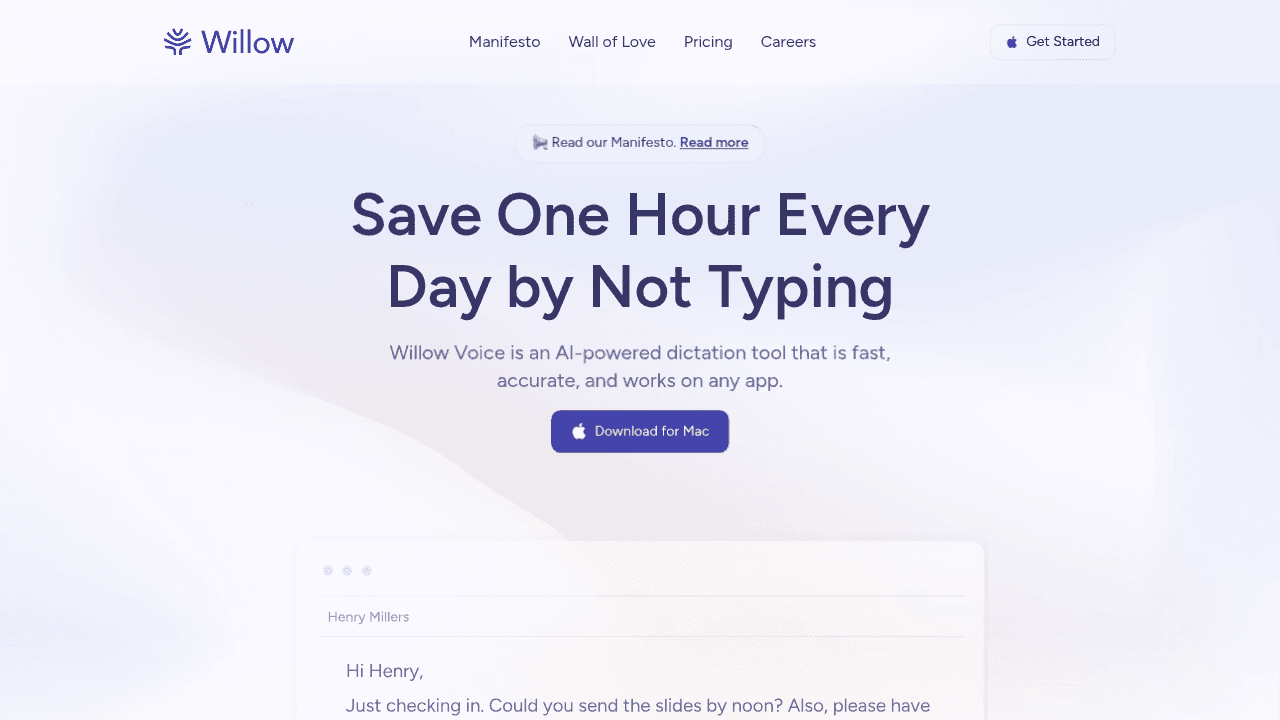
Willow Voice is an AI-powered dictation tool that is fast, accurate, and works on any app, providing voice dictation for emails, documents, Cursor, note-taking, and messaging. Willow delivers sub-1 second latency even with AI post-processing for formatting, offers fast, accurate voice dictation with smooth speech-to-text conversion, and is 3x more accurate than built-in dictation tools.
Key strengths:
Universal hotkey activation works instantly in Cursor and all applications
Context-aware AI recognizes technical terms and programming vocabulary automatically
Sub-second processing maintains coding flow without interruption
Custom dictionaries for company names and industry-specific terminology
Smart formatting that understands coding context and developer intent
Native Mac, Windows, and iOS support for mixed-device engineering teams
SOC 2 Type II and HIPAA compliant for enterprise engineering organizations
Voice input in Cursor follows the same pattern as any other app with Willow. The basic premise is simple: voice is faster than typing through hotkey activation and instant text conversion in any application. You press the function key, speak your prompt or code comment, and watch as perfectly formatted text appears instantly. No copying, no pasting, no workflow interruption.
Built for engineering teams:
Individual tools like Apple's built-in dictation and Windows Speech Recognition stop at the person. Engineering orgs running Cursor at scale need more: every developer should recognize the same codebase terminology from day one, leads need visibility into adoption, and security teams need audit-grade compliance documentation. Shared custom dictionaries let teams standardize codebase terminology across all developers' setups. Codebase auto-tagging in Cursor and Windsurf IDEs automatically pulls variable, function, and class names from open project files, so no one needs to manually configure their dictionary per project. Team leaderboards give engineering leads usage and time-saving data across the group. Willow is SOC 2 Type II and HIPAA compliant and runs natively on Mac, Windows, and iOS, so engineers on Windows workstations, MacBooks, or prompting from an iPhone work from the same vocabulary and configuration with no per-device setup.
Willow is trusted by teams at Uber, Reddit, and companies across 20% of the Fortune 500, as well as by developers at top YC startups building with AI coding tools. Individual plans cover solo developers; team and enterprise plans add shared configuration, admin controls, and compliance documentation for engineering orgs.
Bottom line: Purpose-built for developer productivity with AI coding editors, with the enterprise features to deploy across engineering orgs: shared custom dictionaries, codebase auto-tagging, team leaderboards, and SOC 2 Type II compliance included.
Apple Built-in Dictation
Apple's built-in dictation feature is powered by Siri and ships with desktop and mobile operating systems, but it has a default time limit of about 30 seconds per speech segment. Users report that Mac OS dictation works well enough for basic tasks but has accuracy issues that become annoying over time.

What they offer:
Built into macOS with system-wide availability
Enhanced Dictation mode for offline functionality
No additional software installation required
Voice Control integration for navigation commands
In standard mode, the 30-second segment limit interrupts continuous technical dictation. Enhanced Dictation runs offline without a time limit but requires downloading a language file and tends to achieve lower accuracy than the cloud-based mode. Apple's dictation has no custom vocabulary layer, so technical terms, variable names, and library references can misfire without manual correction. There is no learning loop. The model does not adapt based on corrections over time. For general prose, accuracy is adequate; for dense technical content like AI coding prompts, the error rate and segment interruptions add up quickly.
Willow is 3x more accurate than Apple's built-in dictation, and users report spending far less time correcting errors after switching. Check out our testimonials to see how developers are making the switch.
Bottom line: Time limits and accuracy issues disrupt developer workflow for complex prompts.
Windows Speech Recognition
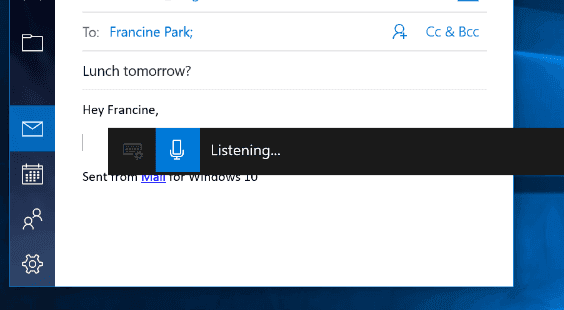
Windows developers note that Windows Voice Typing (Win+H) isn't reliable enough and doesn't work with the thinking-out-loud approach needed for AI coding prompts. Previously known as Windows 11 Speech Recognition, Voice Access works as a dictation tool for writing documents, but since it's part of the system, compatibility varies across applications.
What they offer:
System-wide Windows integration across applications
Voice commands for document formatting and navigation
No additional software cost for Windows users
Accessibility features for hands-free computer control
Windows Voice Typing uses Microsoft Azure cloud-based transcription when connected to the internet and falls back to an on-device model offline, though offline accuracy is noticeably lower. It has no custom vocabulary layer, so technical terms, variable names, and library references will frequently misfire without manual correction. Punctuation commands are limited compared to dedicated tools, and there is no learning loop. The model does not improve based on your corrections over time. For general prose, it performs adequately; for the kind of dense technical dictation required in AI coding prompts, the error rate adds up quickly.
Bottom line: Windows Voice Typing is built for general system-wide dictation, not the dense technical vocabulary and extended phrasing that AI coding prompts require.
Superwhisper
Superwhisper is a voice dictation app for Mac, Windows, and iOS that lets you speak into many apps, including Cursor. It runs on OpenAI Whisper models and gives you direct control over which model size you use, trading processing speed against transcription accuracy.
What they offer:
Local and cloud processing options for offline or online speech recognition
Multiple model tiers (Nano, Fast, and Ultra) selected manually per use case
Custom modes for different transcription scenarios (e.g., coding, email, general dictation)
Hotkey activation with text insertion into the active app on Mac and Windows
iOS app for mobile dictation, though text must be copied out to other apps manually
SOC 2 Type II and HIPAA compliant

The model selection is a real trade-off in practice. The Nano model processes quickly but makes more technical errors. The Ultra model improves accuracy but adds 1-2 seconds of processing time per segment, long enough to break a coding flow state. You pick the model yourself; there is no automatic context switching based on what app is active. On iOS, the workflow is siloed: you speak inside the Superwhisper app, then copy and paste the output into Cursor or wherever you need it. There is no shared dictionary layer across a team, and no codebase auto-tagging for variable or function names. Our Willow vs Superwhisper comparison breaks down the key differences.
Bottom line: Requires a manual copy-paste workflow or custom mode setup that breaks coding flow in Cursor.
Feature Comparison Table
Feature | Willow | Superwhisper | Apple Dictation | Windows Speech |
|---|---|---|---|---|
Universal App Support | ✓ | ✓ | ✓ | ✓ |
Sub-second Latency | ✓ | Variable | Limited | Basic |
Technical Term Recognition | ✓ | Limited | Basic | Basic |
Context-aware Formatting | ✓ | ✗ | ✗ | ✗ |
Auto-Dictionaries | ✓ | ✗ | ✗ | Limited |
Hotkey Activation | ✓ | ✓ | ✓ | ✓ |
Developer-focused | ✓ | ✗ | ✗ | ✗ |
Device Support | Mac, Windows & iOS | Mac, Windows & iOS | Mac & iOS | Windows only |
Enterprise/Team Features | ✓ | ✗ | ✗ | ✗ |
This comparison focuses on features important to Cursor development workflows. Willow's developer-focused features tackle specific pain points that other general-purpose dictation tools miss.
Our blog about the top Notion dictation tools shares similar requirements, but coding demands even higher precision and speed.
Why Willow is the Best AI Dictation Tool for Cursor
Developers can speak at 150 words per minute versus typing at 40 words per minute, giving voice input a 3x speed advantage for writing code prompts and documentation.
Context-aware processing correctly recognizes technical terms on the first pass, so the correction overhead that would otherwise erode that speed advantage remains minimal. The combination of universal compatibility, context-aware AI, and developer-focused features makes it well-suited for AI-powered coding environments like Cursor, where speed and accuracy directly impact productivity.
When explaining a complex algorithm to Cursor, Willow can recognize programming terminology, maintain context across a long explanation, and format the output for code comments or prompts without requiring corrections that break the chain of thought.
General-purpose dictation tools carry no context about which application you're working in. Willow is designed for developer workflows, so the output is shaped for AI coding prompts, not general prose.
The gap widens at the team level. Apple's built-in dictation, Windows Speech Recognition, and Superwhisper are individual tools with no shared configuration layer. For engineering orgs, that means every developer maintains their own dictionary, no one has visibility into adoption, and there is no compliance documentation to hand the security team. Willow closes this gap: shared custom dictionaries carry codebase terminology across every developer's setup, codebase auto-tagging in Cursor and Windsurf IDEs means new team members pick up project vocabulary on day one, and team leaderboards give engineering leads usage data without extra tooling. Willow runs on Mac, Windows, and iOS, so the whole team works from one configuration regardless of which machine a developer is on.
Download Willow and see how it fits into your Cursor workflow.
FAQ
Can you use speech-to-text for writing Cursor AI prompts?
Yes. Voice dictation tools let you speak AI prompts at 150 words per minute versus typing at 40 WPM, making them particularly valuable for developers crafting complex instructions in Cursor's AI-powered coding environment.
What's the main limitation of Apple's built-in dictation for Cursor?
Apple's built-in dictation imposes a 30-second time limit on each speech segment, which interrupts complex coding explanations mid-thought and forces you to restart while trying to maintain context.
Willow vs Superwhisper for Cursor development?
Willow works universally across all applications with sub-second latency and automatic technical term recognition, while Superwhisper requires either custom mode setup or manual copy-paste workflows that break your coding flow.
Does Willow work on Windows for Cursor development?
Yes. Willow Voice runs natively on Windows, so developers on Windows workstations get the same sub-200ms latency, technical term recognition, and hotkey activation as Mac users. The iOS app also covers on-the-go prompting, so you can describe what you want to build from your phone and pick it up in Cursor when you're back at your desk.
Does Willow support team-wide deployment for engineering orgs?
Yes. Willow includes shared custom dictionaries, allowing teams to standardize codebase terminology across the org. Codebase auto-tagging in Cursor and Windsurf IDEs automatically pulls variable and function names from open project files. Team leaderboards give engineering leads usage and time-saving data across the group. Willow is SOC 2 Type II and HIPAA compliant and runs on Mac, Windows, and iOS, making it the only tool here built for org-wide engineering deployment.
How accurate is AI-powered dictation for technical terminology?
Modern AI-powered tools like Willow achieve 98%+ accuracy and are 3x more accurate than built-in dictation, with context-aware processing that understands programming vocabulary and technical concepts automatically.
Final thoughts on voice-powered development workflows
As vibe coding keeps growing, so does the need for fast, reliable, and accurate AI dictation tools in Cursor. While Apple's built-in dictation, Windows Speech Recognition, and Superwhisper each serve general purposes well, they weren't designed for the demanding requirements of AI-assisted development, where accuracy and speed directly impact productivity. For developers who need dictation that recognizes programming terminology and holds up through long technical explanations, Willow is built around that specific use case in ways the other tools here are not.
When you're weighing speech-to-text options for Cursor, you're balancing speed against accuracy, convenience against reliability, and built-in simplicity against specialized features. Some developers stick with what's already installed on their machine, while others hunt for tools that actually understand coding workflows. The choice between basic dictation and AI speech-to-text built for developers can make or break your productivity when you're trying to write detailed prompts. Here's a breakdown of the top options and how each holds up in real developer workflows.
TLDR:
Willow Voice leads with universal app support, sub-second latency, and developer-focused features
Apple's built-in dictation has 30-second time limits that disrupt complex AI prompts
Windows Speech Recognition lacks reliability for thinking-out-loud coding approaches
Superwhisper requires custom setup or manual copy-paste workflows that break coding flow
Willow runs natively on Mac, Windows, and iOS, covering mixed-device engineering teams
Enterprise teams get shared custom dictionaries, SOC 2 Type II compliance, and codebase auto-tagging for Cursor and Windsurf
Why Use Speech to Text in Cursor
Speech-to-text for Cursor uses voice dictation tools to convert spoken words into code, prompts, and text directly in the Cursor code editor. These tools allow hands-free, fast, and accurate text entry, which is particularly useful in AI-powered coding environments where developers can speak their intent and have AI editors generate code.
You probably know this, but it's called "vibe coding," and it allows developers to literally speak their code into existence. With AI-powered coding tools like Cursor paired with voice interfaces, we're seeing a complete change in the developer workflow.
This shift has gone mainstream. Vibe coding adoption data for 2026 shows that AI-assisted development has moved from early-adopter territory into standard engineering practice, with AI-generated code now accounting for a large share of new commits across companies of all sizes. If you're using Cursor regularly, the quality of your voice input tool now directly and measurably impacts how much you ship.
The focus here is on improving Cursor's AI features for developers who want to work faster than typing allows. Voice input runs at around 150 words per minute versus the 40 words per minute typical for typing, which adds up fast when you're crafting detailed AI prompts throughout the day. Think about it. You're working on a complex feature and need to explain your intent to Cursor. Instead of slowly typing out detailed prompts, you can speak naturally and let the AI understand exactly what you're building.
How We Ranked Best Speech-to-Text for Cursor in June 2026
Our evaluation focused on criteria important for developers working with Cursor's AI-powered environment. We tested each solution against multiple criteria that matter in real-world workflows, with accuracy coming first because there's no point in speaking if you spend more time fixing errors than you save.
Key factors, weighted equally:
Universal compatibility across applications
Sub-second latency to maintain coding flow
Technical term recognition in programming vocabulary
Smooth hotkey activation
Cross-device support across Mac and Windows
Team and enterprise readiness: shared dictionaries, compliance certifications, and org-wide deployment features
In AI-assisted programming, the biggest mistake is insufficient information in the prompt. Cursor isn't a mind reader, and vague commands lead to failure, so your dictation tool needs to capture complex technical concepts accurately.
We assessed tools based on their suitability for developer workflows, using speed, accuracy, and integration features as the primary criteria. This methodology drew on publicly available information about each tool's features, user feedback, and documented capabilities instead of hands-on testing.
Quick related note: our guide on best dictation tools for Google Docs provided a baseline for comparison, but coding environments demand higher precision and faster processing.
Best Overall: Willow Voice
Willow Voice is an AI-powered dictation tool that is fast, accurate, and works on any app, providing voice dictation for emails, documents, Cursor, note-taking, and messaging. Willow delivers sub-1 second latency even with AI post-processing for formatting, offers fast, accurate voice dictation with smooth speech-to-text conversion, and is 3x more accurate than built-in dictation tools.
Key strengths:
Universal hotkey activation works instantly in Cursor and all applications
Context-aware AI recognizes technical terms and programming vocabulary automatically
Sub-second processing maintains coding flow without interruption
Custom dictionaries for company names and industry-specific terminology
Smart formatting that understands coding context and developer intent
Native Mac, Windows, and iOS support for mixed-device engineering teams
SOC 2 Type II and HIPAA compliant for enterprise engineering organizations
Voice input in Cursor follows the same pattern as any other app with Willow. The basic premise is simple: voice is faster than typing through hotkey activation and instant text conversion in any application. You press the function key, speak your prompt or code comment, and watch as perfectly formatted text appears instantly. No copying, no pasting, no workflow interruption.
Built for engineering teams:
Individual tools like Apple's built-in dictation and Windows Speech Recognition stop at the person. Engineering orgs running Cursor at scale need more: every developer should recognize the same codebase terminology from day one, leads need visibility into adoption, and security teams need audit-grade compliance documentation. Shared custom dictionaries let teams standardize codebase terminology across all developers' setups. Codebase auto-tagging in Cursor and Windsurf IDEs automatically pulls variable, function, and class names from open project files, so no one needs to manually configure their dictionary per project. Team leaderboards give engineering leads usage and time-saving data across the group. Willow is SOC 2 Type II and HIPAA compliant and runs natively on Mac, Windows, and iOS, so engineers on Windows workstations, MacBooks, or prompting from an iPhone work from the same vocabulary and configuration with no per-device setup.
Willow is trusted by teams at Uber, Reddit, and companies across 20% of the Fortune 500, as well as by developers at top YC startups building with AI coding tools. Individual plans cover solo developers; team and enterprise plans add shared configuration, admin controls, and compliance documentation for engineering orgs.
Bottom line: Purpose-built for developer productivity with AI coding editors, with the enterprise features to deploy across engineering orgs: shared custom dictionaries, codebase auto-tagging, team leaderboards, and SOC 2 Type II compliance included.
Apple Built-in Dictation
Apple's built-in dictation feature is powered by Siri and ships with desktop and mobile operating systems, but it has a default time limit of about 30 seconds per speech segment. Users report that Mac OS dictation works well enough for basic tasks but has accuracy issues that become annoying over time.
What they offer:
Built into macOS with system-wide availability
Enhanced Dictation mode for offline functionality
No additional software installation required
Voice Control integration for navigation commands
In standard mode, the 30-second segment limit interrupts continuous technical dictation. Enhanced Dictation runs offline without a time limit but requires downloading a language file and tends to achieve lower accuracy than the cloud-based mode. Apple's dictation has no custom vocabulary layer, so technical terms, variable names, and library references can misfire without manual correction. There is no learning loop. The model does not adapt based on corrections over time. For general prose, accuracy is adequate; for dense technical content like AI coding prompts, the error rate and segment interruptions add up quickly.
Willow is 3x more accurate than Apple's built-in dictation, and users report spending far less time correcting errors after switching. Check out our testimonials to see how developers are making the switch.
Bottom line: Time limits and accuracy issues disrupt developer workflow for complex prompts.
Windows Speech Recognition
Windows developers note that Windows Voice Typing (Win+H) isn't reliable enough and doesn't work with the thinking-out-loud approach needed for AI coding prompts. Previously known as Windows 11 Speech Recognition, Voice Access works as a dictation tool for writing documents, but since it's part of the system, compatibility varies across applications.
What they offer:
System-wide Windows integration across applications
Voice commands for document formatting and navigation
No additional software cost for Windows users
Accessibility features for hands-free computer control
Windows Voice Typing uses Microsoft Azure cloud-based transcription when connected to the internet and falls back to an on-device model offline, though offline accuracy is noticeably lower. It has no custom vocabulary layer, so technical terms, variable names, and library references will frequently misfire without manual correction. Punctuation commands are limited compared to dedicated tools, and there is no learning loop. The model does not improve based on your corrections over time. For general prose, it performs adequately; for the kind of dense technical dictation required in AI coding prompts, the error rate adds up quickly.
Bottom line: Windows Voice Typing is built for general system-wide dictation, not the dense technical vocabulary and extended phrasing that AI coding prompts require.
Superwhisper
Superwhisper is a voice dictation app for Mac, Windows, and iOS that lets you speak into many apps, including Cursor. It runs on OpenAI Whisper models and gives you direct control over which model size you use, trading processing speed against transcription accuracy.
What they offer:
Local and cloud processing options for offline or online speech recognition
Multiple model tiers (Nano, Fast, and Ultra) selected manually per use case
Custom modes for different transcription scenarios (e.g., coding, email, general dictation)
Hotkey activation with text insertion into the active app on Mac and Windows
iOS app for mobile dictation, though text must be copied out to other apps manually
SOC 2 Type II and HIPAA compliant
The model selection is a real trade-off in practice. The Nano model processes quickly but makes more technical errors. The Ultra model improves accuracy but adds 1-2 seconds of processing time per segment, long enough to break a coding flow state. You pick the model yourself; there is no automatic context switching based on what app is active. On iOS, the workflow is siloed: you speak inside the Superwhisper app, then copy and paste the output into Cursor or wherever you need it. There is no shared dictionary layer across a team, and no codebase auto-tagging for variable or function names. Our Willow vs Superwhisper comparison breaks down the key differences.
Bottom line: Requires a manual copy-paste workflow or custom mode setup that breaks coding flow in Cursor.
Feature Comparison Table
Feature | Willow | Superwhisper | Apple Dictation | Windows Speech |
|---|---|---|---|---|
Universal App Support | ✓ | ✓ | ✓ | ✓ |
Sub-second Latency | ✓ | Variable | Limited | Basic |
Technical Term Recognition | ✓ | Limited | Basic | Basic |
Context-aware Formatting | ✓ | ✗ | ✗ | ✗ |
Auto-Dictionaries | ✓ | ✗ | ✗ | Limited |
Hotkey Activation | ✓ | ✓ | ✓ | ✓ |
Developer-focused | ✓ | ✗ | ✗ | ✗ |
Device Support | Mac, Windows & iOS | Mac, Windows & iOS | Mac & iOS | Windows only |
Enterprise/Team Features | ✓ | ✗ | ✗ | ✗ |
This comparison focuses on features important to Cursor development workflows. Willow's developer-focused features tackle specific pain points that other general-purpose dictation tools miss.
Our blog about the top Notion dictation tools shares similar requirements, but coding demands even higher precision and speed.
Why Willow is the Best AI Dictation Tool for Cursor
Developers can speak at 150 words per minute versus typing at 40 words per minute, giving voice input a 3x speed advantage for writing code prompts and documentation.
Context-aware processing correctly recognizes technical terms on the first pass, so the correction overhead that would otherwise erode that speed advantage remains minimal. The combination of universal compatibility, context-aware AI, and developer-focused features makes it well-suited for AI-powered coding environments like Cursor, where speed and accuracy directly impact productivity.
When explaining a complex algorithm to Cursor, Willow can recognize programming terminology, maintain context across a long explanation, and format the output for code comments or prompts without requiring corrections that break the chain of thought.
General-purpose dictation tools carry no context about which application you're working in. Willow is designed for developer workflows, so the output is shaped for AI coding prompts, not general prose.
The gap widens at the team level. Apple's built-in dictation, Windows Speech Recognition, and Superwhisper are individual tools with no shared configuration layer. For engineering orgs, that means every developer maintains their own dictionary, no one has visibility into adoption, and there is no compliance documentation to hand the security team. Willow closes this gap: shared custom dictionaries carry codebase terminology across every developer's setup, codebase auto-tagging in Cursor and Windsurf IDEs means new team members pick up project vocabulary on day one, and team leaderboards give engineering leads usage data without extra tooling. Willow runs on Mac, Windows, and iOS, so the whole team works from one configuration regardless of which machine a developer is on.
Download Willow and see how it fits into your Cursor workflow.
FAQ
Can you use speech-to-text for writing Cursor AI prompts?
Yes. Voice dictation tools let you speak AI prompts at 150 words per minute versus typing at 40 WPM, making them particularly valuable for developers crafting complex instructions in Cursor's AI-powered coding environment.
What's the main limitation of Apple's built-in dictation for Cursor?
Apple's built-in dictation imposes a 30-second time limit on each speech segment, which interrupts complex coding explanations mid-thought and forces you to restart while trying to maintain context.
Willow vs Superwhisper for Cursor development?
Willow works universally across all applications with sub-second latency and automatic technical term recognition, while Superwhisper requires either custom mode setup or manual copy-paste workflows that break your coding flow.
Does Willow work on Windows for Cursor development?
Yes. Willow Voice runs natively on Windows, so developers on Windows workstations get the same sub-200ms latency, technical term recognition, and hotkey activation as Mac users. The iOS app also covers on-the-go prompting, so you can describe what you want to build from your phone and pick it up in Cursor when you're back at your desk.
Does Willow support team-wide deployment for engineering orgs?
Yes. Willow includes shared custom dictionaries, allowing teams to standardize codebase terminology across the org. Codebase auto-tagging in Cursor and Windsurf IDEs automatically pulls variable and function names from open project files. Team leaderboards give engineering leads usage and time-saving data across the group. Willow is SOC 2 Type II and HIPAA compliant and runs on Mac, Windows, and iOS, making it the only tool here built for org-wide engineering deployment.
How accurate is AI-powered dictation for technical terminology?
Modern AI-powered tools like Willow achieve 98%+ accuracy and are 3x more accurate than built-in dictation, with context-aware processing that understands programming vocabulary and technical concepts automatically.
Final thoughts on voice-powered development workflows
As vibe coding keeps growing, so does the need for fast, reliable, and accurate AI dictation tools in Cursor. While Apple's built-in dictation, Windows Speech Recognition, and Superwhisper each serve general purposes well, they weren't designed for the demanding requirements of AI-assisted development, where accuracy and speed directly impact productivity. For developers who need dictation that recognizes programming terminology and holds up through long technical explanations, Willow is built around that specific use case in ways the other tools here are not.

Try Willow for free
Instant, accurate voice dictation. No card required.
Try Willow for free
Instant, accurate voice dictation. No card required.
Other stories you’ll love
Other stories you’ll love



Your keyboard is optional now
" transform="translate(5 5)" width="9.791000051498413px"/></svg>)

The voice-first interface for modern work.
© Willow Care, Inc. 2026. All rights reserved
Your keyboard is optional now
The voice-first interface for modern work.
© Willow Care, Inc. 2026. All rights reserved
Your keyboard is optional now
The voice-first interface for modern work.
© Willow Care, Inc. 2026. All rights reserved