" transform="translate(5 2)" width="10px"/></svg>)

•
5 min read
Best Speech-to-Text Apps for ChatGPT in August 2026

•
5 min read
Best Speech-to-Text Apps for ChatGPT in August 2026
You know that moment when you have the perfect question to ask ChatGPT, but typing it out feels like running through mud? If your organization spends more time wrestling with keyboards than actually prompting AI tools, you might be ready to try a speech-to-text app for ChatGPT built for professional workflows. The good news is that voice recognition has finally hit its stride, offering practical ways to improve how teams interact with AI tools. Let's break down the top options that'll have your entire workforce speaking their prompts instead of typing them.
TLDR:
Speech-to-text apps convert spoken words into text to use in ChatGPT, allowing faster and more natural AI interactions
Willow Voice offers a complete solution for professional teams, combining cross-device parity (Windows, Mac, iOS), shared custom dictionaries, SOC 2 Type II compliance, and ~200ms processing speeds
ChatGPT's native voice feature works on mobile and Windows, and recently regained Mac support via the GPT-Live update, though it remains restricted to the ChatGPT app
Browser extensions like Voice In provide web-only functionality with real-time transcription
Privacy, accuracy, and universal app support are key factors when choosing a solution
Why Use Speech-to-Text Apps With ChatGPT
When you are deep in a complex problem, typing out a long, detailed prompt breaks your focus. Speech-to-text apps let you speak your thoughts naturally while the software handles the transcription directly into ChatGPT. Unlike simple dictation tools, these applications allow interactive conversations where ChatGPT can process complex context without the friction of a keyboard.
These tools meet the growing demand for faster, team-wide interaction with AI systems. Instead of typing complex prompts, professionals can speak naturally at 150 words per minute versus 40 words per minute typing, letting the software handle the conversion. This is particularly valuable for developers drafting technical PR descriptions on Windows workstations, product managers running distributed sprints, and customer-facing teams working from an iPhone on the go.
The technology has evolved well beyond basic dictation. Modern solutions understand context, handle technical terminology, plus can even adapt their output based on where you're typing. Whether you're crafting prompts in ChatGPT, Claude Code, or Cursor, the right speech-to-text app becomes an important productivity multiplier across mixed-device workforces.
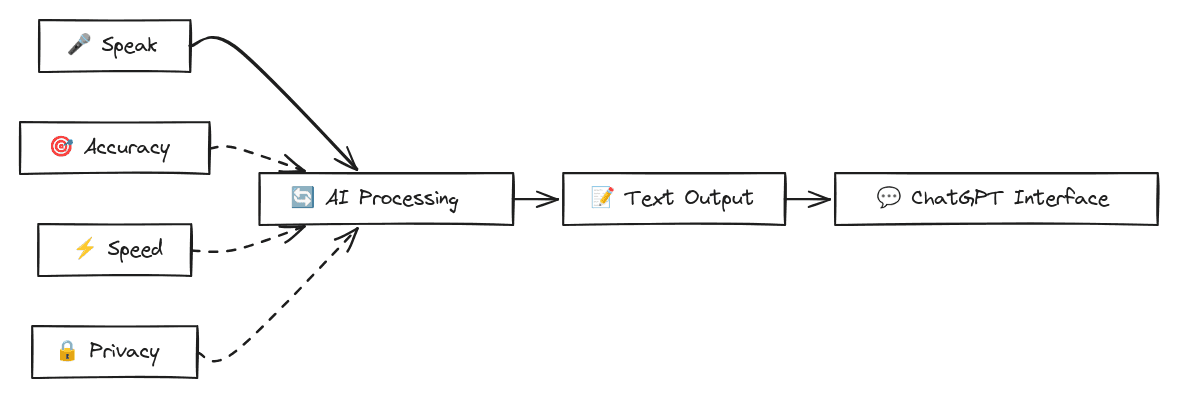
Voice recognition software has reached a tipping point in the last year. Modern AI models understand context, handle technical accents, and adapt on the fly.
How We Assessed Speech-to-Text Apps
Our testing methodology focuses on real-world performance metrics that matter most to ChatGPT users. We assessed each application based on accuracy rates, response latency, universal compatibility across applications, and ease of use.
Key testing criteria include transcription accuracy in technical contexts, integration features with ChatGPT plus other AI systems, privacy plus security features, as well as overall user experience. We favored solutions that support mixed-device teams, enterprise-grade security, and professional AI workflows instead of consumer-grade dictation tools.
Best Speech-to-Text Apps for ChatGPT
Feature | Willow Voice | ChatGPT Native | Voice In | superwhisper | Wispr Flow |
|---|---|---|---|---|---|
Universal App Support | ✓ | ✗ | Web Only | Desktop Only | ✓ |
Privacy | ✓ | ✗ | ✗ | ✓ | ✗ |
Real-time Processing | ✓ | ✗ | ✓ | ✓ | ✓ |
Custom Dictionaries | ✓ | ✗ | Paid only | ✓ | ✓ |
Device Support | Mac, Windows, iOS | Mac, Windows, iOS, Android, Web | Browser | Mac, Windows, iOS | Mac, iOS (Windows in limited rollout) |
Setup Complexity | Minimal | None | Minimal | Medium | Minimal |
1. Best Overall Speech to Text for ChatGPT: Willow Voice
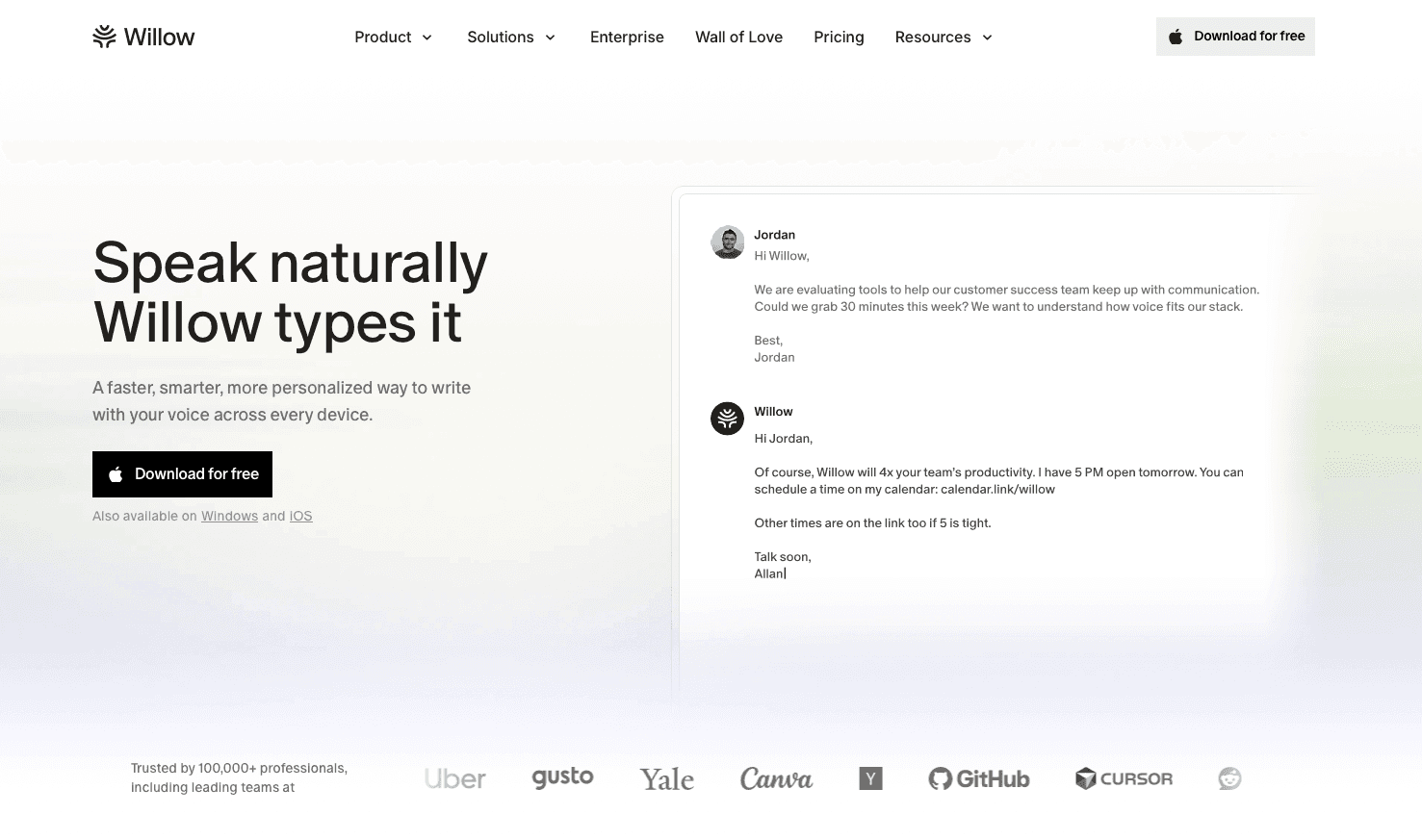
Willow Voice provides AI-powered dictation built for organizations, working consistently across ChatGPT and all applications on Windows, Mac, and iOS. On any desktop, simply press your designated hotkey (Alt+Space on Windows, fn on Mac), speak naturally, and watch your words appear in ~200ms with intelligent formatting. For mobile workflows, Willow's custom iOS voice keyboard provides a native typing alternative.
Key strengths include context-aware AI that reads active applications to correctly transcribe team-specific technical terms, cross-device compatibility for mixed-device fleets, and ~200ms latency. For mixed-device teams running across Windows, Mac, and iOS, Willow's vocabulary and settings carry over without per-device setup, so developers moving between a Windows workstation and a Mac or phone at home work from the same configuration. It delivers 98%+ accuracy with 3x fewer errors than built-in options, making it reliable for complex AI prompts and engineering code reviews.
Other benefits include shared custom dictionaries for AI prompting terminology, automatic filler word removal, and a zero-data-retention architecture. Beyond verbatim transcription, Willow Scribe provides an AI-assisted mode that generates complete emails and messages from voice prompts, or lets you rewrite existing text using voice commands.
This provides a strong option for ChatGPT power users who need reliable, fast dictation everywhere. Whether you're in the ChatGPT web interface, a native app, or any other Windows or Mac application, Willow Voice maintains consistent performance and accuracy.
Enterprise Readiness: Unlike consumer-only alternatives, Willow Voice is built for organizational scale. It features team deployment options, admin controls, Single Sign-On (SSO) for centralized identity management, and SOC 2 Type II plus HIPAA compliance. Organizations can roll out shared custom dictionaries and voice shortcuts so that specialized codebase terms or internal project names transcribe accurately across the entire team from day one, whether on a Windows workstation or a Mac. The enterprise tier also provides a usage-based API to integrate Willow Voice's dictation programmatically into internal tools.
2. Limited Solution: ChatGPT Native
ChatGPT's built-in speech-to-text function works exclusively within the ChatGPT interface. The process involves opening ChatGPT, clicking the microphone button, speaking your prompt, then pressing stop. While OpenAI temporarily retired legacy voice features from their native macOS app in January 2026, the July 2026 GPT-Live update brought continuous audio streaming back to the Mac desktop.
This works smoothly within the supported ChatGPT applications because it's native, so there's no additional software to install or configure.
However, the functionality is limited to ChatGPT's interface only. If you want to use the transcribed text elsewhere, you'll need to manually copy and paste it into other applications. This creates workflow friction for users who work across multiple AI tools or need to add AI responses into documents. The solution works well for users who primarily interact with ChatGPT in isolation but becomes cumbersome for integrated workflows involving multiple applications.
3. Browser-Dependent Tool: Voice In Extension
Voice In is a Chrome extension that brings real-time speech recognition to thousands of websites, including ChatGPT. Because it operates directly inside your browser, you can speak into Google Docs, Gmail, or web-based AI tools without switching applications.
The main drawback is its strict browser dependency.
Since Voice In only works within Chrome and other supported browsers, it offers zero functionality for native desktop applications. You cannot use it in Windows or Mac apps, desktop AI interfaces, or any non-web environment. While it provides a budget-friendly option for people who work entirely in their browser, this lack of universal app support makes it less practical for complex AI workflows that span multiple programs.
4. superwhisper
superwhisper built its reputation on local dictation processing. By keeping data strictly on your device, it became a go-to choice for privacy-conscious users across Mac, Windows, and iOS. While it now offers cloud options for newer AI models, its core strength remains offline speech recognition that works entirely without an internet connection.
Because it puts local processing first, it requires hands-on configuration.
superwhisper involves a learning curve to run optimally. Users spend time adjusting models, training the system, and modifying configurations for specific hardware limits. This architectural trade-off makes it a fit for users who value local privacy over immediate, ready-to-use productivity.
5. Wispr Flow
Wispr Flow offers an out-of-the-box experience across Mac and iOS (with Windows support available in beta or limited rollout).
The main limitation is iOS functionality restrictions due to Apple's API constraints. While the Mac version performs well, the iPhone experience is quite limited compared to the desktop version.
For users who need compatibility across multiple operating systems and don't rely heavily on iOS functionality, Wispr Flow provides a solid middle-ground solution.
How to Choose the Best Speech-to-Text App for ChatGPT
Consider your primary use case and workflow requirements when selecting a speech-to-text solution. If you primarily work within web browsers, a browser extension might suffice. For complete AI workflows spanning multiple applications and mixed-device fleets, especially in enterprise engineering environments where Windows is often the primary operating system, native and universal compatibility becomes important.
Check privacy requirements, especially if you're working with sensitive information or proprietary AI prompts. Look for SOC 2 Type II compliance and zero data retention if you plan to deploy the tool across an organization.
Consider processing speed and accuracy needs based on your usage volume. Heavy ChatGPT users benefit from solutions optimized for AI prompting workflows and powered by advanced AI models, while occasional users might prefer simpler options.
Device compatibility matters a lot. While many legacy voice-to-text tools remain restricted to specific operating systems or browsers, modern AI solutions now treat Windows, Mac, and iOS as first-class environments. Your choice will instead depend on specific workflow requirements, like whether you need deep system integration across mixed-device fleets, cross-device continuity for mobile workflows, or a simple browser extension.
For professional teams who need reliable, universal compatibility across Windows and Mac workstations, along with iOS support for mobile prompting contexts, solutions like Willow Voice provide the optimal balance of speed, accuracy, and enterprise-grade privacy.
Pricing structures vary widely across these tools. Built for professional deployment, Willow Voice provides a Pro plan at $12 per month (billed annually) for faster, more accurate dictation and unlimited Willow Scribe. Other options, including Team and Enterprise plans, are also available for collaborative deployments. For those just getting started, Willow Voice offers an unlimited free AI dictation plan with no word cap or credit card required.
Why Voice Typing Matters for AI Users
Humans can speak at approximately 150 words per minute but typically type only 40 words per minute. This speed difference becomes important when crafting detailed AI prompts or engaging in extended conversations with ChatGPT.
Voice input allows more natural, conversational interactions with AI systems. Instead of carefully crafting written prompts, you can speak naturally and let the AI understand your intent through conversational context. The move toward voice-first AI interaction represents a fundamental change in how we communicate with technology. We're approaching a future where ideas flow at the speed of thought instead of the speed of typing.
This change is particularly relevant for engineering organizations and product teams who spend considerable time crafting prompts, iterating on code reviews, and engaging in complex problem-solving conversations. If you're curious, we also wrote this piece called the best Otter AI alternatives, where we go into meeting transcription vs voice typing tools like Willow Voice.
Recent AI Voice Developments in 2026
With OpenAI's rollout of GPT-Live in early July 2026, followed by the addition of SynthID watermarking for generated audio later that month, the standard for real-time voice interaction has changed again. While GPT-Live offers direct voice-to-voice conversations within ChatGPT, most professional workflows, like prompting AI coding assistants or querying models across different applications, still rely on text input. In these scenarios, a capable system-wide voice typing tool keeps your complex thoughts accurately converted to text before the models process them.
FAQ
How accurate are speech-to-text apps for ChatGPT?
Modern speech-to-text apps achieve 90-95% accuracy for clear speech, with AI-powered solutions like Willow Voice reaching 98%+ accuracy and 3x fewer errors than built-in dictation tools. Accuracy improves with practice and proper enunciation.
What's the best speech-to-text app for ChatGPT if I work across Windows, Mac, and a phone?
Willow Voice is built for exactly this setup. It runs natively on Windows, Mac, and iOS with vocabulary and settings synced across all three, so you can speak into ChatGPT or any other app from the same configuration regardless of which device you're on. ChatGPT Native and Voice In both fall short here: ChatGPT Native is restricted to its own application (even though it regained Mac voice support in July 2026), and Voice In works only inside a browser. For mixed-device teams or professionals who move between devices throughout the day, Willow Voice is the only option in this comparison that treats all three environments as first-class.
Willow Voice vs. superwhisper for ChatGPT and AI prompting workflows?
superwhisper favors local processing and requires hands-on model configuration. That is a reasonable trade-off for privacy-first users willing to spend time on setup, but slower and less immediate than a cloud-processed tool. Willow Voice processes at ~200ms, works system-wide across every app without switching windows, and adds context-aware AI that adapts output to where you're typing, making it a faster fit for high-volume AI prompting workflows across ChatGPT, Cursor, and Claude.
Do speech-to-text apps work offline?
Some solutions like superwhisper offer local processing for offline functionality. Cloud-based solutions like Willow Voice require internet connectivity but provide faster processing and better accuracy through advanced AI models.
How do I choose between a browser extension like Voice In and a desktop app like Willow Voice for ChatGPT?
If you work entirely inside Chrome-based web tools, Voice In covers the basics at low cost. The constraint hits when your workflow moves outside the browser, into a native IDE, desktop Slack, or any non-web app, where Voice In stops working entirely. A system-wide desktop app like Willow Voice activates from a single hotkey (Alt+Space on Windows, fn on Mac) in any application, so the same dictation experience follows you across ChatGPT, Cursor, Notion, and everything else without context-switching.
Can I use speech-to-text with ChatGPT on Windows without switching to a browser?
Yes. Willow Voice runs as a system-wide dictation layer on Windows, activated with Alt+Space inside any application, including the ChatGPT desktop interface, native IDEs, and local tools, with no browser or tab-switching required. Windows 11's built-in voice typing (Win+H) also works cross-app at no cost, though it lacks filler word removal, custom vocabulary learning, and context-aware formatting, and accuracy drops on technical or non-standard terminology.
Can I use speech-to-text apps with other AI tools besides ChatGPT?
Yes. Because system-wide tools like Willow Voice operate at the OS level instead of inside a specific app, they work in any text field on Mac, Windows, and iOS, including Claude, Cursor, Gemini, Notion, Slack, Gmail, and GitHub. This is the core architectural difference from ChatGPT Native (ChatGPT only) and Voice In (browser only): one hotkey covers your entire workflow stack without per-tool setup or plugins.
Are speech-to-text apps secure for sensitive information?
Security varies by solution. Local processing apps keep data on your device, while cloud-based solutions should offer encryption and no-storage policies. Willow Voice, for example, is SOC 2 Type II and HIPAA compliant with a zero-data-retention architecture, meaning audio is processed and discarded by default. Always review privacy policies for sensitive use cases.
Moving Fast With AI Conversations
The days of wrestling with your keyboard to capture fast-moving thoughts are ending. You can now speak your prompts naturally and let the software handle transcription, keeping ChatGPT sessions as fluid as your thinking process. Willow Voice provides an AI voice for ChatGPT that keeps pace with professional workflows. Start using a speech-to-text setup that spans Windows, Mac, and iOS with full admin controls and shared team vocabulary, so you spend more time brainstorming and less time battling your input method. Ready to speak your prompts instead of typing them? Download Willow Voice to get started on Windows, Mac, or iOS today.
You know that moment when you have the perfect question to ask ChatGPT, but typing it out feels like running through mud? If your organization spends more time wrestling with keyboards than actually prompting AI tools, you might be ready to try a speech-to-text app for ChatGPT built for professional workflows. The good news is that voice recognition has finally hit its stride, offering practical ways to improve how teams interact with AI tools. Let's break down the top options that'll have your entire workforce speaking their prompts instead of typing them.
TLDR:
Speech-to-text apps convert spoken words into text to use in ChatGPT, allowing faster and more natural AI interactions
Willow Voice offers a complete solution for professional teams, combining cross-device parity (Windows, Mac, iOS), shared custom dictionaries, SOC 2 Type II compliance, and ~200ms processing speeds
ChatGPT's native voice feature works on mobile and Windows, and recently regained Mac support via the GPT-Live update, though it remains restricted to the ChatGPT app
Browser extensions like Voice In provide web-only functionality with real-time transcription
Privacy, accuracy, and universal app support are key factors when choosing a solution
Why Use Speech-to-Text Apps With ChatGPT
When you are deep in a complex problem, typing out a long, detailed prompt breaks your focus. Speech-to-text apps let you speak your thoughts naturally while the software handles the transcription directly into ChatGPT. Unlike simple dictation tools, these applications allow interactive conversations where ChatGPT can process complex context without the friction of a keyboard.
These tools meet the growing demand for faster, team-wide interaction with AI systems. Instead of typing complex prompts, professionals can speak naturally at 150 words per minute versus 40 words per minute typing, letting the software handle the conversion. This is particularly valuable for developers drafting technical PR descriptions on Windows workstations, product managers running distributed sprints, and customer-facing teams working from an iPhone on the go.
The technology has evolved well beyond basic dictation. Modern solutions understand context, handle technical terminology, plus can even adapt their output based on where you're typing. Whether you're crafting prompts in ChatGPT, Claude Code, or Cursor, the right speech-to-text app becomes an important productivity multiplier across mixed-device workforces.
Voice recognition software has reached a tipping point in the last year. Modern AI models understand context, handle technical accents, and adapt on the fly.
How We Assessed Speech-to-Text Apps
Our testing methodology focuses on real-world performance metrics that matter most to ChatGPT users. We assessed each application based on accuracy rates, response latency, universal compatibility across applications, and ease of use.
Key testing criteria include transcription accuracy in technical contexts, integration features with ChatGPT plus other AI systems, privacy plus security features, as well as overall user experience. We favored solutions that support mixed-device teams, enterprise-grade security, and professional AI workflows instead of consumer-grade dictation tools.
Best Speech-to-Text Apps for ChatGPT
Feature | Willow Voice | ChatGPT Native | Voice In | superwhisper | Wispr Flow |
|---|---|---|---|---|---|
Universal App Support | ✓ | ✗ | Web Only | Desktop Only | ✓ |
Privacy | ✓ | ✗ | ✗ | ✓ | ✗ |
Real-time Processing | ✓ | ✗ | ✓ | ✓ | ✓ |
Custom Dictionaries | ✓ | ✗ | Paid only | ✓ | ✓ |
Device Support | Mac, Windows, iOS | Mac, Windows, iOS, Android, Web | Browser | Mac, Windows, iOS | Mac, iOS (Windows in limited rollout) |
Setup Complexity | Minimal | None | Minimal | Medium | Minimal |
1. Best Overall Speech to Text for ChatGPT: Willow Voice
Willow Voice provides AI-powered dictation built for organizations, working consistently across ChatGPT and all applications on Windows, Mac, and iOS. On any desktop, simply press your designated hotkey (Alt+Space on Windows, fn on Mac), speak naturally, and watch your words appear in ~200ms with intelligent formatting. For mobile workflows, Willow's custom iOS voice keyboard provides a native typing alternative.
Key strengths include context-aware AI that reads active applications to correctly transcribe team-specific technical terms, cross-device compatibility for mixed-device fleets, and ~200ms latency. For mixed-device teams running across Windows, Mac, and iOS, Willow's vocabulary and settings carry over without per-device setup, so developers moving between a Windows workstation and a Mac or phone at home work from the same configuration. It delivers 98%+ accuracy with 3x fewer errors than built-in options, making it reliable for complex AI prompts and engineering code reviews.
Other benefits include shared custom dictionaries for AI prompting terminology, automatic filler word removal, and a zero-data-retention architecture. Beyond verbatim transcription, Willow Scribe provides an AI-assisted mode that generates complete emails and messages from voice prompts, or lets you rewrite existing text using voice commands.
This provides a strong option for ChatGPT power users who need reliable, fast dictation everywhere. Whether you're in the ChatGPT web interface, a native app, or any other Windows or Mac application, Willow Voice maintains consistent performance and accuracy.
Enterprise Readiness: Unlike consumer-only alternatives, Willow Voice is built for organizational scale. It features team deployment options, admin controls, Single Sign-On (SSO) for centralized identity management, and SOC 2 Type II plus HIPAA compliance. Organizations can roll out shared custom dictionaries and voice shortcuts so that specialized codebase terms or internal project names transcribe accurately across the entire team from day one, whether on a Windows workstation or a Mac. The enterprise tier also provides a usage-based API to integrate Willow Voice's dictation programmatically into internal tools.
2. Limited Solution: ChatGPT Native
ChatGPT's built-in speech-to-text function works exclusively within the ChatGPT interface. The process involves opening ChatGPT, clicking the microphone button, speaking your prompt, then pressing stop. While OpenAI temporarily retired legacy voice features from their native macOS app in January 2026, the July 2026 GPT-Live update brought continuous audio streaming back to the Mac desktop.
This works smoothly within the supported ChatGPT applications because it's native, so there's no additional software to install or configure.
However, the functionality is limited to ChatGPT's interface only. If you want to use the transcribed text elsewhere, you'll need to manually copy and paste it into other applications. This creates workflow friction for users who work across multiple AI tools or need to add AI responses into documents. The solution works well for users who primarily interact with ChatGPT in isolation but becomes cumbersome for integrated workflows involving multiple applications.
3. Browser-Dependent Tool: Voice In Extension
Voice In is a Chrome extension that brings real-time speech recognition to thousands of websites, including ChatGPT. Because it operates directly inside your browser, you can speak into Google Docs, Gmail, or web-based AI tools without switching applications.
The main drawback is its strict browser dependency.
Since Voice In only works within Chrome and other supported browsers, it offers zero functionality for native desktop applications. You cannot use it in Windows or Mac apps, desktop AI interfaces, or any non-web environment. While it provides a budget-friendly option for people who work entirely in their browser, this lack of universal app support makes it less practical for complex AI workflows that span multiple programs.
4. superwhisper
superwhisper built its reputation on local dictation processing. By keeping data strictly on your device, it became a go-to choice for privacy-conscious users across Mac, Windows, and iOS. While it now offers cloud options for newer AI models, its core strength remains offline speech recognition that works entirely without an internet connection.
Because it puts local processing first, it requires hands-on configuration.
superwhisper involves a learning curve to run optimally. Users spend time adjusting models, training the system, and modifying configurations for specific hardware limits. This architectural trade-off makes it a fit for users who value local privacy over immediate, ready-to-use productivity.
5. Wispr Flow
Wispr Flow offers an out-of-the-box experience across Mac and iOS (with Windows support available in beta or limited rollout).
The main limitation is iOS functionality restrictions due to Apple's API constraints. While the Mac version performs well, the iPhone experience is quite limited compared to the desktop version.
For users who need compatibility across multiple operating systems and don't rely heavily on iOS functionality, Wispr Flow provides a solid middle-ground solution.
How to Choose the Best Speech-to-Text App for ChatGPT
Consider your primary use case and workflow requirements when selecting a speech-to-text solution. If you primarily work within web browsers, a browser extension might suffice. For complete AI workflows spanning multiple applications and mixed-device fleets, especially in enterprise engineering environments where Windows is often the primary operating system, native and universal compatibility becomes important.
Check privacy requirements, especially if you're working with sensitive information or proprietary AI prompts. Look for SOC 2 Type II compliance and zero data retention if you plan to deploy the tool across an organization.
Consider processing speed and accuracy needs based on your usage volume. Heavy ChatGPT users benefit from solutions optimized for AI prompting workflows and powered by advanced AI models, while occasional users might prefer simpler options.
Device compatibility matters a lot. While many legacy voice-to-text tools remain restricted to specific operating systems or browsers, modern AI solutions now treat Windows, Mac, and iOS as first-class environments. Your choice will instead depend on specific workflow requirements, like whether you need deep system integration across mixed-device fleets, cross-device continuity for mobile workflows, or a simple browser extension.
For professional teams who need reliable, universal compatibility across Windows and Mac workstations, along with iOS support for mobile prompting contexts, solutions like Willow Voice provide the optimal balance of speed, accuracy, and enterprise-grade privacy.
Pricing structures vary widely across these tools. Built for professional deployment, Willow Voice provides a Pro plan at $12 per month (billed annually) for faster, more accurate dictation and unlimited Willow Scribe. Other options, including Team and Enterprise plans, are also available for collaborative deployments. For those just getting started, Willow Voice offers an unlimited free AI dictation plan with no word cap or credit card required.
Why Voice Typing Matters for AI Users
Humans can speak at approximately 150 words per minute but typically type only 40 words per minute. This speed difference becomes important when crafting detailed AI prompts or engaging in extended conversations with ChatGPT.
Voice input allows more natural, conversational interactions with AI systems. Instead of carefully crafting written prompts, you can speak naturally and let the AI understand your intent through conversational context. The move toward voice-first AI interaction represents a fundamental change in how we communicate with technology. We're approaching a future where ideas flow at the speed of thought instead of the speed of typing.
This change is particularly relevant for engineering organizations and product teams who spend considerable time crafting prompts, iterating on code reviews, and engaging in complex problem-solving conversations. If you're curious, we also wrote this piece called the best Otter AI alternatives, where we go into meeting transcription vs voice typing tools like Willow Voice.
Recent AI Voice Developments in 2026
With OpenAI's rollout of GPT-Live in early July 2026, followed by the addition of SynthID watermarking for generated audio later that month, the standard for real-time voice interaction has changed again. While GPT-Live offers direct voice-to-voice conversations within ChatGPT, most professional workflows, like prompting AI coding assistants or querying models across different applications, still rely on text input. In these scenarios, a capable system-wide voice typing tool keeps your complex thoughts accurately converted to text before the models process them.
FAQ
How accurate are speech-to-text apps for ChatGPT?
Modern speech-to-text apps achieve 90-95% accuracy for clear speech, with AI-powered solutions like Willow Voice reaching 98%+ accuracy and 3x fewer errors than built-in dictation tools. Accuracy improves with practice and proper enunciation.
What's the best speech-to-text app for ChatGPT if I work across Windows, Mac, and a phone?
Willow Voice is built for exactly this setup. It runs natively on Windows, Mac, and iOS with vocabulary and settings synced across all three, so you can speak into ChatGPT or any other app from the same configuration regardless of which device you're on. ChatGPT Native and Voice In both fall short here: ChatGPT Native is restricted to its own application (even though it regained Mac voice support in July 2026), and Voice In works only inside a browser. For mixed-device teams or professionals who move between devices throughout the day, Willow Voice is the only option in this comparison that treats all three environments as first-class.
Willow Voice vs. superwhisper for ChatGPT and AI prompting workflows?
superwhisper favors local processing and requires hands-on model configuration. That is a reasonable trade-off for privacy-first users willing to spend time on setup, but slower and less immediate than a cloud-processed tool. Willow Voice processes at ~200ms, works system-wide across every app without switching windows, and adds context-aware AI that adapts output to where you're typing, making it a faster fit for high-volume AI prompting workflows across ChatGPT, Cursor, and Claude.
Do speech-to-text apps work offline?
Some solutions like superwhisper offer local processing for offline functionality. Cloud-based solutions like Willow Voice require internet connectivity but provide faster processing and better accuracy through advanced AI models.
How do I choose between a browser extension like Voice In and a desktop app like Willow Voice for ChatGPT?
If you work entirely inside Chrome-based web tools, Voice In covers the basics at low cost. The constraint hits when your workflow moves outside the browser, into a native IDE, desktop Slack, or any non-web app, where Voice In stops working entirely. A system-wide desktop app like Willow Voice activates from a single hotkey (Alt+Space on Windows, fn on Mac) in any application, so the same dictation experience follows you across ChatGPT, Cursor, Notion, and everything else without context-switching.
Can I use speech-to-text with ChatGPT on Windows without switching to a browser?
Yes. Willow Voice runs as a system-wide dictation layer on Windows, activated with Alt+Space inside any application, including the ChatGPT desktop interface, native IDEs, and local tools, with no browser or tab-switching required. Windows 11's built-in voice typing (Win+H) also works cross-app at no cost, though it lacks filler word removal, custom vocabulary learning, and context-aware formatting, and accuracy drops on technical or non-standard terminology.
Can I use speech-to-text apps with other AI tools besides ChatGPT?
Yes. Because system-wide tools like Willow Voice operate at the OS level instead of inside a specific app, they work in any text field on Mac, Windows, and iOS, including Claude, Cursor, Gemini, Notion, Slack, Gmail, and GitHub. This is the core architectural difference from ChatGPT Native (ChatGPT only) and Voice In (browser only): one hotkey covers your entire workflow stack without per-tool setup or plugins.
Are speech-to-text apps secure for sensitive information?
Security varies by solution. Local processing apps keep data on your device, while cloud-based solutions should offer encryption and no-storage policies. Willow Voice, for example, is SOC 2 Type II and HIPAA compliant with a zero-data-retention architecture, meaning audio is processed and discarded by default. Always review privacy policies for sensitive use cases.
Moving Fast With AI Conversations
The days of wrestling with your keyboard to capture fast-moving thoughts are ending. You can now speak your prompts naturally and let the software handle transcription, keeping ChatGPT sessions as fluid as your thinking process. Willow Voice provides an AI voice for ChatGPT that keeps pace with professional workflows. Start using a speech-to-text setup that spans Windows, Mac, and iOS with full admin controls and shared team vocabulary, so you spend more time brainstorming and less time battling your input method. Ready to speak your prompts instead of typing them? Download Willow Voice to get started on Windows, Mac, or iOS today.

Try Willow for free
Instant, accurate voice dictation. No card required.
Try Willow for free
Instant, accurate voice dictation. No card required.
Other stories you’ll love
Other stories you’ll love



Your keyboard is optional now
" transform="translate(5 5)" width="9.791000051498413px"/></svg>)

The voice-first interface for modern work.
© Willow Care, Inc. 2026. All rights reserved
Your keyboard is optional now
The voice-first interface for modern work.
© Willow Care, Inc. 2026. All rights reserved
Your keyboard is optional now
The voice-first interface for modern work.
© Willow Care, Inc. 2026. All rights reserved