" transform="translate(5 2)" width="10px"/></svg>)

•
5 min read
AI Voice Dictation for Claude (June 2026)

•
5 min read
AI Voice Dictation for Claude (June 2026)
Most people who use Claude regularly hit the same wall: your thinking outruns your typing. You have a clear idea of what you want, but by the time it's typed out, the prompt is compressed, context is missing, and the response that comes back is close but not quite right. The fix isn't a better prompting technique. It's a faster input method. This post covers how voice dictation changes what you get from Claude and what to look for in a tool built for that workflow.
TLDR:
Voice lets you speak prompts at 150 WPM vs typing at 40 WPM for 4x faster Claude workflows
Willow delivers 200ms latency, keeping you in flow vs 700ms+ delays from other tools
Speaking naturally produces detailed prompts with context that get better Claude outputs
Willow learns your vocabulary and corrections, building toward zero-edit dictation over time
SOC 2 and HIPAA compliance protect sensitive data with a zero data retention architecture
Why Voice Dictation Changes How You Work in Claude
Most people type around 40 words per minute but speak at 150 WPM. That's roughly a 3x-4x gap between how fast your brain works and how fast your fingers can keep up. Professional dictation software closes that gap, running about 3x faster than typing. When input speed matches thinking speed, you stop compressing your thoughts before they reach the prompt.
This matters because Claude's output quality is directly tied to prompt quality. Claude responds better to complete instructions with specific context that go beyond the basics. A vague prompt gets a generic answer. A detailed one, with constraints, tone, audience, and goals spelled out, gets something actually useful.
Voice removes the friction that keeps prompts vague. When you speak, you naturally explain the why, mention edge cases, and give Claude the full picture. It's how you'd brief a colleague. The result is a better first response and far less back-and-forth.
How Willow Works Inside Claude
There's no plugin to install, no extension to configure, and no Claude-specific setup required. Willow works at the OS level, which means it drops transcribed text directly into any input field on your screen, including Claude's prompt box.
The workflow is simple:
Press the hotkey (the Function key by default) to start recording wherever your cursor sits
Speak your prompt naturally, the same way you'd explain something to a colleague
Willow injects the transcribed text exactly where your cursor is, ready to send
At 200ms latency, text appears almost before you've finished thinking. Most dictation tools, including Wispr Flow and Apple's built-in voice dictation, have a 700ms or more delay, which is just enough to break your concentration. That gap adds up across a full workday.
Works Everywhere You Type
Because Willow runs system-wide, it works identically in Claude, ChatGPT, Cursor, Notion, or any other app. No per-app configuration, no switching modes. Willow runs on both Mac and Windows, so teams across both platforms get the same fast, accurate dictation experience. Check out Willow's full feature set and supported integrations for the complete picture.
Getting Better Outputs from Claude by Speaking Your Prompts
Speaking forces you to finish your thoughts. Typing rewards compression. That difference shows up directly in what Claude gives back.
According to Claude's own prompt engineering best practices, the difference between a vague instruction and a well-crafted prompt can mean the gap between generic outputs and exactly what you need. A poorly structured prompt might require multiple back-and-forth exchanges to clarify intent, while a well-engineered prompt gets you there in one shot. Voice naturally produces the latter. You explain the audience, the tone, the constraints, and the goal, all in the time it would have taken to type a five-word query.
What Willow adds on top is cleanup. Filler words like "um" and "uh" are automatically stripped, grammar is corrected in real time, and the text arrives in Claude's prompt box already structured. You speak casually. The prompt reads professionally.
According to Claude's own prompt engineering best practices, the difference between a vague instruction and a well-crafted prompt can mean the gap between generic outputs and exactly what you need. A poorly structured prompt might require multiple back-and-forth exchanges to clarify intent, while a well-engineered prompt gets you there in one shot. Voice naturally produces the latter. You explain the audience, the tone, the constraints, and the goal, all in the time it would have taken to type a five-word query.
What Willow adds on top is cleanup. Filler words like "um" and "uh" are automatically stripped, grammar is corrected in real time, and the text arrives in Claude's prompt box already structured. You speak casually. The prompt reads professionally.
Here's how typed and spoken prompts actually compare:
Prompt Characteristic | Typed Prompt | Spoken Prompt with Willow |
|---|---|---|
Average word count | 15-25 words | 60-100 words |
Context detail | Minimal, compressed | Complete, natural explanation |
Edge case coverage | Rarely included | Naturally described |
Formatting | Manual effort required | Auto-formatted by Willow |
How Willow Learns Your Voice and Your Workflow
Generic dictation treats every session as a blank slate. Willow doesn't. Every correction you make gets logged, and Willow applies it automatically from that point forward. Misspell a client's name once, fix it once, and it never happens again.
These compounds are in a few specific ways:
Corrections to names, proper nouns, or unusual spellings get remembered across all future sessions, so your vocabulary builds automatically without manual setup.
Context-aware spelling catches specific entities like technical terms, product names, and people's names before errors even appear in the first place.
Custom dictionaries let you add company names, industry jargon, or team-specific vocabulary for consistent recognition every time you speak.
For Claude users, this matters a lot. If you regularly prompt on a specific codebase, research domain, or product category, Willow starts recognizing that vocabulary without needing reminders. Your prompts stop getting garbled by terms that tools like Wispr Flow or Apple's built-in voice dictation have never seen before.
The goal Willow aims for is zero-edit dictation, where text arrives in Claude's prompt box, already matching your intent, with no cleanup needed. That happens because Willow's Auto-Dictionary logs every correction you make to a client's name spelled a specific way, a product name like "Claude Sonnet 3.7," an industry term like "RAG pipeline" or "zero-shot prompt," and applies it automatically from that point forward. Custom dictionaries let you pre-load your team's vocabulary, and context-aware spelling catches names and nomenclature before errors appear. The result is a tool that gets sharper the more you use it, in a way no generic dictation tool can replicate.
Speed and Accuracy That Keeps You in Flow
Latency matters more than most people expect. At 200ms, Willow's transcription is effectively instant; text appears as you finish speaking. Tools like Wispr Flow and Apple Dictation can take 700ms or more, and research confirms that anything over 300ms is noticeable and disruptive in real-time use. When you're building a multi-prompt session in Claude, that delay compounds. Five prompts in, you've already lost meaningful time and mental momentum waiting for text to catch up.
Accuracy compounds too, in the opposite direction. Willow is 3x more accurate than standard built-in dictation, which means you stop second-guessing what landed in the prompt box before hitting send. With tools like Apple Dictation, you're constantly re-reading to catch mangled terms. With Willow, you trust the output. That trust keeps you in flow. As production speech recognition benchmarks show, real-time assistants need both sub-300ms latency and high accuracy. Willow clears both bars.
Privacy and Security When Speaking into Claude
When you prompt Claude with sensitive information, you're already considering what you're sharing. The dictation layer shouldn't add a second concern on top of that.
Willow is SOC 2 certified and HIPAA-compliant, with a zero-data-retention architecture: voice is processed and then deleted. Nothing is stored. Willow is built for organizations, with enterprise-grade security, admin controls, and team-wide deployment in mind. For teams using Claude in compliance-driven or confidential workflows, shared custom dictionaries and shortcuts are available across the whole team without relaxing any compliance guarantees. Security details are fully documented at Willow's compliance page.
How This Compares to Other Dictation Options
Most generic dictation tools were not built with enterprise compliance in mind. Wispr Flow may offer HIPAA/BAA on certain plans, but is not positioned as a medical-first tool with dedicated medical vocabulary optimization like Willow. If you work in healthcare, legal, or finance and need to prompt Claude with confidential context, that difference matters. Willow is purpose-built for those constraints, with medical vocabulary optimization and clear BAA guarantees that go beyond standard compliance checkboxes.
Start Using Voice Dictation in Claude with Willow
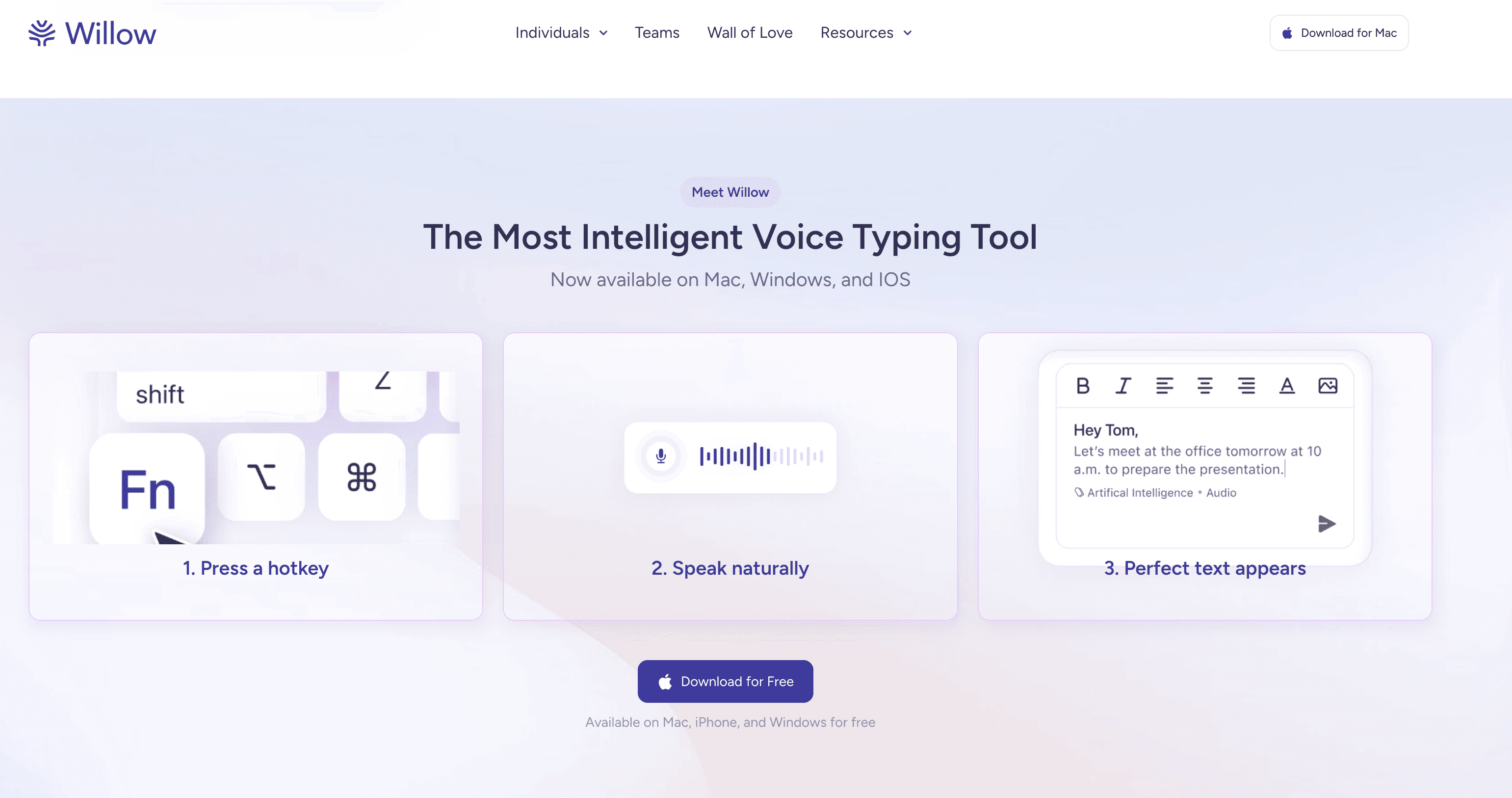
Getting started takes about two minutes. Download Willow, set your hotkey, and your next Claude prompt is a spoken sentence away. The free trial includes 2,000 words, recharged weekly, with no credit card required. If you decide to stay, the individual plan runs $12/month billed annually. Full pricing details are here.
Every prompt you type instead of speaking is a 3x–4x speed gap you're leaving open. Speaking at 150 WPM versus typing at 40 WPM is not a marginal gain. Over a full day of prompting, that gap adds up fast.
Willow also brings three things other tools like Wispr Flow and Apple's built-in voice dictation don't combine: 200ms latency so text keeps pace with your thinking, personalization that learns your writing style over time, and enterprise-grade security with zero data retention and clear BAA guarantees, purpose-built for compliance-driven teams, not added as an afterthought.
Try Willow free and send your first voice prompt today.
FAQ
How does voice dictation make Claude prompts better than typing them?
Speaking naturally forces you to explain the full context, constraints, and goals that Claude needs for quality outputs, while typing rewards compression that leads to vague prompts. At 150 words per minute versus 40 WPM typing, you can deliver the detailed instructions that Claude responds best to without the friction.
Does Willow work directly inside Claude, or do I need a browser extension?
Willow works at the OS level, so there's no plugin or extension needed. Press the Function key wherever your cursor sits, speak your prompt, and the transcribed text appears directly in Claude's prompt box at 200ms latency. The same workflow works in ChatGPT, Cursor, or any other app.
How does Willow learn my technical vocabulary for Claude prompts?
Every correction you make gets remembered automatically across all future sessions. Context-aware spelling catches technical terms and proper nouns before errors appear, and custom dictionaries let you add industry jargon or product names that generic tools like Wispr Flow and Apple's built-in voice dictation don't recognize.
Can I use Willow for prompts containing confidential information?
Yes. Willow is SOC 2 certified and HIPAA compliant, with zero data retention; voice is processed and then immediately deleted. Unlike tools that may offer compliance for select plans, Willow delivers dedicated medical vocabulary optimization and clear BAA guarantees, making it the purpose-built choice for healthcare, legal, and finance teams that handle sensitive information. Full security details are on Willow's compliance page.
How long does it take to start using Willow with Claude?
About two minutes. Download Willow, set your hotkey, and your next Claude prompt is ready to speak. The free trial includes 2,000 words recharged weekly with no credit card required.
Most people who use Claude regularly hit the same wall: your thinking outruns your typing. You have a clear idea of what you want, but by the time it's typed out, the prompt is compressed, context is missing, and the response that comes back is close but not quite right. The fix isn't a better prompting technique. It's a faster input method. This post covers how voice dictation changes what you get from Claude and what to look for in a tool built for that workflow.
TLDR:
Voice lets you speak prompts at 150 WPM vs typing at 40 WPM for 4x faster Claude workflows
Willow delivers 200ms latency, keeping you in flow vs 700ms+ delays from other tools
Speaking naturally produces detailed prompts with context that get better Claude outputs
Willow learns your vocabulary and corrections, building toward zero-edit dictation over time
SOC 2 and HIPAA compliance protect sensitive data with a zero data retention architecture
Why Voice Dictation Changes How You Work in Claude
Most people type around 40 words per minute but speak at 150 WPM. That's roughly a 3x-4x gap between how fast your brain works and how fast your fingers can keep up. Professional dictation software closes that gap, running about 3x faster than typing. When input speed matches thinking speed, you stop compressing your thoughts before they reach the prompt.
This matters because Claude's output quality is directly tied to prompt quality. Claude responds better to complete instructions with specific context that go beyond the basics. A vague prompt gets a generic answer. A detailed one, with constraints, tone, audience, and goals spelled out, gets something actually useful.
Voice removes the friction that keeps prompts vague. When you speak, you naturally explain the why, mention edge cases, and give Claude the full picture. It's how you'd brief a colleague. The result is a better first response and far less back-and-forth.
How Willow Works Inside Claude
There's no plugin to install, no extension to configure, and no Claude-specific setup required. Willow works at the OS level, which means it drops transcribed text directly into any input field on your screen, including Claude's prompt box.
The workflow is simple:
Press the hotkey (the Function key by default) to start recording wherever your cursor sits
Speak your prompt naturally, the same way you'd explain something to a colleague
Willow injects the transcribed text exactly where your cursor is, ready to send
At 200ms latency, text appears almost before you've finished thinking. Most dictation tools, including Wispr Flow and Apple's built-in voice dictation, have a 700ms or more delay, which is just enough to break your concentration. That gap adds up across a full workday.
Works Everywhere You Type
Because Willow runs system-wide, it works identically in Claude, ChatGPT, Cursor, Notion, or any other app. No per-app configuration, no switching modes. Willow runs on both Mac and Windows, so teams across both platforms get the same fast, accurate dictation experience. Check out Willow's full feature set and supported integrations for the complete picture.
Getting Better Outputs from Claude by Speaking Your Prompts
Speaking forces you to finish your thoughts. Typing rewards compression. That difference shows up directly in what Claude gives back.
According to Claude's own prompt engineering best practices, the difference between a vague instruction and a well-crafted prompt can mean the gap between generic outputs and exactly what you need. A poorly structured prompt might require multiple back-and-forth exchanges to clarify intent, while a well-engineered prompt gets you there in one shot. Voice naturally produces the latter. You explain the audience, the tone, the constraints, and the goal, all in the time it would have taken to type a five-word query.
What Willow adds on top is cleanup. Filler words like "um" and "uh" are automatically stripped, grammar is corrected in real time, and the text arrives in Claude's prompt box already structured. You speak casually. The prompt reads professionally.
According to Claude's own prompt engineering best practices, the difference between a vague instruction and a well-crafted prompt can mean the gap between generic outputs and exactly what you need. A poorly structured prompt might require multiple back-and-forth exchanges to clarify intent, while a well-engineered prompt gets you there in one shot. Voice naturally produces the latter. You explain the audience, the tone, the constraints, and the goal, all in the time it would have taken to type a five-word query.
What Willow adds on top is cleanup. Filler words like "um" and "uh" are automatically stripped, grammar is corrected in real time, and the text arrives in Claude's prompt box already structured. You speak casually. The prompt reads professionally.
Here's how typed and spoken prompts actually compare:
Prompt Characteristic | Typed Prompt | Spoken Prompt with Willow |
|---|---|---|
Average word count | 15-25 words | 60-100 words |
Context detail | Minimal, compressed | Complete, natural explanation |
Edge case coverage | Rarely included | Naturally described |
Formatting | Manual effort required | Auto-formatted by Willow |
How Willow Learns Your Voice and Your Workflow
Generic dictation treats every session as a blank slate. Willow doesn't. Every correction you make gets logged, and Willow applies it automatically from that point forward. Misspell a client's name once, fix it once, and it never happens again.
These compounds are in a few specific ways:
Corrections to names, proper nouns, or unusual spellings get remembered across all future sessions, so your vocabulary builds automatically without manual setup.
Context-aware spelling catches specific entities like technical terms, product names, and people's names before errors even appear in the first place.
Custom dictionaries let you add company names, industry jargon, or team-specific vocabulary for consistent recognition every time you speak.
For Claude users, this matters a lot. If you regularly prompt on a specific codebase, research domain, or product category, Willow starts recognizing that vocabulary without needing reminders. Your prompts stop getting garbled by terms that tools like Wispr Flow or Apple's built-in voice dictation have never seen before.
The goal Willow aims for is zero-edit dictation, where text arrives in Claude's prompt box, already matching your intent, with no cleanup needed. That happens because Willow's Auto-Dictionary logs every correction you make to a client's name spelled a specific way, a product name like "Claude Sonnet 3.7," an industry term like "RAG pipeline" or "zero-shot prompt," and applies it automatically from that point forward. Custom dictionaries let you pre-load your team's vocabulary, and context-aware spelling catches names and nomenclature before errors appear. The result is a tool that gets sharper the more you use it, in a way no generic dictation tool can replicate.
Speed and Accuracy That Keeps You in Flow
Latency matters more than most people expect. At 200ms, Willow's transcription is effectively instant; text appears as you finish speaking. Tools like Wispr Flow and Apple Dictation can take 700ms or more, and research confirms that anything over 300ms is noticeable and disruptive in real-time use. When you're building a multi-prompt session in Claude, that delay compounds. Five prompts in, you've already lost meaningful time and mental momentum waiting for text to catch up.
Accuracy compounds too, in the opposite direction. Willow is 3x more accurate than standard built-in dictation, which means you stop second-guessing what landed in the prompt box before hitting send. With tools like Apple Dictation, you're constantly re-reading to catch mangled terms. With Willow, you trust the output. That trust keeps you in flow. As production speech recognition benchmarks show, real-time assistants need both sub-300ms latency and high accuracy. Willow clears both bars.
Privacy and Security When Speaking into Claude
When you prompt Claude with sensitive information, you're already considering what you're sharing. The dictation layer shouldn't add a second concern on top of that.
Willow is SOC 2 certified and HIPAA-compliant, with a zero-data-retention architecture: voice is processed and then deleted. Nothing is stored. Willow is built for organizations, with enterprise-grade security, admin controls, and team-wide deployment in mind. For teams using Claude in compliance-driven or confidential workflows, shared custom dictionaries and shortcuts are available across the whole team without relaxing any compliance guarantees. Security details are fully documented at Willow's compliance page.
How This Compares to Other Dictation Options
Most generic dictation tools were not built with enterprise compliance in mind. Wispr Flow may offer HIPAA/BAA on certain plans, but is not positioned as a medical-first tool with dedicated medical vocabulary optimization like Willow. If you work in healthcare, legal, or finance and need to prompt Claude with confidential context, that difference matters. Willow is purpose-built for those constraints, with medical vocabulary optimization and clear BAA guarantees that go beyond standard compliance checkboxes.
Start Using Voice Dictation in Claude with Willow
Getting started takes about two minutes. Download Willow, set your hotkey, and your next Claude prompt is a spoken sentence away. The free trial includes 2,000 words, recharged weekly, with no credit card required. If you decide to stay, the individual plan runs $12/month billed annually. Full pricing details are here.
Every prompt you type instead of speaking is a 3x–4x speed gap you're leaving open. Speaking at 150 WPM versus typing at 40 WPM is not a marginal gain. Over a full day of prompting, that gap adds up fast.
Willow also brings three things other tools like Wispr Flow and Apple's built-in voice dictation don't combine: 200ms latency so text keeps pace with your thinking, personalization that learns your writing style over time, and enterprise-grade security with zero data retention and clear BAA guarantees, purpose-built for compliance-driven teams, not added as an afterthought.
Try Willow free and send your first voice prompt today.
FAQ
How does voice dictation make Claude prompts better than typing them?
Speaking naturally forces you to explain the full context, constraints, and goals that Claude needs for quality outputs, while typing rewards compression that leads to vague prompts. At 150 words per minute versus 40 WPM typing, you can deliver the detailed instructions that Claude responds best to without the friction.
Does Willow work directly inside Claude, or do I need a browser extension?
Willow works at the OS level, so there's no plugin or extension needed. Press the Function key wherever your cursor sits, speak your prompt, and the transcribed text appears directly in Claude's prompt box at 200ms latency. The same workflow works in ChatGPT, Cursor, or any other app.
How does Willow learn my technical vocabulary for Claude prompts?
Every correction you make gets remembered automatically across all future sessions. Context-aware spelling catches technical terms and proper nouns before errors appear, and custom dictionaries let you add industry jargon or product names that generic tools like Wispr Flow and Apple's built-in voice dictation don't recognize.
Can I use Willow for prompts containing confidential information?
Yes. Willow is SOC 2 certified and HIPAA compliant, with zero data retention; voice is processed and then immediately deleted. Unlike tools that may offer compliance for select plans, Willow delivers dedicated medical vocabulary optimization and clear BAA guarantees, making it the purpose-built choice for healthcare, legal, and finance teams that handle sensitive information. Full security details are on Willow's compliance page.
How long does it take to start using Willow with Claude?
About two minutes. Download Willow, set your hotkey, and your next Claude prompt is ready to speak. The free trial includes 2,000 words recharged weekly with no credit card required.

Try Willow for free
Instant, accurate voice dictation. No card required.
Try Willow for free
Instant, accurate voice dictation. No card required.
Other stories you’ll love
Other stories you’ll love



Your keyboard is optional now
" transform="translate(5 5)" width="9.791000051498413px"/></svg>)

The voice-first interface for modern work.
© Willow Care, Inc. 2026. All rights reserved
Your keyboard is optional now
The voice-first interface for modern work.
© Willow Care, Inc. 2026. All rights reserved
Your keyboard is optional now
The voice-first interface for modern work.
© Willow Care, Inc. 2026. All rights reserved