" transform="translate(5 2)" width="10px"/></svg>)

•
5 min read
What Is Speech to Text? A Complete Guide (August 2026)

•
5 min read
What Is Speech to Text? A Complete Guide (August 2026)
What is speech to text? The simple answer: it turns your voice into written words. Whether it works well enough to rely on is a harder question. Newer systems have changed what's possible, especially for people writing at volume. This guide breaks down how the technology works, where it still falls short, and what more advanced voice dictation options look like.
TLDR:
Speech to text converts spoken words to written text at 150 WPM vs. 40 WPM typing speed, nearly 3x faster.
Context-aware AI models can distinguish homophones, filter filler words, and adapt to your speaking style.
Students with dyslexia, ADHD, and dysgraphia can produce longer, more accurate writing using voice vs. handwriting.
Works natively on Mac, Windows, and iOS. Mixed-device teams can roll out one tool across every machine without per-device setup.
Some modern solutions can deliver 98%+ accuracy at ~200ms latency, 3x fewer errors than built-in tools, with a system-wide hotkey that works in any app on Mac, Windows, and iOS.
Willow Voice is our top pick for speech to text, delivering 98%+ accuracy, ~200ms latency, and 3x fewer errors than built-in tools like Apple Dictation. Competitors including Wispr Flow and Apple's built-in voice dictation run at 700ms or more, making clean, high-volume output harder to get. Willow works system-wide on Mac, Windows, and iOS, with SOC 2 Type II and HIPAA compliance built in.
What Is Speech to Text?
Speech to text is AI-powered tech that converts spoken words into written text in real time. You speak, it types. But the gap between basic transcription and what's possible in 2026 is wide.
Early speech recognition just matched sounds to words. Today's tools understand context, filter filler words, and adapt to how you speak. A basic tool transcribes. A smart one listens.
It runs across devices: computers, smartphones, tablets, even browsers. Whether it's called voice dictation, automatic speech recognition, or voice typing, the idea is the same: your voice as input.
Context-aware models can distinguish "their," "there," and "they're," catch names, handle accents, and format output automatically.
How Speech to Text Technology Works
When you speak into a microphone, three things happen fast: your audio gets captured, an AI model interprets it, and text appears. That chain is what separates a frustrating experience from a great one.
There are three stages:
Audio input: your microphone captures raw sound waves and converts them to a digital signal
Acoustic modeling: AI maps those signals to phonemes, the smallest units of sound in speech
Language decoding: a language model predicts the most probable word sequence based on context, grammar, and vocabulary
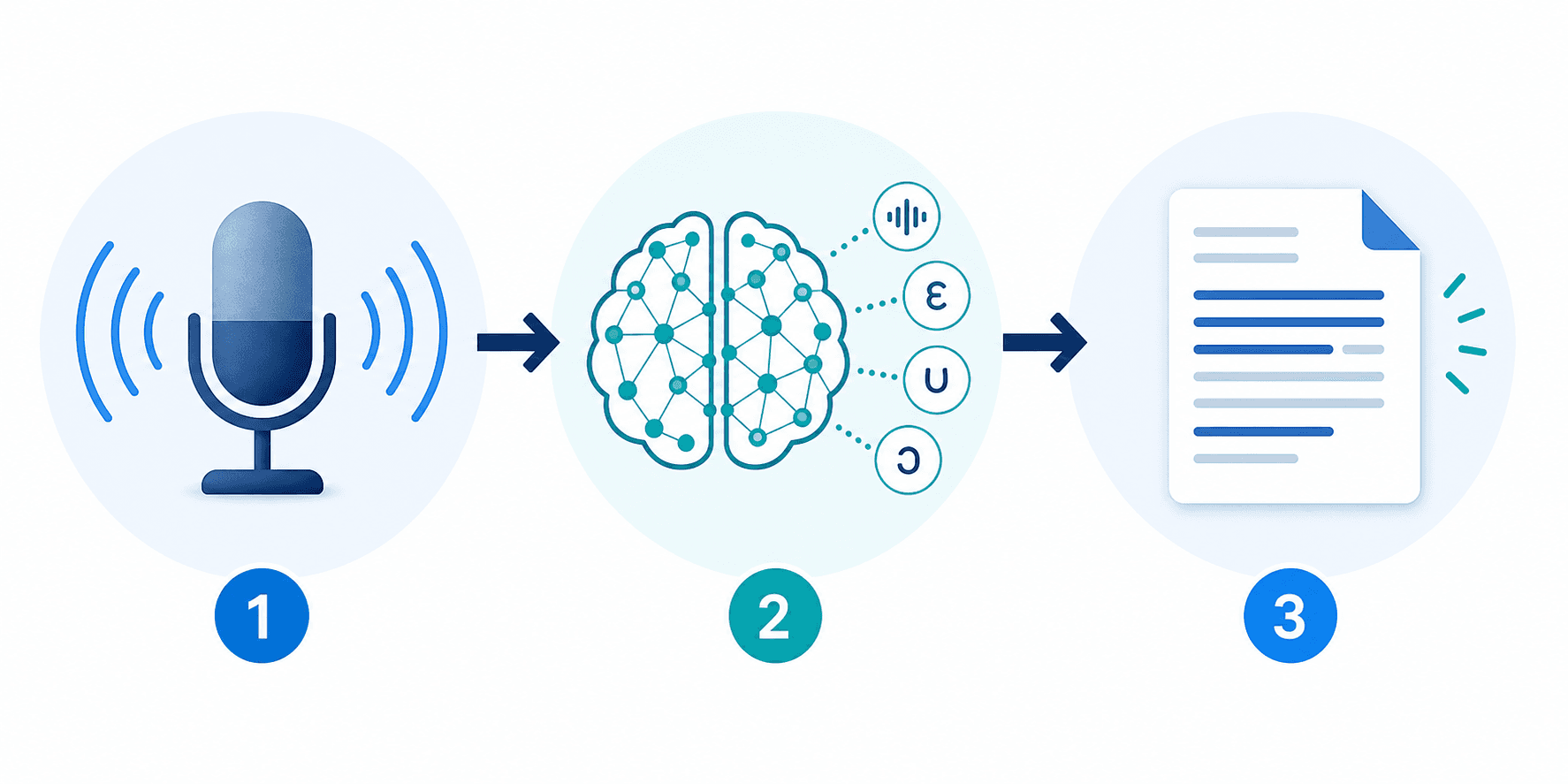
Context is the key. A language model hears "their" versus "there" as identical sounds, then reads surrounding words and picks the right one.
The Speed Advantage: Why Dictation Outpaces Typing
Research puts average conversational English at around 150 words per minute. Average typing speed? About 40 wpm.
That's nearly a 3x gap, meaning a 10-minute typing task takes roughly 2.5 minutes to speak. For someone writing dozens of emails, Slack messages, or docs daily, that adds up fast.
Speed only matters if the output is clean. Latency and accuracy are where most tools fall short.
Speech to Text for Students with Disabilities
For students who struggle with the physical or cognitive demands of writing, speech to text changes what's possible in the classroom. Dyslexia, ADHD, dysgraphia, and motor skill challenges all create friction between a student's ideas and the page. Speech to text removes that barrier.
What the Research Shows
Studies found that students using speech to text produced longer output, fewer mechanics errors, higher percentages of correctly spelled words, and more correct writing sequences overall compared to handwritten work. It points to a real gap between what students can express verbally versus through writing alone.
Who Benefits Most
Students with dyslexia who know what they want to say but lose it in the process of spelling
Students with ADHD who think faster than they can type, leading to lost ideas and frustration
Students with dysgraphia for whom the physical act of writing is genuinely painful or exhausting
Students with motor or physical disabilities that make keyboard use difficult
Speech to Text as an Accommodation
In formal educational settings, speech to text qualifies as an assistive tech accommodation under laws like IDEA and Section 504. Schools can offer it on assignments, tests, and exams when a student's disability affects written expression.
The accommodation levels the playing field so a student's grade reflects what they know, not how well they can type.
Speech to Text Across Industries and Use Cases
Here's where speech to text does real work:
Healthcare: Physicians record patient notes, SOAP notes, and discharge summaries directly into EHR systems, cutting documentation time.
Legal: Lawyers record case notes and draft briefs using dictation, and may use transcription tools for depositions alongside or after recordings.
Customer service: Call centers use live transcription for real-time coaching, compliance logging, and post-call summaries.
Content creation: Podcasters and video creators generate rough transcripts for subtitles, show notes, and repurposed content.
Coding and AI prompting: Developers speak complex prompts into tools like Cursor, Claude, and ChatGPT instead of typing them out.
The thread across all of these: removing the keyboard as a bottleneck. Speaking is faster, and when output is accurate, downstream work shrinks.
Accuracy: What to Expect from Speech Recognition in 2026
Accuracy in speech recognition is measured by Word Error Rate (WER): the percentage of words a system gets wrong. A 5% WER means 95% accuracy, fine until you're editing a 500-word document and catching 25 mistakes.
Several factors shift accuracy in practice:
Background noise degrades output fast, especially on built-in microphones
Strong accents still trip up models not trained on diverse speakers
Technical vocabulary (medical terms, legal jargon, product names) requires context-aware models to land correctly
Audio quality matters more than most users expect
The best tools today can approach near-human accuracy under clean audio conditions. Willow Voice delivers 98%+ accuracy with 3x fewer errors than built-in tools like Apple Dictation, with 200ms latency that keeps up with how fast you speak. The edge is context awareness: understanding what you're working on and adapting in real time.
Free vs. Paid Speech to Text Options
Apple Dictation, Google Docs Voice Typing, and Microsoft Word Dictation cost nothing and work for occasional use. But they share a common ceiling:
Locked to specific apps or windows, not system-wide, with no context awareness or filler word removal
Higher error rates with accents, jargon, or fast speech
No team features, shared dictionaries, or compliance certifications
Paid tools like Willow Voice close those gaps. The difference shows up in latency, accuracy, and post-dictation editing time. For a professional writing dozens of messages daily, errors compound. Free tools shift the cost from your wallet to your time.
Willow Voice offers a free unlimited plan -- no word cap, no credit card required.
Tool | Latency | Accuracy | Context Aware | System-Wide | SOC 2 / HIPAA | Price |
|---|---|---|---|---|---|---|
Willow Voice | ~200ms | 3x fewer errors than built-in tools | Yes - adapts to your writing style | Yes - Mac, Windows, iOS | Both | Free unlimited plan; paid plans from $12/month |
Wispr Flow | 700ms+ | Standard | Limited | Yes | SOC 2 Type II, ISO 27001, HIPAA | Paid |
Apple Dictation | 700ms+ | Lower; struggles with accents and jargon | No | No - Apple apps only | No | Free |
Google Docs Voice Typing | 700ms+ | Lower; no filler word removal | No | No - Google Docs only | No | Free |
Microsoft Word Dictation | 700ms+ | Lower; limited vocabulary handling | No | No - Microsoft apps only | No | Free with Microsoft 365 |
Key Features That Separate Basic from Advanced Solutions
Once basic accuracy is covered, these are the features that matter:
Context awareness: understands what you're working on and adapts transcription accordingly
Custom dictionaries: add company names, product terms, and jargon so they're never misheard
Tone matching: outputs that sound formal in email, casual in Slack
Formatting commands: speak "new line" or "bullet point" to structure content hands-free
Filler word removal: strips "um," "uh," and repeated words automatically
Offline mode: local transcription when you need strict data privacy
Multi-language support: useful for global teams
SOC 2 Type II and HIPAA compliance: non-negotiable for healthcare, legal, or enterprise use
Team features: shared custom dictionaries, admin controls, and usage leaderboards let organizations standardize vocabulary and roll out voice dictation at scale without per-user setup
Basic dictation tools skip most of this list. Fine for occasional use, but for anyone working at volume or handling sensitive data, these features determine whether the tool fits the workflow.
Privacy and Security Considerations
Voice data is sensitive by nature. When you record a patient note, a legal brief, or a confidential business strategy, you need to know where that audio goes.
Most free tools are vague on this. Some retain audio to train their models. Some tools offer limited transparency around how voice data is stored or used. For industries handling sensitive data, that ambiguity is a dealbreaker. Healthcare requires HIPAA compliance. Enterprise legal and financial workflows often require SOC 2 certification.
Willow Voice is both SOC 2 and HIPAA compliant, with a zero data retention policy. Audio is never stored. For teams that need strict local-only processing, offline mode keeps everything on-device.
Choosing the Right Speech to Text Solution for Your Needs
The right tool depends on your use case. A student writing essays has different needs than a physician charting patient notes. Run through these before deciding:
System: do you need Mac, Windows, iOS, Android, or browser support?
Use case: occasional personal use, or high-volume professional documentation?
Accuracy requirements: casual messaging tolerates errors; legal and medical work does not
Budget: free tools work for light use, but professional volume calls for a paid plan
Privacy: does your workflow involve sensitive data requiring HIPAA or SOC 2 compliance?
Team features: shared dictionaries, custom shortcuts, admin controls, and org-wide rollout matter when consistency across a team counts
Offline access: required if you work in areas with unreliable connectivity or strict data policies
If your answers point toward professional, high-volume, or compliance-driven use, free tools will cost more in editing time than they save in subscription fees.
How Willow Voice Delivers Next-Generation Speech to Text

Willow Voice was built around three gaps: personalization, speed, and team security.
On personalization, Willow learns your writing style over time. Correct a word once, it remembers forever. You spend less time editing; it becomes the most accurate dictation tool for you.
On speed, 200ms latency keeps you in flow state. Competitors like Wispr Flow and Apple's built-in voice dictation run at 700ms or more. That lag breaks rhythm. Willow Voice doesn't.
On team security, SOC 2 Type II and HIPAA compliance with zero data retention, plus shared dictionaries, admin controls, and shortcuts, make it viable for enterprise workflows where free tools aren't allowed. Willow runs natively on Mac, Windows, and iOS, so mixed-device teams (Windows workstations, Mac laptops, and phones) work from one consistent tool without separate setups or per-device configuration.
It works system-wide on Mac, Windows, and iOS, in any app. Offline mode and cloud processing give you flexibility when you need it. The free plan is unlimited, with no word cap and no credit card required, at willowvoice.com.
FAQs
What is speech to text technology?
Speech to text is AI-powered technology that converts spoken words into written text in real time. Modern systems use context-aware models to understand accents, filter filler words, distinguish homophones like "their" and "there," and format output automatically.
Speech to text online free vs. paid tools: what's the actual difference?
Free options like Apple's built-in voice dictation and Google Docs Voice Typing work for occasional use but lack context awareness, system-wide functionality, and team features. Paid tools close the gap on latency (200ms vs. 700ms+) and accuracy (3x fewer errors), and offer compliance certifications (SOC 2, HIPAA) that free tools can't match.
How does speech to text help students write faster?
Speech averages 150 words per minute vs. typing at 40 wpm, a 3x speed advantage. For students who think faster than they type or struggle with writing physically, speech to text captures ideas at the speed of thought, letting them focus on content over mechanics.
Final Thoughts on Speech to Text Solutions
So, what is speech to text? At its best, it removes typing from the equation entirely. The difference comes down to how much correction you're left doing after you speak. Willow Voice closes that gap by combining fast transcription with a system that adjusts to your vocabulary and writing habits over time. If you want to see how far the technology has come, try Willow today.
What is speech to text? The simple answer: it turns your voice into written words. Whether it works well enough to rely on is a harder question. Newer systems have changed what's possible, especially for people writing at volume. This guide breaks down how the technology works, where it still falls short, and what more advanced voice dictation options look like.
TLDR:
Speech to text converts spoken words to written text at 150 WPM vs. 40 WPM typing speed, nearly 3x faster.
Context-aware AI models can distinguish homophones, filter filler words, and adapt to your speaking style.
Students with dyslexia, ADHD, and dysgraphia can produce longer, more accurate writing using voice vs. handwriting.
Works natively on Mac, Windows, and iOS. Mixed-device teams can roll out one tool across every machine without per-device setup.
Some modern solutions can deliver 98%+ accuracy at ~200ms latency, 3x fewer errors than built-in tools, with a system-wide hotkey that works in any app on Mac, Windows, and iOS.
Willow Voice is our top pick for speech to text, delivering 98%+ accuracy, ~200ms latency, and 3x fewer errors than built-in tools like Apple Dictation. Competitors including Wispr Flow and Apple's built-in voice dictation run at 700ms or more, making clean, high-volume output harder to get. Willow works system-wide on Mac, Windows, and iOS, with SOC 2 Type II and HIPAA compliance built in.
What Is Speech to Text?
Speech to text is AI-powered tech that converts spoken words into written text in real time. You speak, it types. But the gap between basic transcription and what's possible in 2026 is wide.
Early speech recognition just matched sounds to words. Today's tools understand context, filter filler words, and adapt to how you speak. A basic tool transcribes. A smart one listens.
It runs across devices: computers, smartphones, tablets, even browsers. Whether it's called voice dictation, automatic speech recognition, or voice typing, the idea is the same: your voice as input.
Context-aware models can distinguish "their," "there," and "they're," catch names, handle accents, and format output automatically.
How Speech to Text Technology Works
When you speak into a microphone, three things happen fast: your audio gets captured, an AI model interprets it, and text appears. That chain is what separates a frustrating experience from a great one.
There are three stages:
Audio input: your microphone captures raw sound waves and converts them to a digital signal
Acoustic modeling: AI maps those signals to phonemes, the smallest units of sound in speech
Language decoding: a language model predicts the most probable word sequence based on context, grammar, and vocabulary
Context is the key. A language model hears "their" versus "there" as identical sounds, then reads surrounding words and picks the right one.
The Speed Advantage: Why Dictation Outpaces Typing
Research puts average conversational English at around 150 words per minute. Average typing speed? About 40 wpm.
That's nearly a 3x gap, meaning a 10-minute typing task takes roughly 2.5 minutes to speak. For someone writing dozens of emails, Slack messages, or docs daily, that adds up fast.
Speed only matters if the output is clean. Latency and accuracy are where most tools fall short.
Speech to Text for Students with Disabilities
For students who struggle with the physical or cognitive demands of writing, speech to text changes what's possible in the classroom. Dyslexia, ADHD, dysgraphia, and motor skill challenges all create friction between a student's ideas and the page. Speech to text removes that barrier.
What the Research Shows
Studies found that students using speech to text produced longer output, fewer mechanics errors, higher percentages of correctly spelled words, and more correct writing sequences overall compared to handwritten work. It points to a real gap between what students can express verbally versus through writing alone.
Who Benefits Most
Students with dyslexia who know what they want to say but lose it in the process of spelling
Students with ADHD who think faster than they can type, leading to lost ideas and frustration
Students with dysgraphia for whom the physical act of writing is genuinely painful or exhausting
Students with motor or physical disabilities that make keyboard use difficult
Speech to Text as an Accommodation
In formal educational settings, speech to text qualifies as an assistive tech accommodation under laws like IDEA and Section 504. Schools can offer it on assignments, tests, and exams when a student's disability affects written expression.
The accommodation levels the playing field so a student's grade reflects what they know, not how well they can type.
Speech to Text Across Industries and Use Cases
Here's where speech to text does real work:
Healthcare: Physicians record patient notes, SOAP notes, and discharge summaries directly into EHR systems, cutting documentation time.
Legal: Lawyers record case notes and draft briefs using dictation, and may use transcription tools for depositions alongside or after recordings.
Customer service: Call centers use live transcription for real-time coaching, compliance logging, and post-call summaries.
Content creation: Podcasters and video creators generate rough transcripts for subtitles, show notes, and repurposed content.
Coding and AI prompting: Developers speak complex prompts into tools like Cursor, Claude, and ChatGPT instead of typing them out.
The thread across all of these: removing the keyboard as a bottleneck. Speaking is faster, and when output is accurate, downstream work shrinks.
Accuracy: What to Expect from Speech Recognition in 2026
Accuracy in speech recognition is measured by Word Error Rate (WER): the percentage of words a system gets wrong. A 5% WER means 95% accuracy, fine until you're editing a 500-word document and catching 25 mistakes.
Several factors shift accuracy in practice:
Background noise degrades output fast, especially on built-in microphones
Strong accents still trip up models not trained on diverse speakers
Technical vocabulary (medical terms, legal jargon, product names) requires context-aware models to land correctly
Audio quality matters more than most users expect
The best tools today can approach near-human accuracy under clean audio conditions. Willow Voice delivers 98%+ accuracy with 3x fewer errors than built-in tools like Apple Dictation, with 200ms latency that keeps up with how fast you speak. The edge is context awareness: understanding what you're working on and adapting in real time.
Free vs. Paid Speech to Text Options
Apple Dictation, Google Docs Voice Typing, and Microsoft Word Dictation cost nothing and work for occasional use. But they share a common ceiling:
Locked to specific apps or windows, not system-wide, with no context awareness or filler word removal
Higher error rates with accents, jargon, or fast speech
No team features, shared dictionaries, or compliance certifications
Paid tools like Willow Voice close those gaps. The difference shows up in latency, accuracy, and post-dictation editing time. For a professional writing dozens of messages daily, errors compound. Free tools shift the cost from your wallet to your time.
Willow Voice offers a free unlimited plan -- no word cap, no credit card required.
Tool | Latency | Accuracy | Context Aware | System-Wide | SOC 2 / HIPAA | Price |
|---|---|---|---|---|---|---|
Willow Voice | ~200ms | 3x fewer errors than built-in tools | Yes - adapts to your writing style | Yes - Mac, Windows, iOS | Both | Free unlimited plan; paid plans from $12/month |
Wispr Flow | 700ms+ | Standard | Limited | Yes | SOC 2 Type II, ISO 27001, HIPAA | Paid |
Apple Dictation | 700ms+ | Lower; struggles with accents and jargon | No | No - Apple apps only | No | Free |
Google Docs Voice Typing | 700ms+ | Lower; no filler word removal | No | No - Google Docs only | No | Free |
Microsoft Word Dictation | 700ms+ | Lower; limited vocabulary handling | No | No - Microsoft apps only | No | Free with Microsoft 365 |
Key Features That Separate Basic from Advanced Solutions
Once basic accuracy is covered, these are the features that matter:
Context awareness: understands what you're working on and adapts transcription accordingly
Custom dictionaries: add company names, product terms, and jargon so they're never misheard
Tone matching: outputs that sound formal in email, casual in Slack
Formatting commands: speak "new line" or "bullet point" to structure content hands-free
Filler word removal: strips "um," "uh," and repeated words automatically
Offline mode: local transcription when you need strict data privacy
Multi-language support: useful for global teams
SOC 2 Type II and HIPAA compliance: non-negotiable for healthcare, legal, or enterprise use
Team features: shared custom dictionaries, admin controls, and usage leaderboards let organizations standardize vocabulary and roll out voice dictation at scale without per-user setup
Basic dictation tools skip most of this list. Fine for occasional use, but for anyone working at volume or handling sensitive data, these features determine whether the tool fits the workflow.
Privacy and Security Considerations
Voice data is sensitive by nature. When you record a patient note, a legal brief, or a confidential business strategy, you need to know where that audio goes.
Most free tools are vague on this. Some retain audio to train their models. Some tools offer limited transparency around how voice data is stored or used. For industries handling sensitive data, that ambiguity is a dealbreaker. Healthcare requires HIPAA compliance. Enterprise legal and financial workflows often require SOC 2 certification.
Willow Voice is both SOC 2 and HIPAA compliant, with a zero data retention policy. Audio is never stored. For teams that need strict local-only processing, offline mode keeps everything on-device.
Choosing the Right Speech to Text Solution for Your Needs
The right tool depends on your use case. A student writing essays has different needs than a physician charting patient notes. Run through these before deciding:
System: do you need Mac, Windows, iOS, Android, or browser support?
Use case: occasional personal use, or high-volume professional documentation?
Accuracy requirements: casual messaging tolerates errors; legal and medical work does not
Budget: free tools work for light use, but professional volume calls for a paid plan
Privacy: does your workflow involve sensitive data requiring HIPAA or SOC 2 compliance?
Team features: shared dictionaries, custom shortcuts, admin controls, and org-wide rollout matter when consistency across a team counts
Offline access: required if you work in areas with unreliable connectivity or strict data policies
If your answers point toward professional, high-volume, or compliance-driven use, free tools will cost more in editing time than they save in subscription fees.
How Willow Voice Delivers Next-Generation Speech to Text
Willow Voice was built around three gaps: personalization, speed, and team security.
On personalization, Willow learns your writing style over time. Correct a word once, it remembers forever. You spend less time editing; it becomes the most accurate dictation tool for you.
On speed, 200ms latency keeps you in flow state. Competitors like Wispr Flow and Apple's built-in voice dictation run at 700ms or more. That lag breaks rhythm. Willow Voice doesn't.
On team security, SOC 2 Type II and HIPAA compliance with zero data retention, plus shared dictionaries, admin controls, and shortcuts, make it viable for enterprise workflows where free tools aren't allowed. Willow runs natively on Mac, Windows, and iOS, so mixed-device teams (Windows workstations, Mac laptops, and phones) work from one consistent tool without separate setups or per-device configuration.
It works system-wide on Mac, Windows, and iOS, in any app. Offline mode and cloud processing give you flexibility when you need it. The free plan is unlimited, with no word cap and no credit card required, at willowvoice.com.
FAQs
What is speech to text technology?
Speech to text is AI-powered technology that converts spoken words into written text in real time. Modern systems use context-aware models to understand accents, filter filler words, distinguish homophones like "their" and "there," and format output automatically.
Speech to text online free vs. paid tools: what's the actual difference?
Free options like Apple's built-in voice dictation and Google Docs Voice Typing work for occasional use but lack context awareness, system-wide functionality, and team features. Paid tools close the gap on latency (200ms vs. 700ms+) and accuracy (3x fewer errors), and offer compliance certifications (SOC 2, HIPAA) that free tools can't match.
How does speech to text help students write faster?
Speech averages 150 words per minute vs. typing at 40 wpm, a 3x speed advantage. For students who think faster than they type or struggle with writing physically, speech to text captures ideas at the speed of thought, letting them focus on content over mechanics.
Final Thoughts on Speech to Text Solutions
So, what is speech to text? At its best, it removes typing from the equation entirely. The difference comes down to how much correction you're left doing after you speak. Willow Voice closes that gap by combining fast transcription with a system that adjusts to your vocabulary and writing habits over time. If you want to see how far the technology has come, try Willow today.

Try Willow for free
Instant, accurate voice dictation. No card required.
Try Willow for free
Instant, accurate voice dictation. No card required.
Other stories you’ll love
Other stories you’ll love


Your keyboard is optional now
" transform="translate(5 5)" width="9.791000051498413px"/></svg>)

The voice-first interface for modern work.
© Willow Care, Inc. 2026. All rights reserved
Your keyboard is optional now
The voice-first interface for modern work.
© Willow Care, Inc. 2026. All rights reserved
Your keyboard is optional now
The voice-first interface for modern work.
© Willow Care, Inc. 2026. All rights reserved