" transform="translate(5 2)" width="10px"/></svg>)

•
5 min read
Introducing Willow Frontier Pro

Lawrence Liu
Co-Founder / CTO

•
5 min read
Introducing Willow Frontier Pro
Lawrence Liu
Co-Founder / CTO
Today, we are making dictation free. Forever.
We'll write more about the motivation behind this in a separate post. The short version is that we've seen how much voice can change someone's relationship with the world.
Sometimes that means giving a doctor 3 hours of their evening back. Sometimes it means helping someone with a disability communicate more easily. Sometimes it's much more personal, like telling someone you love that you're thinking about them or texting your parents while you're walking home.
When writing becomes effortless, people simply communicate more.
This post is more on the technical side: how we created Willow Frontier Pro (and subsequently Willow Frontier Mini), why it's faster, and how we made the best version of Willow efficient enough to offer for free.
The Constraint
If the best model is too slow, people won't use it. If the best model is too expensive, it becomes a premium feature. And if the best model produces text that still needs cleanup, the user pays the cost in editing time.
The engineering constraint was simple:
Make the best Willow experience fast enough, accurate enough, and efficient enough to support everyone.
That meant optimizing two parts of the product at the same time:
How quickly output appears after you stop speaking.
How much users have to edit after the output appears.
Making Voice Feel Instant
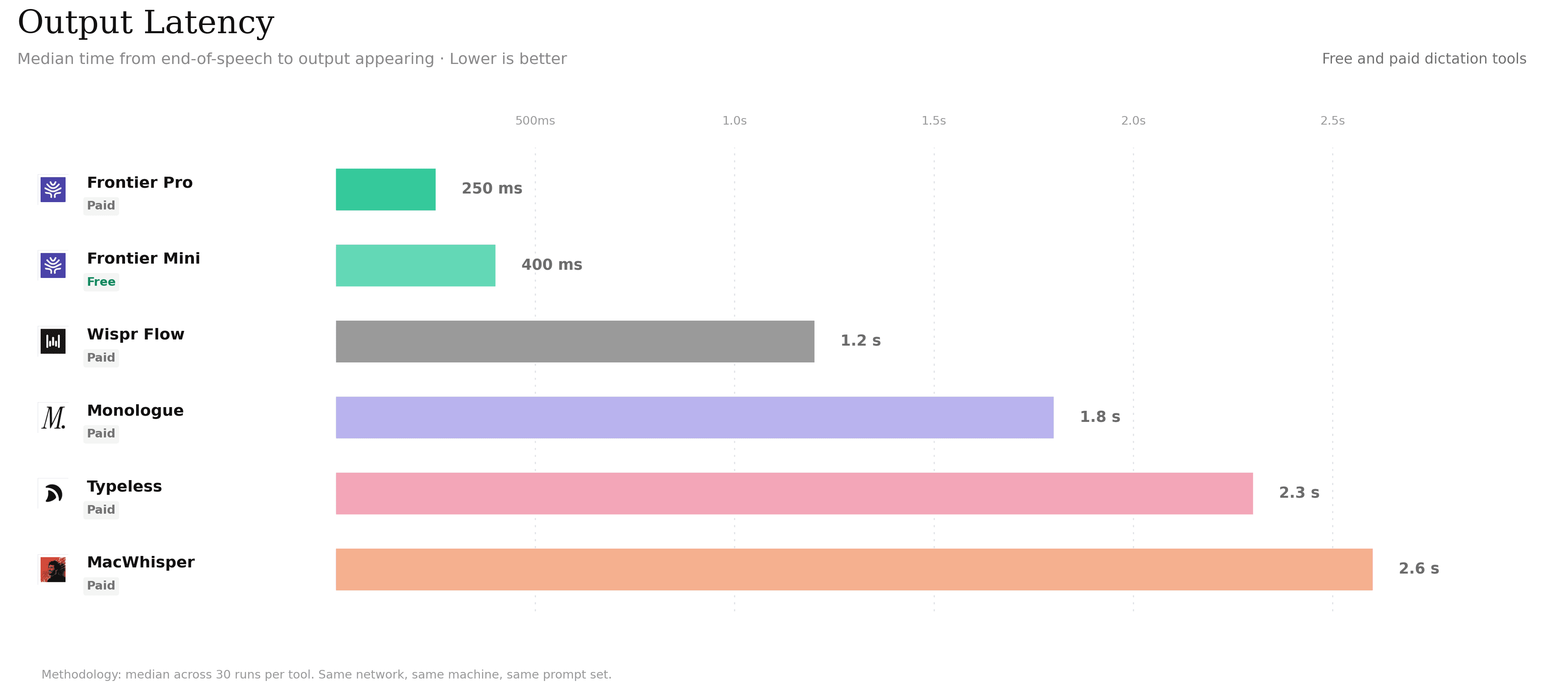
In our benchmark, Willow returned output faster than the paid dictation tools we tested. Even Willow Frontier Mini beat every comparison tool on output latency.
For dictation, latency is king, because there is an extra step to hurdle: the momentum of habit. Any perceived or noticed friction will stop adoption. If the output appears quickly, the interaction feels like an extension of thought. If it lags, the user becomes aware, loses momentum, and goes to their habitual modality.
The surprising thing about Frontier Pro was that, after spending months optimizing our edit model, the model path stopped being the main bottleneck for now. Inference became fast enough that latency was more so in less glamorous places: moving audio, coordinating services, and inserting text back into the app.
Most of our engineering attention then came to systems latency. A few things we worked on in no particular order: better compression techniques, tightening of the handoff between ASR and the edit pass, removing unnecessary routing, and optimization on where services physically ran. At the speeds we were at, data-center-to-data-center travel time mattered.
Frontier Pro is fast because the model is fast. But just as importantly, the rest of the path became boring, short, and measurable!
From Raw Speech to Finished Text
Willow Frontier Pro starts with best-in-class ASR, but raw ASR is not our final product.
Speech recognition answers one question:
What words did the user say?
Dictation has to answer a harder one:
What text did the user mean to put into this app?
That second step is what we call the edit model.
We started from scratch again using new RL techniques to train a lightweight speculative model for post-ASR editing. There were two main tasks we had to complete:
Turning speech into clean, usable, grammatically correct, output.
The easiest way to understand why this is hard is to record yourself talking for thirty seconds. Most of us don't speak in clean paragraphs. We trail off, restart sentences, change direction mid-thought, skip punctuation, over-explain one clause, restart entire paragraphs, switch languages halfway through, and produce run-on sentences that, if transcribed literally without any cleanup or post-processing, would look a lot like this one...
That is fine for conversation. It is absolutely terrible for text.
So before Willow could personalize to a user, it first had to solve the baseline problem of making raw transcripts readable: grouping fragments, choosing sentence boundaries, adding punctuation, preserving raw intent, and making the final text feel written instead of transcribed. A surprisingly non-trivial problem.
2. Make it feel like the user wrote it
Once that baseline worked, the next layer was personalization.
The edit model takes raw transcription and turns it into text that is closer to what the user would have written. It handles the small details that make dictation feel reliable:
capitalization
paragraph breaks
names and glossary terms
code and technical vocabulary
app-specific writing conventions
the user's prior accepted edits
This is also where the product constraint becomes more interesting: personalization has to respect privacy.
When users choose to keep privacy mode off, Willow can learn from richer correction signals, such as the edits a user accepts after a dictation. However, when privacy mode is on, we cannot rely on transcript content in the same way. Instead, we look at aggregate edit behavior through metrics like Levenshtein distance: how much text changed, how often users rewrote output, and whether a dictation required meaningful cleanup.
Why We Optimize for Edits, Not Just Accuracy
Word error rate is useful for speech research. It is not representative of a satisfactory user experience.
A sentence can have the right words and still be wrong for the user. Maybe the punctuation is awkward. Maybe the company name is miscapitalized. Maybe the output is too verbose for Slack and too casual for email. Maybe the user always writes with a certain structure, and the model keeps flattening it.
The user does not ask, "Was the transcript mostly correct?"
They ask, "Can I send this?"
That is why edit rate is one of the most important product metrics for Willow. It measures the cleanup tax after dictation. The lower it gets, the more users can trust voice as a default way to write.
We've seen this proven through metrics. Users that retain longest, edit the least. Users that churn the quickest, don't see a magic moment - oftentimes, editing their first 3 dictations the most.
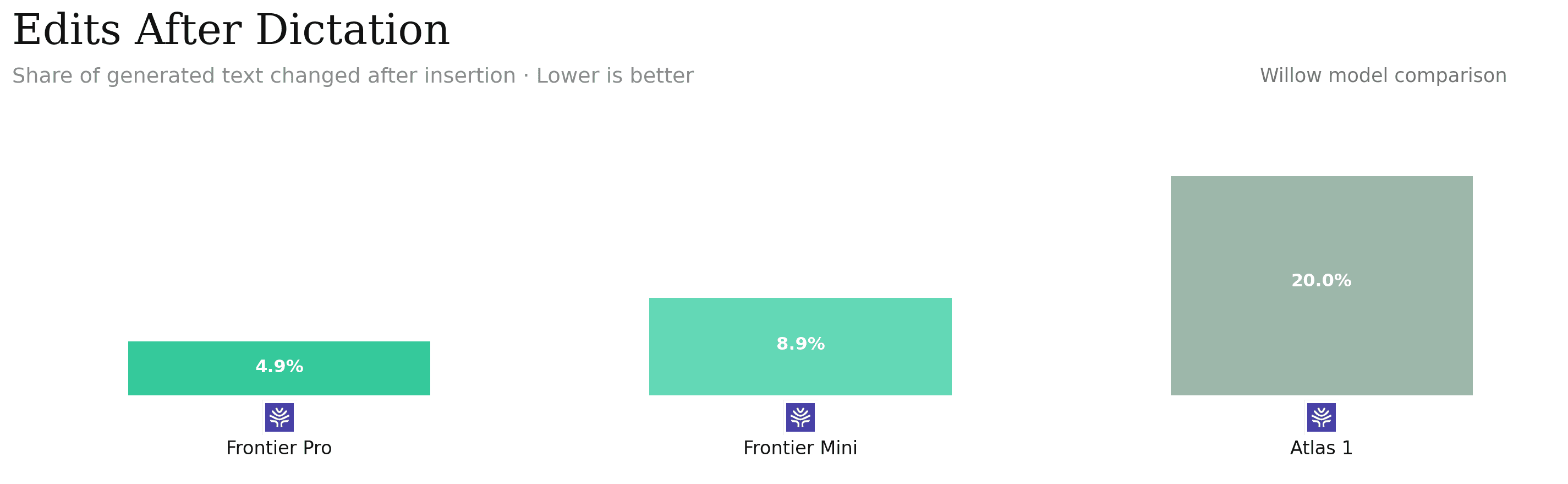
Compared with Willow Atlas 1, Willow Frontier Pro and Willow Frontier Mini drastically reduce the amount of editing users had to do after dictation.
Making the Best Dictation Available to Everyone
Frontier Pro and Frontier Mini share the fundamental product philosophy: dictation produces text you can use immediately. However, they differ in what they optimize for.
Frontier Pro is optimized for the lowest edit rate. It spends more of its budget on the final writing step: formatting, names, glossary terms, prior accepted edits, and small preferences that make text feel like something the user would have written.
Frontier Mini is optimized for universal access. It uses the same overall architecture, but with a smaller and faster edit path. It's the model we can run for everyone: efficient enough to make free, and still strong enough to beat the paid tools we tested on accuracy and latency.
The Frontier series is our first step in making dictation accessible to everyone. When writing becomes effortless, people communicate more, and have more time for the parts of life that actually matter.
Today, we are making dictation free. Forever.
We'll write more about the motivation behind this in a separate post. The short version is that we've seen how much voice can change someone's relationship with the world.
Sometimes that means giving a doctor 3 hours of their evening back. Sometimes it means helping someone with a disability communicate more easily. Sometimes it's much more personal, like telling someone you love that you're thinking about them or texting your parents while you're walking home.
When writing becomes effortless, people simply communicate more.
This post is more on the technical side: how we created Willow Frontier Pro (and subsequently Willow Frontier Mini), why it's faster, and how we made the best version of Willow efficient enough to offer for free.
The Constraint
If the best model is too slow, people won't use it. If the best model is too expensive, it becomes a premium feature. And if the best model produces text that still needs cleanup, the user pays the cost in editing time.
The engineering constraint was simple:
Make the best Willow experience fast enough, accurate enough, and efficient enough to support everyone.
That meant optimizing two parts of the product at the same time:
How quickly output appears after you stop speaking.
How much users have to edit after the output appears.
Making Voice Feel Instant
In our benchmark, Willow returned output faster than the paid dictation tools we tested. Even Willow Frontier Mini beat every comparison tool on output latency.
For dictation, latency is king, because there is an extra step to hurdle: the momentum of habit. Any perceived or noticed friction will stop adoption. If the output appears quickly, the interaction feels like an extension of thought. If it lags, the user becomes aware, loses momentum, and goes to their habitual modality.
The surprising thing about Frontier Pro was that, after spending months optimizing our edit model, the model path stopped being the main bottleneck for now. Inference became fast enough that latency was more so in less glamorous places: moving audio, coordinating services, and inserting text back into the app.
Most of our engineering attention then came to systems latency. A few things we worked on in no particular order: better compression techniques, tightening of the handoff between ASR and the edit pass, removing unnecessary routing, and optimization on where services physically ran. At the speeds we were at, data-center-to-data-center travel time mattered.
Frontier Pro is fast because the model is fast. But just as importantly, the rest of the path became boring, short, and measurable!
From Raw Speech to Finished Text
Willow Frontier Pro starts with best-in-class ASR, but raw ASR is not our final product.
Speech recognition answers one question:
What words did the user say?
Dictation has to answer a harder one:
What text did the user mean to put into this app?
That second step is what we call the edit model.
We started from scratch again using new RL techniques to train a lightweight speculative model for post-ASR editing. There were two main tasks we had to complete:
Turning speech into clean, usable, grammatically correct, output.
The easiest way to understand why this is hard is to record yourself talking for thirty seconds. Most of us don't speak in clean paragraphs. We trail off, restart sentences, change direction mid-thought, skip punctuation, over-explain one clause, restart entire paragraphs, switch languages halfway through, and produce run-on sentences that, if transcribed literally without any cleanup or post-processing, would look a lot like this one...
That is fine for conversation. It is absolutely terrible for text.
So before Willow could personalize to a user, it first had to solve the baseline problem of making raw transcripts readable: grouping fragments, choosing sentence boundaries, adding punctuation, preserving raw intent, and making the final text feel written instead of transcribed. A surprisingly non-trivial problem.
2. Make it feel like the user wrote it
Once that baseline worked, the next layer was personalization.
The edit model takes raw transcription and turns it into text that is closer to what the user would have written. It handles the small details that make dictation feel reliable:
capitalization
paragraph breaks
names and glossary terms
code and technical vocabulary
app-specific writing conventions
the user's prior accepted edits
This is also where the product constraint becomes more interesting: personalization has to respect privacy.
When users choose to keep privacy mode off, Willow can learn from richer correction signals, such as the edits a user accepts after a dictation. However, when privacy mode is on, we cannot rely on transcript content in the same way. Instead, we look at aggregate edit behavior through metrics like Levenshtein distance: how much text changed, how often users rewrote output, and whether a dictation required meaningful cleanup.
Why We Optimize for Edits, Not Just Accuracy
Word error rate is useful for speech research. It is not representative of a satisfactory user experience.
A sentence can have the right words and still be wrong for the user. Maybe the punctuation is awkward. Maybe the company name is miscapitalized. Maybe the output is too verbose for Slack and too casual for email. Maybe the user always writes with a certain structure, and the model keeps flattening it.
The user does not ask, "Was the transcript mostly correct?"
They ask, "Can I send this?"
That is why edit rate is one of the most important product metrics for Willow. It measures the cleanup tax after dictation. The lower it gets, the more users can trust voice as a default way to write.
We've seen this proven through metrics. Users that retain longest, edit the least. Users that churn the quickest, don't see a magic moment - oftentimes, editing their first 3 dictations the most.
Compared with Willow Atlas 1, Willow Frontier Pro and Willow Frontier Mini drastically reduce the amount of editing users had to do after dictation.
Making the Best Dictation Available to Everyone
Frontier Pro and Frontier Mini share the fundamental product philosophy: dictation produces text you can use immediately. However, they differ in what they optimize for.
Frontier Pro is optimized for the lowest edit rate. It spends more of its budget on the final writing step: formatting, names, glossary terms, prior accepted edits, and small preferences that make text feel like something the user would have written.
Frontier Mini is optimized for universal access. It uses the same overall architecture, but with a smaller and faster edit path. It's the model we can run for everyone: efficient enough to make free, and still strong enough to beat the paid tools we tested on accuracy and latency.
The Frontier series is our first step in making dictation accessible to everyone. When writing becomes effortless, people communicate more, and have more time for the parts of life that actually matter.

Try Willow for free
Instant, accurate voice dictation. No card required.
Try Willow for free
Instant, accurate voice dictation. No card required.
Other stories you’ll love
Other stories you’ll love



Your keyboard is optional now
" transform="translate(5 5)" width="9.791000051498413px"/></svg>)

The voice-first interface for modern work.
© Willow Care, Inc. 2026. All rights reserved
Your keyboard is optional now
The voice-first interface for modern work.
© Willow Care, Inc. 2026. All rights reserved
Your keyboard is optional now
The voice-first interface for modern work.
© Willow Care, Inc. 2026. All rights reserved