" transform="translate(5 2)" width="10px"/></svg>)

•
5 min read
Best Voice Dictation Email Tools July 2026

•
5 min read
Best Voice Dictation Email Tools July 2026
Writing emails by voice can make you up to 3x faster, but only if the tool actually works. Too many professionals waste time fixing errors or juggling different apps instead of just speaking and hitting send. The real advantage comes from software that accurately captures your tone, works in every inbox, and instantly turns speech into text without locking you into clunky workflows. Let’s look at the five best voice-to-text email tools and see which ones really live up to the promise.
TLDR:
Voice dictation can make email writing 3x faster (150 WPM speaking vs 40 WPM typing)
Willow Voice offers context-aware AI that adapts tone for professional vs casual emails: the free plan gives everyone unlimited dictation, and the Pro plan adds faster, more accurate dictation plus unlimited Willow Scribe
Most tools like Apple Dictation and Dragon lack universal compatibility across Mac, Windows, and iOS email clients
Shared custom dictionaries, admin controls, and SOC 2 Type II compliance let teams roll voice dictation out across an entire org, beyond a single inbox
What is Voice-to-Text?
You're staring at a reply that needs to go out, and the words are already forming faster than your fingers can move. Voice-to-text for emails captures spoken replies through speech recognition and turns them into written messages, letting professionals compose, reply to, and draft emails using voice instead of typing every word by hand.
The technology processes your speech in real time, converting it to formatted text while maintaining the tone and context appropriate for email communication. Think of it as having a smart assistant that hears what you're saying and understands whether you're writing to your CEO or texting your teammate.
Most email voice-typing tools now include features like automatic punctuation, filler-word removal, and basic formatting. The best ones go further by understanding context and adjusting your message tone based on who you're writing to.
How We Ranked Voice-to-Text Tools for Writing Emails
We looked at voice-to-text email tools based on accuracy rates, cross-application compatibility, processing speed, and email-specific features like tone matching and context awareness. Our assessment considered real-world email workflows including composing new messages, replying to threads, and handling technical terms commonly found in professional correspondence.
We focused on tools that integrate smoothly with popular email clients like Gmail, Outlook, and Apple Mail. The Stanford speech study shows that voice input can be much faster than typing, but only when the tools actually work reliably.
Our ranking criteria included:
Universal compatibility across email apps and operating systems
Processing speed and latency for real-time email composition
Context awareness for professional versus casual email tone
Custom dictionary support for company names, names of people, and technical terminology
Setup complexity and learning curve for new users
Team deployment and compliance readiness for organizations rolling dictation out beyond a single inbox
We also considered how well each tool handles the specific challenges of email writing, like proper greeting formatting, signature placement, and thread reply context.
Feature | Willow Voice | Dragon | Voice In | Apple | Microsoft |
|---|---|---|---|---|---|
Device support | Mac, Windows, iOS | Windows only | Browser only (any OS) | Mac, iOS only | Windows only |
Context-aware formatting | Yes | Manual setup | Basic | No | Basic |
Processing speed | ~200ms | Not published | 700ms+ | 700ms+ | 700ms+ |
Custom dictionaries | Yes | Advanced | Limited | No | Basic |
Tone matching | Automatic | Manual configuration | No | No | No |
Setup complexity | Minimal | Extensive | Moderate | None | Moderate |
1. Best Overall: Willow Voice
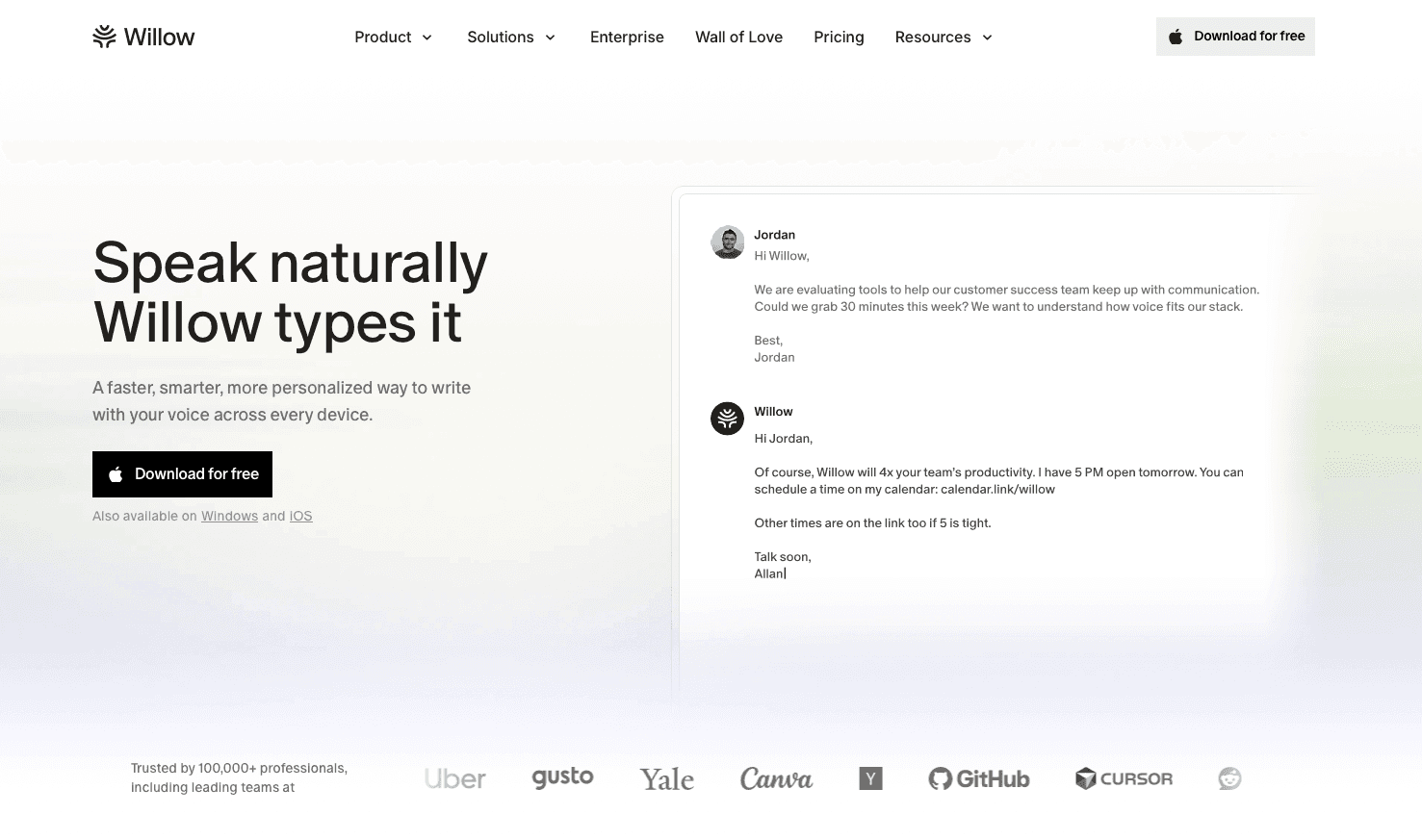
Willow Voice delivers context-aware voice dictation that works across any email application with about 200ms processing time and automatic tone matching. The AI understands when you're writing formal business emails versus casual messages and adjusts formatting accordingly.
Universal compatibility means smooth email dictation whether you're using Gmail, Outlook, Apple Mail, or web-based email clients on a Mac or Windows machine. Willow also ships a custom voice keyboard for iOS, so replying to an email on your phone between meetings works the same way as at your desk. No switching between different tools or remembering which dictation method works where.
Key features for email workflows:
Instant activation with a customizable hotkey (Fn on Mac, Alt+Space on Windows) across every application
Context-aware AI that adapts tone for professional versus casual emails
Custom dictionaries for company names and technical terms
Automatic filler word removal and intelligent formatting
Multi-language support for international correspondence
Privacy-focused processing with no data storage
It works smoothly in Gmail, Slack, Notion, and everywhere else you communicate, whether you're a developer replying to a GitHub pull request thread, a clinician sending a patient follow-up, or an account manager closing out a client email. Willow Scribe can even help draft email replies when you're stuck on how to respond to tricky messages.
Bottom line: Fast, accurate, and actually works like dictation should.
2. Dragon Professional

Dragon offers dictation features that can be configured for email workflows across Windows applications including Outlook and web browsers. The software requires extensive setup and training to achieve optimal performance for email dictation tasks.
What they offer
Dragon has been around for decades and provides a suite of voice recognition features. The software learns your voice patterns over time and can achieve high accuracy rates once properly configured.
Features include:
Desktop application for Windows with email integration options
Voice training features for improved recognition accuracy
Custom vocabulary creation for industry-specific email terminology
Document formatting through voice commands
Advanced macro creation for repetitive email tasks
Limitation: Expensive licensing model and requires a big time investment for setup and training. Many users find the initial configuration process overwhelming, and the software can feel clunky compared to more recent solutions. They also do not support macOS at all.
Bottom line: High-end solution for Windows users willing to invest in complex configuration processes. Great for specialized workflows like attorneys but overkill for most email needs.
3. Voice In (Chrome Extension)
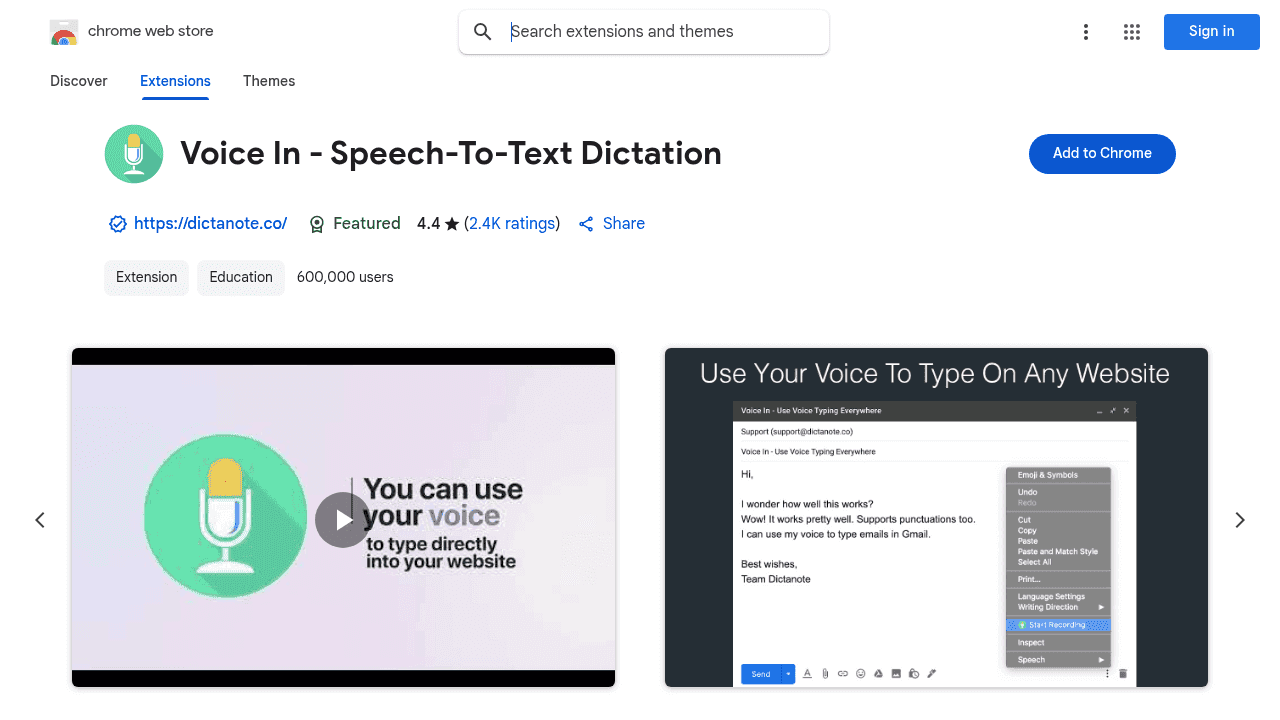
Voice In functions as a browser extension that adds voice input features to web-based email providers like Gmail and Outlook. The extension installs once through the Chrome Web Store and then works across thousands of supported sites without additional per-site configuration.
What they offer
This Chrome extension takes a different approach by focusing on browser-based voice input. It's particularly useful for people who do most of their email work through web interfaces.
Key features:
Browser-based voice typing for Gmail and web email clients
Multi-language support for international email communication
Basic voice commands for punctuation and formatting
Integration with thousands of websites including email providers
Customizable voice shortcuts and commands
Limitation: Only works inside the Chrome browser, so there's no coverage for native email applications like Apple Mail or Outlook desktop, which creates workflow gaps.
Bottom line: Adequate for users who primarily work within web browsers but leaves gaps for native email applications. Good as a supplementary tool, but not sufficient for heavy email users.
4. Apple Dictation
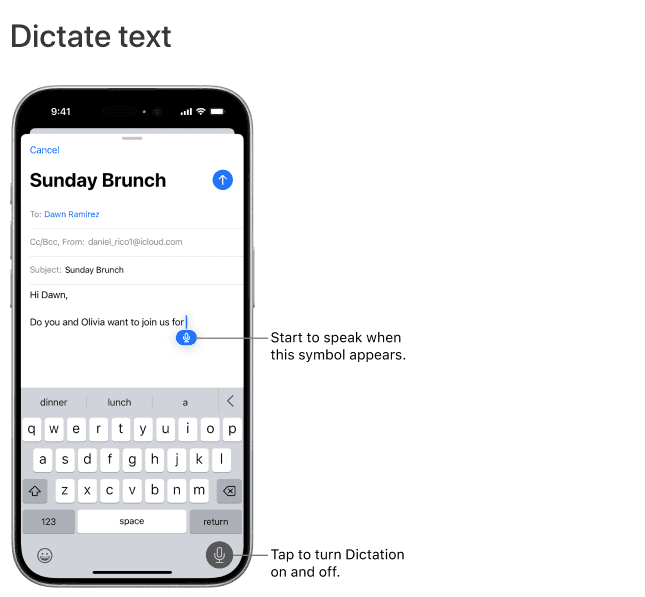
Apple provides built-in voice input across macOS and iOS devices, and it works within email applications like Apple Mail and web browsers accessing Gmail or Outlook. The feature activates through keyboard shortcuts or microphone buttons within supported applications.
What they offer
Apple's dictation comes free with every Mac and iOS device, making it the most accessible option for many users. The integration feels decent since it's built into the operating system.
Built-in features:
System-wide dictation across Mac and iOS email applications
Offline processing on newer Apple Silicon devices
Basic punctuation and formatting voice commands
Free inclusion with all Apple devices
Limitation: Auto-stops after 30 seconds of silence; macOS Tahoe (version 26) removed the hard session-length cap. The accuracy also lags behind dedicated solutions, especially for technical terms or proper nouns. It's also unavailable on Windows or Android.
Bottom line: Basic functionality for occasional email dictation but insufficient for professional email workflows. Fine for quick messages but frustrating for longer correspondence.
5. Microsoft Word Dictation
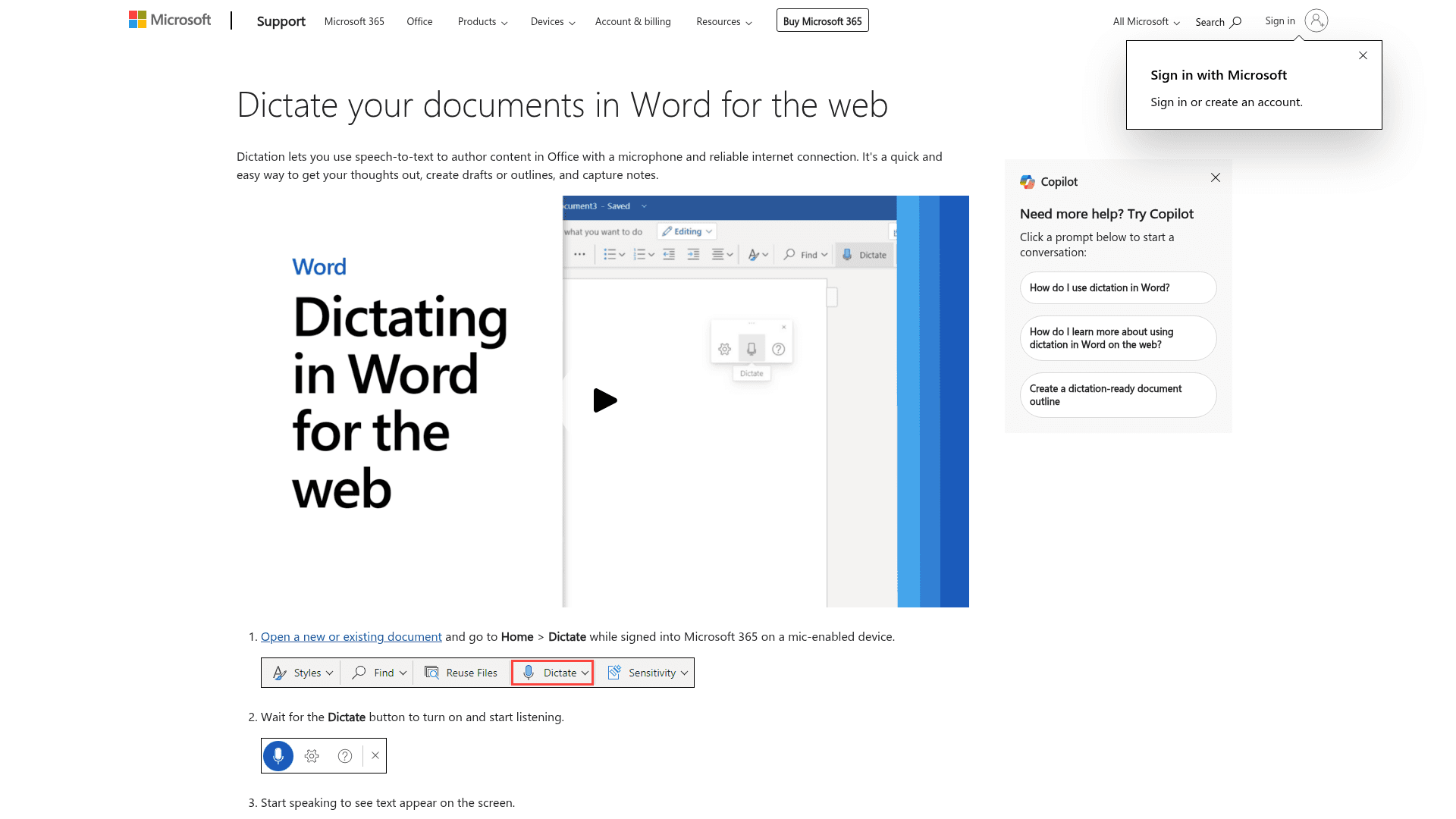
Microsoft includes voice input in Outlook and Word for users with Microsoft 365 subscriptions. The dictation feature requires activation through ribbon menu options and works within Microsoft's email environment.
What they offer
Microsoft's approach integrates dictation directly into their productivity suite, which works well if you're already committed to their ecosystem.
Available features:
Integration with Outlook desktop application for email dictation
Voice commands for basic formatting and punctuation
Multi-language support for international correspondence
Cloud-based processing for improved accuracy
Integration with Microsoft Editor for grammar suggestions
Limitation: Restricted to Microsoft applications and requires an active Microsoft 365 subscription for full functionality. This creates workflow limitations for users working across multiple email clients or operating systems.
Bottom line: Functional within the Microsoft ecosystem but creates workflow limitations for users who work across multiple email clients. Decent if you're all-in on Microsoft tools.
Why Willow is the Best Voice-to-Text Tool for Email
Willow eliminates the common frustrations of email dictation with context-aware AI that automatically adapts to your communication style and the recipient's context. While other tools require complex setup or limit you to specific applications, Willow works instantly across your entire email workflow with professional accuracy and formatting.
The key difference is that Willow understands email context. When you're replying to your boss, it automatically formats your message with appropriate professional tone and structure. When you're messaging a teammate, it keeps the wording casual and conversational. Other dictation tools treat all text input the same way. That works fine for documents, but emails have unique requirements like proper greetings, signatures, and tone matching based on your recipient and relationship.
We've also fixed the speed problem that affects most voice recognition software. While competitors can take 700 milliseconds or more to process your speech, Willow delivers results in about 200 milliseconds. That might not sound like much, but it makes the difference between dictation feeling natural versus feeling like you're waiting for a slow computer. Accuracy tracks the same pattern: Willow is about 3x more accurate than built-in OS dictation tools like Apple Dictation, so fewer typos slip through, and you spend less time going back to fix words it misheard.
The universal compatibility means you never have to think about which email client you're using or whether your dictation tool will work. Whether you use Gmail, Outlook, Apple Mail, or any web-based email service on Mac, Windows, or iOS, Willow just works.
Willow's Free plan gives everyone unlimited AI dictation with no word caps and no credit card required, so you can experience the difference context-aware AI makes for your email workflow. Power users who want faster, more accurate dictation plus unlimited Willow Scribe can upgrade to the Pro tier, starting with the Individual plan at $12 a month, billed annually. The team features described above (shared dictionaries, admin controls, and team leaderboards) are included with the Pro Team plan at $10 per user per month, billed annually ($12 per user per month, billed monthly). Larger organizations that need centralized deployment and a signed BAA can get custom Enterprise pricing.
Enterprise Readiness: Scaling Voice-to-Text Email From One Inbox to a Whole Org
A single Willow account handles one person's inbox well, but email dictation looks different once IT has to answer for it. When ten people on a support team each build their own custom vocabulary from scratch, a new hire starts at zero, an admin has no way to see who has actually adopted the tool, and there's no compliance documentation trail for a security review. Most consumer dictation tools, including Apple Dictation and browser extensions like Voice In, were built for one person on one device and stop there.
Willow closes that gap with infrastructure built for org-wide rollout, well beyond a single install. Every paid seat runs on Willow's fastest and most accurate model, so the speed and accuracy that make dictation worth adopting in the first place hold up at team scale, beyond a single power user. Admin controls let a team lead push shared custom dictionaries and voice shortcuts to every member at once, so client names, product terms, and internal shorthand transcribe correctly from a new hire's first email instead of after weeks of individual corrections. That matters as much for a software team writing PR follow-ups and incident emails as it does for a healthcare practice routing patient correspondence, where consistent terminology and response time both affect outcomes.
Team leaderboards give managers visibility into adoption and time saved across the team without having to chase individual check-ins. Willow is SOC 2 Type II certified and HIPAA compliant with zero data retention, so rolling out voice dictation across an email team fits within existing security review requirements, and a signed BAA is available for healthcare organizations handling patient correspondence. For organizations running a mix of Windows desktops and Mac laptops, cross-device vocabulary sync means the same shared dictionary and shortcuts follow every team member no matter which machine they log in from, and the iOS keyboard extends that same setup to reps replying on a phone between meetings. This is the same infrastructure enterprise customers like Uber and Gusto already rely on for org-wide email rollout.
FAQ
How much faster is voice-to-text compared to typing emails?
Voice dictation is approximately 3x faster than typing, with average speaking speeds of 150 words per minute compared to 40 words per minute for typing.
What's the main difference between basic dictation and context-aware voice tools?
Context-aware tools like Willow automatically adjust tone and formatting based on your recipient and email type, while basic dictation simply converts speech to text without understanding whether you're writing to your boss or a teammate.
Can I use voice-to-text with any email client?
It depends on the tool. Universal solutions like Willow work across Gmail, Outlook, Apple Mail, and web-based clients on Mac, Windows, and iOS, while others are limited to specific platforms (Dragon for Windows only, Voice In for browsers only).
How do voice-to-text tools handle technical terms and company names?
The best tools offer custom dictionaries that let you add company names, industry terms, and technical vocabulary to maintain consistent spelling, whereas basic tools often struggle with specialized terminology.
Why do some voice dictation tools have delays while others are instant?
Processing speed varies greatly. Advanced tools like Willow deliver results in about 200 milliseconds through optimized AI processing, while older solutions can take 700 milliseconds or more, which makes the experience feel clunky and unnatural.
Final thoughts on voice-to-text tools for email writing
The difference between struggling with clunky dictation and actually writing emails faster comes down to choosing tools that work universally and understand context. Most solutions force you to adapt your workflow to their limitations, but the best voice-to-text email tools adapt to how you already work. When your dictation software can match your tone to your recipient and process speech instantly across any email client, that 3x speed boost becomes reality instead of marketing promises. Download Willow and use it across your next batch of email replies to see how much of that gap closes for you, no credit card required to start.
Writing emails by voice can make you up to 3x faster, but only if the tool actually works. Too many professionals waste time fixing errors or juggling different apps instead of just speaking and hitting send. The real advantage comes from software that accurately captures your tone, works in every inbox, and instantly turns speech into text without locking you into clunky workflows. Let’s look at the five best voice-to-text email tools and see which ones really live up to the promise.
TLDR:
Voice dictation can make email writing 3x faster (150 WPM speaking vs 40 WPM typing)
Willow Voice offers context-aware AI that adapts tone for professional vs casual emails: the free plan gives everyone unlimited dictation, and the Pro plan adds faster, more accurate dictation plus unlimited Willow Scribe
Most tools like Apple Dictation and Dragon lack universal compatibility across Mac, Windows, and iOS email clients
Shared custom dictionaries, admin controls, and SOC 2 Type II compliance let teams roll voice dictation out across an entire org, beyond a single inbox
What is Voice-to-Text?
You're staring at a reply that needs to go out, and the words are already forming faster than your fingers can move. Voice-to-text for emails captures spoken replies through speech recognition and turns them into written messages, letting professionals compose, reply to, and draft emails using voice instead of typing every word by hand.
The technology processes your speech in real time, converting it to formatted text while maintaining the tone and context appropriate for email communication. Think of it as having a smart assistant that hears what you're saying and understands whether you're writing to your CEO or texting your teammate.
Most email voice-typing tools now include features like automatic punctuation, filler-word removal, and basic formatting. The best ones go further by understanding context and adjusting your message tone based on who you're writing to.
How We Ranked Voice-to-Text Tools for Writing Emails
We looked at voice-to-text email tools based on accuracy rates, cross-application compatibility, processing speed, and email-specific features like tone matching and context awareness. Our assessment considered real-world email workflows including composing new messages, replying to threads, and handling technical terms commonly found in professional correspondence.
We focused on tools that integrate smoothly with popular email clients like Gmail, Outlook, and Apple Mail. The Stanford speech study shows that voice input can be much faster than typing, but only when the tools actually work reliably.
Our ranking criteria included:
Universal compatibility across email apps and operating systems
Processing speed and latency for real-time email composition
Context awareness for professional versus casual email tone
Custom dictionary support for company names, names of people, and technical terminology
Setup complexity and learning curve for new users
Team deployment and compliance readiness for organizations rolling dictation out beyond a single inbox
We also considered how well each tool handles the specific challenges of email writing, like proper greeting formatting, signature placement, and thread reply context.
Feature | Willow Voice | Dragon | Voice In | Apple | Microsoft |
|---|---|---|---|---|---|
Device support | Mac, Windows, iOS | Windows only | Browser only (any OS) | Mac, iOS only | Windows only |
Context-aware formatting | Yes | Manual setup | Basic | No | Basic |
Processing speed | ~200ms | Not published | 700ms+ | 700ms+ | 700ms+ |
Custom dictionaries | Yes | Advanced | Limited | No | Basic |
Tone matching | Automatic | Manual configuration | No | No | No |
Setup complexity | Minimal | Extensive | Moderate | None | Moderate |
1. Best Overall: Willow Voice
Willow Voice delivers context-aware voice dictation that works across any email application with about 200ms processing time and automatic tone matching. The AI understands when you're writing formal business emails versus casual messages and adjusts formatting accordingly.
Universal compatibility means smooth email dictation whether you're using Gmail, Outlook, Apple Mail, or web-based email clients on a Mac or Windows machine. Willow also ships a custom voice keyboard for iOS, so replying to an email on your phone between meetings works the same way as at your desk. No switching between different tools or remembering which dictation method works where.
Key features for email workflows:
Instant activation with a customizable hotkey (Fn on Mac, Alt+Space on Windows) across every application
Context-aware AI that adapts tone for professional versus casual emails
Custom dictionaries for company names and technical terms
Automatic filler word removal and intelligent formatting
Multi-language support for international correspondence
Privacy-focused processing with no data storage
It works smoothly in Gmail, Slack, Notion, and everywhere else you communicate, whether you're a developer replying to a GitHub pull request thread, a clinician sending a patient follow-up, or an account manager closing out a client email. Willow Scribe can even help draft email replies when you're stuck on how to respond to tricky messages.
Bottom line: Fast, accurate, and actually works like dictation should.
2. Dragon Professional
Dragon offers dictation features that can be configured for email workflows across Windows applications including Outlook and web browsers. The software requires extensive setup and training to achieve optimal performance for email dictation tasks.
What they offer
Dragon has been around for decades and provides a suite of voice recognition features. The software learns your voice patterns over time and can achieve high accuracy rates once properly configured.
Features include:
Desktop application for Windows with email integration options
Voice training features for improved recognition accuracy
Custom vocabulary creation for industry-specific email terminology
Document formatting through voice commands
Advanced macro creation for repetitive email tasks
Limitation: Expensive licensing model and requires a big time investment for setup and training. Many users find the initial configuration process overwhelming, and the software can feel clunky compared to more recent solutions. They also do not support macOS at all.
Bottom line: High-end solution for Windows users willing to invest in complex configuration processes. Great for specialized workflows like attorneys but overkill for most email needs.
3. Voice In (Chrome Extension)
Voice In functions as a browser extension that adds voice input features to web-based email providers like Gmail and Outlook. The extension installs once through the Chrome Web Store and then works across thousands of supported sites without additional per-site configuration.
What they offer
This Chrome extension takes a different approach by focusing on browser-based voice input. It's particularly useful for people who do most of their email work through web interfaces.
Key features:
Browser-based voice typing for Gmail and web email clients
Multi-language support for international email communication
Basic voice commands for punctuation and formatting
Integration with thousands of websites including email providers
Customizable voice shortcuts and commands
Limitation: Only works inside the Chrome browser, so there's no coverage for native email applications like Apple Mail or Outlook desktop, which creates workflow gaps.
Bottom line: Adequate for users who primarily work within web browsers but leaves gaps for native email applications. Good as a supplementary tool, but not sufficient for heavy email users.
4. Apple Dictation
Apple provides built-in voice input across macOS and iOS devices, and it works within email applications like Apple Mail and web browsers accessing Gmail or Outlook. The feature activates through keyboard shortcuts or microphone buttons within supported applications.
What they offer
Apple's dictation comes free with every Mac and iOS device, making it the most accessible option for many users. The integration feels decent since it's built into the operating system.
Built-in features:
System-wide dictation across Mac and iOS email applications
Offline processing on newer Apple Silicon devices
Basic punctuation and formatting voice commands
Free inclusion with all Apple devices
Limitation: Auto-stops after 30 seconds of silence; macOS Tahoe (version 26) removed the hard session-length cap. The accuracy also lags behind dedicated solutions, especially for technical terms or proper nouns. It's also unavailable on Windows or Android.
Bottom line: Basic functionality for occasional email dictation but insufficient for professional email workflows. Fine for quick messages but frustrating for longer correspondence.
5. Microsoft Word Dictation
Microsoft includes voice input in Outlook and Word for users with Microsoft 365 subscriptions. The dictation feature requires activation through ribbon menu options and works within Microsoft's email environment.
What they offer
Microsoft's approach integrates dictation directly into their productivity suite, which works well if you're already committed to their ecosystem.
Available features:
Integration with Outlook desktop application for email dictation
Voice commands for basic formatting and punctuation
Multi-language support for international correspondence
Cloud-based processing for improved accuracy
Integration with Microsoft Editor for grammar suggestions
Limitation: Restricted to Microsoft applications and requires an active Microsoft 365 subscription for full functionality. This creates workflow limitations for users working across multiple email clients or operating systems.
Bottom line: Functional within the Microsoft ecosystem but creates workflow limitations for users who work across multiple email clients. Decent if you're all-in on Microsoft tools.
Why Willow is the Best Voice-to-Text Tool for Email
Willow eliminates the common frustrations of email dictation with context-aware AI that automatically adapts to your communication style and the recipient's context. While other tools require complex setup or limit you to specific applications, Willow works instantly across your entire email workflow with professional accuracy and formatting.
The key difference is that Willow understands email context. When you're replying to your boss, it automatically formats your message with appropriate professional tone and structure. When you're messaging a teammate, it keeps the wording casual and conversational. Other dictation tools treat all text input the same way. That works fine for documents, but emails have unique requirements like proper greetings, signatures, and tone matching based on your recipient and relationship.
We've also fixed the speed problem that affects most voice recognition software. While competitors can take 700 milliseconds or more to process your speech, Willow delivers results in about 200 milliseconds. That might not sound like much, but it makes the difference between dictation feeling natural versus feeling like you're waiting for a slow computer. Accuracy tracks the same pattern: Willow is about 3x more accurate than built-in OS dictation tools like Apple Dictation, so fewer typos slip through, and you spend less time going back to fix words it misheard.
The universal compatibility means you never have to think about which email client you're using or whether your dictation tool will work. Whether you use Gmail, Outlook, Apple Mail, or any web-based email service on Mac, Windows, or iOS, Willow just works.
Willow's Free plan gives everyone unlimited AI dictation with no word caps and no credit card required, so you can experience the difference context-aware AI makes for your email workflow. Power users who want faster, more accurate dictation plus unlimited Willow Scribe can upgrade to the Pro tier, starting with the Individual plan at $12 a month, billed annually. The team features described above (shared dictionaries, admin controls, and team leaderboards) are included with the Pro Team plan at $10 per user per month, billed annually ($12 per user per month, billed monthly). Larger organizations that need centralized deployment and a signed BAA can get custom Enterprise pricing.
Enterprise Readiness: Scaling Voice-to-Text Email From One Inbox to a Whole Org
A single Willow account handles one person's inbox well, but email dictation looks different once IT has to answer for it. When ten people on a support team each build their own custom vocabulary from scratch, a new hire starts at zero, an admin has no way to see who has actually adopted the tool, and there's no compliance documentation trail for a security review. Most consumer dictation tools, including Apple Dictation and browser extensions like Voice In, were built for one person on one device and stop there.
Willow closes that gap with infrastructure built for org-wide rollout, well beyond a single install. Every paid seat runs on Willow's fastest and most accurate model, so the speed and accuracy that make dictation worth adopting in the first place hold up at team scale, beyond a single power user. Admin controls let a team lead push shared custom dictionaries and voice shortcuts to every member at once, so client names, product terms, and internal shorthand transcribe correctly from a new hire's first email instead of after weeks of individual corrections. That matters as much for a software team writing PR follow-ups and incident emails as it does for a healthcare practice routing patient correspondence, where consistent terminology and response time both affect outcomes.
Team leaderboards give managers visibility into adoption and time saved across the team without having to chase individual check-ins. Willow is SOC 2 Type II certified and HIPAA compliant with zero data retention, so rolling out voice dictation across an email team fits within existing security review requirements, and a signed BAA is available for healthcare organizations handling patient correspondence. For organizations running a mix of Windows desktops and Mac laptops, cross-device vocabulary sync means the same shared dictionary and shortcuts follow every team member no matter which machine they log in from, and the iOS keyboard extends that same setup to reps replying on a phone between meetings. This is the same infrastructure enterprise customers like Uber and Gusto already rely on for org-wide email rollout.
FAQ
How much faster is voice-to-text compared to typing emails?
Voice dictation is approximately 3x faster than typing, with average speaking speeds of 150 words per minute compared to 40 words per minute for typing.
What's the main difference between basic dictation and context-aware voice tools?
Context-aware tools like Willow automatically adjust tone and formatting based on your recipient and email type, while basic dictation simply converts speech to text without understanding whether you're writing to your boss or a teammate.
Can I use voice-to-text with any email client?
It depends on the tool. Universal solutions like Willow work across Gmail, Outlook, Apple Mail, and web-based clients on Mac, Windows, and iOS, while others are limited to specific platforms (Dragon for Windows only, Voice In for browsers only).
How do voice-to-text tools handle technical terms and company names?
The best tools offer custom dictionaries that let you add company names, industry terms, and technical vocabulary to maintain consistent spelling, whereas basic tools often struggle with specialized terminology.
Why do some voice dictation tools have delays while others are instant?
Processing speed varies greatly. Advanced tools like Willow deliver results in about 200 milliseconds through optimized AI processing, while older solutions can take 700 milliseconds or more, which makes the experience feel clunky and unnatural.
Final thoughts on voice-to-text tools for email writing
The difference between struggling with clunky dictation and actually writing emails faster comes down to choosing tools that work universally and understand context. Most solutions force you to adapt your workflow to their limitations, but the best voice-to-text email tools adapt to how you already work. When your dictation software can match your tone to your recipient and process speech instantly across any email client, that 3x speed boost becomes reality instead of marketing promises. Download Willow and use it across your next batch of email replies to see how much of that gap closes for you, no credit card required to start.

Try Willow for free
Instant, accurate voice dictation. No card required.
Try Willow for free
Instant, accurate voice dictation. No card required.
Other stories you’ll love
Other stories you’ll love


Your keyboard is optional now
" transform="translate(5 5)" width="9.791000051498413px"/></svg>)

The voice-first interface for modern work.
© Willow Care, Inc. 2026. All rights reserved
Your keyboard is optional now
The voice-first interface for modern work.
© Willow Care, Inc. 2026. All rights reserved
Your keyboard is optional now
The voice-first interface for modern work.
© Willow Care, Inc. 2026. All rights reserved