" transform="translate(5 2)" width="10px"/></svg>)

•
5 min read
9 Best Time Management Tools for Professionals August 2026
•
5 min read
9 Best Time Management Tools for Professionals August 2026
You’ve probably tested every time management tool under the sun (task lists, calendars, productivity dashboards) only to end up buried under even more notifications and logins. Instead of simplifying your workday, most tools just add another layer of chaos. Here’s the hard truth: professionals today aren’t suffering from a lack of tools, they’re suffering from too many that don’t work together. In this guide, we’ll break down 9 powerful tools that can change your scattered workdays into a productivity engine.
TLDR:
Voice dictation tools like Willow boost productivity 4x by letting you speak at 150 WPM vs typing at 40 WPM.
Knowledge workers switch between apps 1,100+ times daily, making integrated tools important for focus.
Teams using proper communication tools spend less time in meetings.
Time blocking in calendars and automation tools like Zapier cut out hours of manual work weekly.
Choose tools that reduce friction and complexity in your workflow.
Why Time Management Tools Matter for Professionals in 2026
The modern professional world has changed completely. We're no longer managing our time: we're managing our attention across dozens of apps, notifications, and competing priorities.

Studies show that the average knowledge worker switches between apps over 1,100 times per day. That's inefficient and exhausting.
The best time management tools in 2026 do more than track your time. They actively save it by reducing friction, automating repetitive tasks, and helping you work in your natural flow state. Think of them as productivity multipliers, not simple organizers.
9 Best Time Management Tools at a Glance
Tool | Category | Best For | Standout Feature | Free Option |
|---|---|---|---|---|
Slack | Team Communication | Real-time team messaging and async updates | 2,600+ app integrations for centralized notifications | Yes (limited) |
Willow Voice | Voice Dictation | Professionals who type a lot and want to work faster | 150 WPM speech vs. 40 WPM typing, with AI-powered context-aware accuracy | Yes (unlimited) |
Loom | Screen Recording | Async video walkthroughs instead of meetings | Screen and camera recording with comment reactions | Yes (limited) |
Asana | Project Management | Coordinating multi-person projects with dependencies | Task dependency mapping that shows downstream impact | Yes (limited) |
Todoist | Task Management | Personal to-do organization without complexity | Smart text parsing creates tasks instantly from natural language | Yes (limited) |
Notion | All-in-One Workspace | Replacing multiple tools with one connected workspace | Links notes, databases, and task lists in one place | Yes (limited) |
Motion | AI Scheduling | Professionals who want their day planned automatically | AI rebuilds your schedule in real time when priorities shift | No (paid only) |
Google Calendar | Calendar and Scheduling | Time blocking and protecting deep work hours | Deep Google Workspace integration for automated workflows | Yes |
Zapier | Workflow Automation | Cutting repetitive manual tasks between apps | 5,000+ app connections with no-code setup | Yes (limited) |
Communication and Collaboration Tools
Slack for Team Communication
Slack has become the backbone of team communication for good reason. Instead of drowning in email threads that take forever to follow, you get real-time conversations organized by topic, project, or team.
What makes Slack particularly powerful in 2026 is its integration ecosystem. With over 2,600 apps connected, you can pull in updates from project management tools, get notifications from your calendar, and even automate routine communications.
Teams using Slack report spending 23% less time in meetings and 32% less time on email. That's hours back in your week for actual work. For enterprise teams, Slack's admin controls and channel management settings allow IT to standardize how the whole org communicates, reducing noise and keeping notifications relevant. Our Slack productivity guide for teams covers advanced setups to get even more out of it.
But here's where it gets interesting: AI business tools are now integrated directly into Slack, helping you draft messages, summarize conversations, and even suggest action items from your discussions.
Voice Dictation for Faster Communication
Speaking of speed, let's talk about the elephant in the room. Most professionals still type everything: emails, Slack messages, documents, and notes. But you speak at roughly 150 words per minute while you type at maybe 40.
By mid-2026, voice dictation has moved from early-adopter territory to standard practice in high-output professional environments. Accuracy is now high enough for professional use, with strong context awareness for technical terms, and the integration works across all your apps on Mac, Windows, and iOS.
Willow Voice is changing how professionals communicate by making voice input as natural as speaking to a colleague. You press a hotkey (fn on Mac, Alt+Space on Windows), speak your message, and it appears perfectly formatted in Gmail, Slack, or wherever you're working. For teams running a mix of Windows desktops and Macs, the same hotkey and vocabulary follow each person across every device without per-device setup.
For organizations rolling this out at scale, Willow Voice is SOC 2 Type II certified and HIPAA compliant, with shared custom dictionaries and admin controls that let IT push vocabulary changes across the whole group without touching individual installs. That means a new hire on a Windows workstation gets the same setup as a senior employee on a Mac from their first day.
Screen Recording for Asynchronous Communication
Loom lets you skip unnecessary meetings by recording quick screen and camera videos to share updates, walkthroughs, or feedback. Teammates can watch on their own time, react with comments, and stay aligned without finding a common calendar slot. Teams that adopt it often report shorter stand-ups and fewer status meetings, freeing up hours each week.
Project Management and Task Organization
Asana for Project Coordination
Asana shines when you need to coordinate complex projects with multiple team members. It's about creating clear workflows that keep everyone aligned and making lists that actually work.
The real power comes from Asana's ability to show dependencies. When one task is delayed, you immediately see how it affects everything downstream. No more surprise deadline conflicts or wondering why a project stalled.
According to project management reviews, teams using Asana complete projects 50% faster on average. That's because everyone can see exactly what needs to happen next and who's responsible for making it happen.
Todoist for Personal Task Management
While Asana handles team coordination, Todoist excels at personal task management. With over 47 million users, it's proven itself as the go-to tool for professionals who need to stay organized without complexity.
What sets Todoist apart is its smart text parsing. Type "Call John tomorrow at 2pm" and it automatically creates a task scheduled for 2pm tomorrow. No clicking through date pickers or dropdown menus.
All-in-One Productivity Workspaces
Notion for Complete Organization
Notion has exploded to over 100 million users by solving a fundamental problem: tool proliferation. Instead of having separate apps for notes, databases, task management, and documentation, Notion combines everything into one flexible workspace.
Notion's AI features have gotten particularly sophisticated in 2026. You can ask it to summarize long documents, generate project templates, or even draft content based on your existing notes and data.
For enterprise teams, Notion's workspace permissions and admin controls allow IT to manage access, lock templates, and standardize documentation structure across departments. Teams running on both Windows and Mac will find Notion's web and desktop apps behave consistently across both platforms, making it a practical choice for mixed-device organizations.
Calendar and Scheduling Solutions
AI-Powered Scheduling Apps
Motion is an AI scheduling app that blends task management and calendar scheduling into one tool, then uses AI to plan your day automatically. It looks at deadlines, priorities, and meetings, and builds a schedule for you. It adjusts when new tasks or interruptions pop up.
Google Calendar for Time Blocking
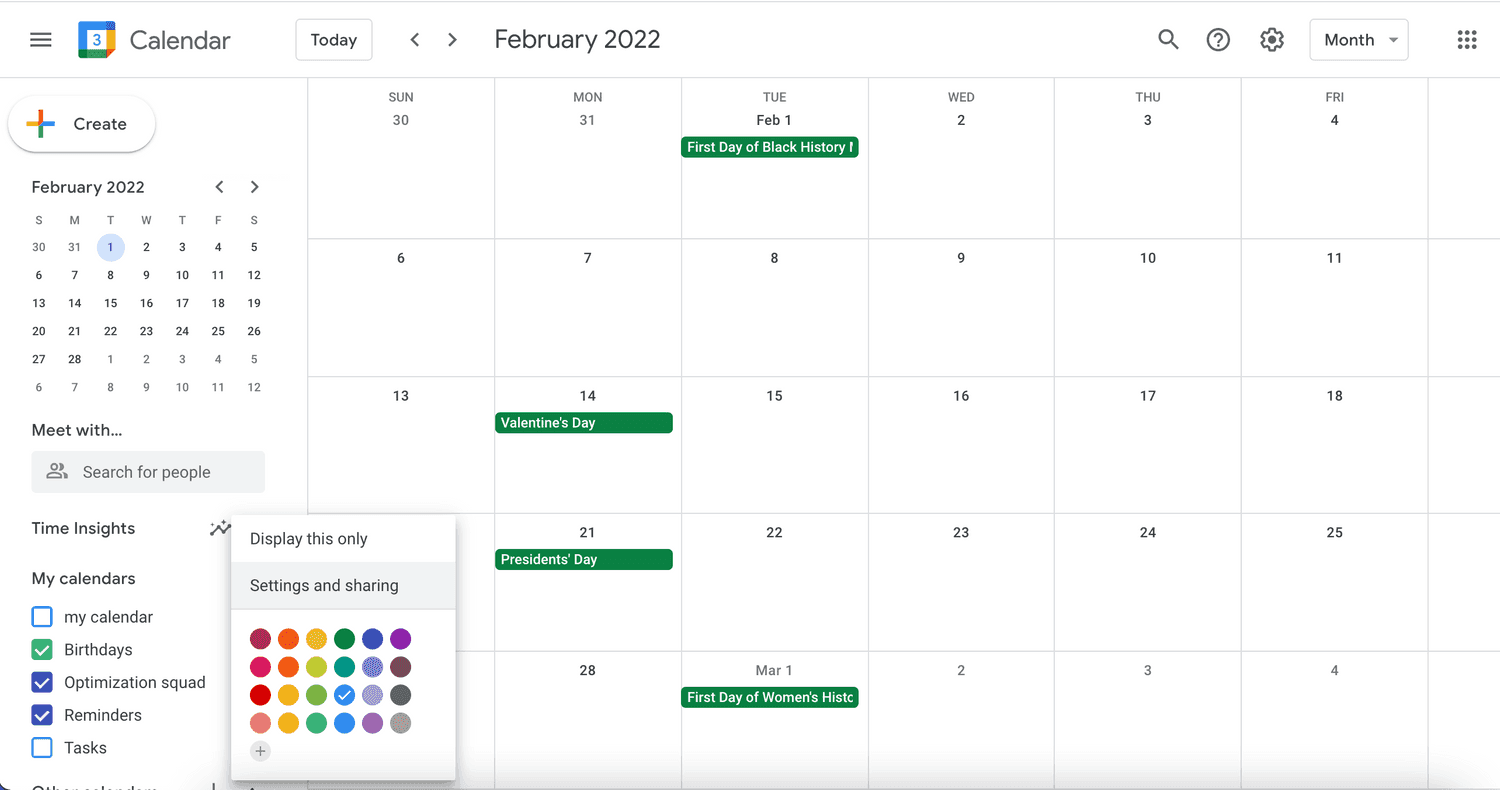
Google Calendar has evolved far beyond simple appointment scheduling. In 2026, it's become a sophisticated time management system that helps professionals protect their focus time and optimize their energy.
Time blocking is where Google Calendar really shines. Instead of just scheduling meetings, you block out time for deep work, email processing, and strategic thinking. This prevents your calendar from becoming a series of back-to-back meetings with no time for actual work.
The integration with other Google Workspace tools creates powerful workflows. Calendar events can automatically create documents, send follow-up emails, or update project status. Your calendar becomes the central hub coordinating your entire workday.
Advanced Google Calendar features like multiple calendar overlays, smart scheduling suggestions, and automatic meeting room booking save hours of coordination time each week.
Automation and Workflow Tools
Zapier for Workflow Automation
Zapier connects different apps to automate repetitive tasks that eat up your day. Instead of manually copying information between tools or remembering to update multiple systems, Zapier handles it automatically.
The time savings add up quickly. Automatically save email attachments to cloud storage. Create calendar events from new project tasks. Send Slack notifications when important emails arrive. Each automation might save just a few minutes, but they compound into hours each week.
Zapier works with over 5,000 apps, covering virtually any combination of tools in your workflow. Whatever combination of tools you use, there's probably a way to connect them and eliminate manual work.
How Willow Voice Fits Into Your Time Management Stack

Every tool in this guide saves time somewhere in your workflow. The bottleneck underneath all of them: you type at around 40 words per minute.
Willow Voice removes that ceiling. You speak at 150 words per minute, and text lands in whatever app you have open, whether that's Gmail, Slack, Notion, Asana, or any other tool in your stack. The same hotkey works everywhere, with no copy-paste or window switching required: fn on Mac, Alt+Space on Windows. You press it, speak, and the text appears. That single change compounds across every tool you already use.
For individuals, the gain is immediate. For teams, Willow Voice adds an organizational layer that matters: shared custom dictionaries push consistent terminology across every team member from day one, admin controls let you manage vocabulary and settings org-wide without touching individual installs, and the same setup follows each person across Mac, Windows, and iOS without per-device configuration. A new hire on a Windows workstation gets the same vocabulary and shortcuts as a senior employee on a Mac from their first session.
Willow Voice is SOC 2 Type II certified and HIPAA compliant with zero data retention, so org-wide rollout fits within existing security review requirements. For teams that need to move fast without stalling in a compliance approval cycle, that matters. Try Willow Voice free and see where speaking instead of typing opens up the most time in your day. Our full roundup of time management software tools covers 23 more options if you want to go deeper on any category.
FAQs
What's the main productivity difference between typing and voice dictation?
Most professionals type at around 40 words per minute but speak at 150 words per minute, creating a 4x speed advantage for voice dictation. This translates to 73% time savings on tasks like email drafting, document creation, and note-taking.
When should I consider using automation tools like Zapier?
Focus on automating your most frequent, repetitive tasks first for the biggest impact. If you find yourself manually copying information between apps, updating multiple systems with the same data, or doing the same sequence of actions daily, automation can save you hours each week.
How long does it typically take to see productivity improvements from new time management tools?
Voice dictation tools provide immediate 4x speed improvements. More complex systems like Notion or project management tools typically show major benefits after 2-3 weeks once you've set up your workflows and integrations.
Final Thoughts on Key Time Management Tools for Professionals
The right combination of time management tools can change your chaotic workdays into smooth productivity machines. Voice dictation offers the biggest immediate impact: speaking at 150 words per minute versus typing at 40 means you can try Willow Voice and start communicating meaningfully faster. Willow Voice works on Mac, Windows, and iOS with shared team dictionaries, admin controls, and SOC 2 Type II compliance built in, so it scales from one person to an entire org without extra setup. The best time management software tools reduce friction and avoid adding complexity to your existing workflow. Start with the tool that removes your biggest bottleneck today.
You’ve probably tested every time management tool under the sun (task lists, calendars, productivity dashboards) only to end up buried under even more notifications and logins. Instead of simplifying your workday, most tools just add another layer of chaos. Here’s the hard truth: professionals today aren’t suffering from a lack of tools, they’re suffering from too many that don’t work together. In this guide, we’ll break down 9 powerful tools that can change your scattered workdays into a productivity engine.
TLDR:
Voice dictation tools like Willow boost productivity 4x by letting you speak at 150 WPM vs typing at 40 WPM.
Knowledge workers switch between apps 1,100+ times daily, making integrated tools important for focus.
Teams using proper communication tools spend less time in meetings.
Time blocking in calendars and automation tools like Zapier cut out hours of manual work weekly.
Choose tools that reduce friction and complexity in your workflow.
Why Time Management Tools Matter for Professionals in 2026
The modern professional world has changed completely. We're no longer managing our time: we're managing our attention across dozens of apps, notifications, and competing priorities.
Studies show that the average knowledge worker switches between apps over 1,100 times per day. That's inefficient and exhausting.
The best time management tools in 2026 do more than track your time. They actively save it by reducing friction, automating repetitive tasks, and helping you work in your natural flow state. Think of them as productivity multipliers, not simple organizers.
9 Best Time Management Tools at a Glance
Tool | Category | Best For | Standout Feature | Free Option |
|---|---|---|---|---|
Slack | Team Communication | Real-time team messaging and async updates | 2,600+ app integrations for centralized notifications | Yes (limited) |
Willow Voice | Voice Dictation | Professionals who type a lot and want to work faster | 150 WPM speech vs. 40 WPM typing, with AI-powered context-aware accuracy | Yes (unlimited) |
Loom | Screen Recording | Async video walkthroughs instead of meetings | Screen and camera recording with comment reactions | Yes (limited) |
Asana | Project Management | Coordinating multi-person projects with dependencies | Task dependency mapping that shows downstream impact | Yes (limited) |
Todoist | Task Management | Personal to-do organization without complexity | Smart text parsing creates tasks instantly from natural language | Yes (limited) |
Notion | All-in-One Workspace | Replacing multiple tools with one connected workspace | Links notes, databases, and task lists in one place | Yes (limited) |
Motion | AI Scheduling | Professionals who want their day planned automatically | AI rebuilds your schedule in real time when priorities shift | No (paid only) |
Google Calendar | Calendar and Scheduling | Time blocking and protecting deep work hours | Deep Google Workspace integration for automated workflows | Yes |
Zapier | Workflow Automation | Cutting repetitive manual tasks between apps | 5,000+ app connections with no-code setup | Yes (limited) |
Communication and Collaboration Tools
Slack for Team Communication
Slack has become the backbone of team communication for good reason. Instead of drowning in email threads that take forever to follow, you get real-time conversations organized by topic, project, or team.
What makes Slack particularly powerful in 2026 is its integration ecosystem. With over 2,600 apps connected, you can pull in updates from project management tools, get notifications from your calendar, and even automate routine communications.
Teams using Slack report spending 23% less time in meetings and 32% less time on email. That's hours back in your week for actual work. For enterprise teams, Slack's admin controls and channel management settings allow IT to standardize how the whole org communicates, reducing noise and keeping notifications relevant. Our Slack productivity guide for teams covers advanced setups to get even more out of it.
But here's where it gets interesting: AI business tools are now integrated directly into Slack, helping you draft messages, summarize conversations, and even suggest action items from your discussions.
Voice Dictation for Faster Communication
Speaking of speed, let's talk about the elephant in the room. Most professionals still type everything: emails, Slack messages, documents, and notes. But you speak at roughly 150 words per minute while you type at maybe 40.
By mid-2026, voice dictation has moved from early-adopter territory to standard practice in high-output professional environments. Accuracy is now high enough for professional use, with strong context awareness for technical terms, and the integration works across all your apps on Mac, Windows, and iOS.
Willow Voice is changing how professionals communicate by making voice input as natural as speaking to a colleague. You press a hotkey (fn on Mac, Alt+Space on Windows), speak your message, and it appears perfectly formatted in Gmail, Slack, or wherever you're working. For teams running a mix of Windows desktops and Macs, the same hotkey and vocabulary follow each person across every device without per-device setup.
For organizations rolling this out at scale, Willow Voice is SOC 2 Type II certified and HIPAA compliant, with shared custom dictionaries and admin controls that let IT push vocabulary changes across the whole group without touching individual installs. That means a new hire on a Windows workstation gets the same setup as a senior employee on a Mac from their first day.
Screen Recording for Asynchronous Communication
Loom lets you skip unnecessary meetings by recording quick screen and camera videos to share updates, walkthroughs, or feedback. Teammates can watch on their own time, react with comments, and stay aligned without finding a common calendar slot. Teams that adopt it often report shorter stand-ups and fewer status meetings, freeing up hours each week.
Project Management and Task Organization
Asana for Project Coordination
Asana shines when you need to coordinate complex projects with multiple team members. It's about creating clear workflows that keep everyone aligned and making lists that actually work.
The real power comes from Asana's ability to show dependencies. When one task is delayed, you immediately see how it affects everything downstream. No more surprise deadline conflicts or wondering why a project stalled.
According to project management reviews, teams using Asana complete projects 50% faster on average. That's because everyone can see exactly what needs to happen next and who's responsible for making it happen.
Todoist for Personal Task Management
While Asana handles team coordination, Todoist excels at personal task management. With over 47 million users, it's proven itself as the go-to tool for professionals who need to stay organized without complexity.
What sets Todoist apart is its smart text parsing. Type "Call John tomorrow at 2pm" and it automatically creates a task scheduled for 2pm tomorrow. No clicking through date pickers or dropdown menus.
All-in-One Productivity Workspaces
Notion for Complete Organization
Notion has exploded to over 100 million users by solving a fundamental problem: tool proliferation. Instead of having separate apps for notes, databases, task management, and documentation, Notion combines everything into one flexible workspace.
Notion's AI features have gotten particularly sophisticated in 2026. You can ask it to summarize long documents, generate project templates, or even draft content based on your existing notes and data.
For enterprise teams, Notion's workspace permissions and admin controls allow IT to manage access, lock templates, and standardize documentation structure across departments. Teams running on both Windows and Mac will find Notion's web and desktop apps behave consistently across both platforms, making it a practical choice for mixed-device organizations.
Calendar and Scheduling Solutions
AI-Powered Scheduling Apps
Motion is an AI scheduling app that blends task management and calendar scheduling into one tool, then uses AI to plan your day automatically. It looks at deadlines, priorities, and meetings, and builds a schedule for you. It adjusts when new tasks or interruptions pop up.
Google Calendar for Time Blocking
Google Calendar has evolved far beyond simple appointment scheduling. In 2026, it's become a sophisticated time management system that helps professionals protect their focus time and optimize their energy.
Time blocking is where Google Calendar really shines. Instead of just scheduling meetings, you block out time for deep work, email processing, and strategic thinking. This prevents your calendar from becoming a series of back-to-back meetings with no time for actual work.
The integration with other Google Workspace tools creates powerful workflows. Calendar events can automatically create documents, send follow-up emails, or update project status. Your calendar becomes the central hub coordinating your entire workday.
Advanced Google Calendar features like multiple calendar overlays, smart scheduling suggestions, and automatic meeting room booking save hours of coordination time each week.
Automation and Workflow Tools
Zapier for Workflow Automation
Zapier connects different apps to automate repetitive tasks that eat up your day. Instead of manually copying information between tools or remembering to update multiple systems, Zapier handles it automatically.
The time savings add up quickly. Automatically save email attachments to cloud storage. Create calendar events from new project tasks. Send Slack notifications when important emails arrive. Each automation might save just a few minutes, but they compound into hours each week.
Zapier works with over 5,000 apps, covering virtually any combination of tools in your workflow. Whatever combination of tools you use, there's probably a way to connect them and eliminate manual work.
How Willow Voice Fits Into Your Time Management Stack
Every tool in this guide saves time somewhere in your workflow. The bottleneck underneath all of them: you type at around 40 words per minute.
Willow Voice removes that ceiling. You speak at 150 words per minute, and text lands in whatever app you have open, whether that's Gmail, Slack, Notion, Asana, or any other tool in your stack. The same hotkey works everywhere, with no copy-paste or window switching required: fn on Mac, Alt+Space on Windows. You press it, speak, and the text appears. That single change compounds across every tool you already use.
For individuals, the gain is immediate. For teams, Willow Voice adds an organizational layer that matters: shared custom dictionaries push consistent terminology across every team member from day one, admin controls let you manage vocabulary and settings org-wide without touching individual installs, and the same setup follows each person across Mac, Windows, and iOS without per-device configuration. A new hire on a Windows workstation gets the same vocabulary and shortcuts as a senior employee on a Mac from their first session.
Willow Voice is SOC 2 Type II certified and HIPAA compliant with zero data retention, so org-wide rollout fits within existing security review requirements. For teams that need to move fast without stalling in a compliance approval cycle, that matters. Try Willow Voice free and see where speaking instead of typing opens up the most time in your day. Our full roundup of time management software tools covers 23 more options if you want to go deeper on any category.
FAQs
What's the main productivity difference between typing and voice dictation?
Most professionals type at around 40 words per minute but speak at 150 words per minute, creating a 4x speed advantage for voice dictation. This translates to 73% time savings on tasks like email drafting, document creation, and note-taking.
When should I consider using automation tools like Zapier?
Focus on automating your most frequent, repetitive tasks first for the biggest impact. If you find yourself manually copying information between apps, updating multiple systems with the same data, or doing the same sequence of actions daily, automation can save you hours each week.
How long does it typically take to see productivity improvements from new time management tools?
Voice dictation tools provide immediate 4x speed improvements. More complex systems like Notion or project management tools typically show major benefits after 2-3 weeks once you've set up your workflows and integrations.
Final Thoughts on Key Time Management Tools for Professionals
The right combination of time management tools can change your chaotic workdays into smooth productivity machines. Voice dictation offers the biggest immediate impact: speaking at 150 words per minute versus typing at 40 means you can try Willow Voice and start communicating meaningfully faster. Willow Voice works on Mac, Windows, and iOS with shared team dictionaries, admin controls, and SOC 2 Type II compliance built in, so it scales from one person to an entire org without extra setup. The best time management software tools reduce friction and avoid adding complexity to your existing workflow. Start with the tool that removes your biggest bottleneck today.

Try Willow for free
Instant, accurate voice dictation. No card required.
Try Willow for free
Instant, accurate voice dictation. No card required.
Other stories you’ll love
Other stories you’ll love



Your keyboard is optional now
" transform="translate(5 5)" width="9.791000051498413px"/></svg>)

The voice-first interface for modern work.
© Willow Care, Inc. 2026. All rights reserved
Your keyboard is optional now
The voice-first interface for modern work.
© Willow Care, Inc. 2026. All rights reserved
Your keyboard is optional now
The voice-first interface for modern work.
© Willow Care, Inc. 2026. All rights reserved